Final Cut Pro (FCP) is a macOS-exclusive, professional non-linear video editor that has evolved into a central pillar of Apple’s Creator Studio. It integrates with Motion and Compressor, and, increasingly, with in-app and cloud-based workflows that appeal to professionals, students, and social content creators alike. The software emphasizes a streamlined, touch-friendly in-app experience on iPad and a native, highly optimized workflow on Macs using Apple silicon.
Origins, ecosystem, and platform scope
Final Cut Pro X was unveiled in 2011 as a complete rewrite of its predecessor, introducing a 64-bit architecture, a magnetic timeline, and new workflow concepts. Final Cut Pro X’s evolution has focused on performance optimization for Apple hardware, including native support for ProRes and enhanced media handling within a Library/Project/Event structure. Final Cut Pro is part of Apple Creator Studio, alongside Motion and Compressor, and is designed to synergize with other Apple tools and services.
Adobe Premiere Pro, by contrast, has long been cross‑platform, running on macOS and Windows, and tightly integrated with the Creative Cloud ecosystem. This enables seamless workflow connections to After Effects, Photoshop, Audition, and other Adobe apps, as well as centralized asset management and remote collaboration features within teams. In contrast, Final Cut Pro remains Apple-only, optimized for macOS and iPadOS as part of the Creator Studio bundle.
Core design philosophies and user experience
Final Cut Pro adopts a “user experience first” philosophy with an incredibly clean, minimal workspace and a trackless Magnetic Timeline. Clips snap and connect, with primary storyline and attached elements flowing automatically, which can speed up editing once mastered. The interface is intentionally less configurable than some competitors, prioritizing speed and clarity for common editing tasks.
Premiere Pro emphasizes configurability and a traditional, track-based timeline. It provides extensive workspace customization, complex panel layouts, and flexible nesting capabilities, which can suit editors who prefer granular control and a highly tailored environment. This contrast-magnetic timeline versus traditional tracks-defines the most noticeable difference in day-to-day use.
Timeline and project organization
Final Cut Pro uses a Library/Events/Projects structure, with Libraries containing Events, which in turn contain Projects and media. Projects create new timelines, and events hold all media; this model is designed to streamline media management and keep projects organized as they scale. Premiere Pro uses Projects and Sequences, with bins and color labeling as organizational tools; media can be managed with a more conventional folder-like approach and integration with Creative Cloud assets.
Performance and optimization
Final Cut Pro is highly optimized for Apple Silicon and macOS, delivering near real-time playback and efficient rendering for ProRes workflows. Tests comparing H.264, ProRes 422, and RED RAW across FCP and Premiere Pro often show FCP excelling in ProRes workflows and delivering strong performance on M1/M2 devices, with some caveats for certain codecs like H.264. Premiere Pro, designed for broad hardware support, can behave differently across devices and sometimes show stability issues on less-powerful systems.
Formats, codecs, and workflow compatibility
Both applications support a broad range of formats and codecs, with most footage readily importable into either program. A notable exception is RED RAW, which requires plugins or specific workflows in Final Cut Pro while Premiere Pro offers native support. Neither tool supports Sony RAW (ARAW) or Blackmagic RAW (BRAW) in all cases, and native support for some RAW formats may require plugins or alternate paths.
Final Cut Pro is deeply integrated with ProRes and HEVC, with robust support for HDR and wide color spaces, including Rec. 2020 variants. Premiere Pro offers broad export and format options, including H.265/HEVC, and a flexible Encoder/Media Encoder workflow for batch processing and publishing to multiple targets. Export options in Final Cut can be extended with Apple Compressor for added output formats and customization.
Color, effects, and titles
Premiere Pro ships with Lumetri Color tools, offering extensive color grading with LUT support, color wheels, curves, and advanced scopes. Final Cut Pro includes powerful color tools such as Color Wheels, Color Curves, and Scopes, along with native LUT support and integrated color management, making it capable of high-end color work within a streamlined interface. For titles, Premiere Pro provides Photoshop-like text controls and strong captioning features, including multi-language captioning and translation. Final Cut Pro counters with robust 3D titles and motion-based title templates, with advanced options accessible through Motion for deep customization.
Audio editing and sound design
Audio editing is strong in both apps. Premiere Pro offers a comprehensive Audio Mixer with track-based controls, multi-channel output, and integration with Audition for more advanced processing. Final Cut Pro provides built‑in audio tools, a wide library of royalty-free sound effects, and the ability to match audio across clips, plus compatibility with Logic Pro plug-ins for enhanced sound design. Both platforms can accommodate professional audio workflows, though the approach differs in workflow and UI.
Multicam and collaborative workflows
Final Cut Pro supports advanced multicam editing with automatic synchronization and a dedicated angle viewer, continuing its tradition of efficient performance on Apple hardware. Premiere Pro offers multicam capabilities as well, frequently favored in larger teams thanks to its Creative Cloud ecosystem, which enables straightforward collaboration and asset sharing via Creative Cloud Libraries and Team Projects.
AI and automation features
Adobe Premiere Pro has integrated several AI-assisted features under the umbrella of Adobe Sensei, including auto-captioning, speech-to-text-based editing, and generative AI tools like Generative Extend for frame interpolation. Final Cut Pro has introduced AI-assisted features such as auto-captioning and scene removal integrations, plus Living Tools like Scene Removal and Magnetic Mask, and has begun to leverage Image Playground for generating stills. Overall, Premiere Pro tends to lead in generative AI capabilities, while Final Cut Pro emphasizes smart automation and efficient native editing features within Apple’s ecosystem.
Pricing, licensing, and licenses
Final Cut Pro is a perpetual license with a one-time purchase price (about $299.99) from the Mac App Store, with free future updates. It is bundled within Apple Creator Studio subscriptions that may include additional apps and services. Premiere Pro operates on a subscription model through Creative Cloud, typically around $20.99 per month (billed annually at times, with discounts for students and teams). After five years, total costs under the Creative Cloud can surpass the one-off Final Cut Pro purchase depending on plan choices, usage, and included add-ons.
When to choose which editor
Premiere Pro is well-suited for longer, more complex projects, larger teams, and workflows that rely on cross-application exchanges with After Effects, Photoshop, and Audition. Its traditional timelines and deep panel customization appeal to editors who need intricate control and a robust collaboration model via Creative Cloud. Final Cut Pro is excellent for solo editors, social media creators, and teams deeply embedded in the Apple ecosystem. Its fast, streamlined interface, trackless timeline, and tight macOS/iPadOS optimization make it ideal for quick turnarounds, social content, and projects where consistency and performance on Apple hardware matter most.
In practical terms, choosing between them often comes down to workflow, hardware, and subscription preferences. If you value a one-time purchase, Apple ecosystem optimization, and fast social-ready editing, Final Cut Pro is a strong pick. If you need cross-platform compatibility, broader collaboration with Creative Cloud apps, and extensive customization, Premiere Pro remains a versatile staple.
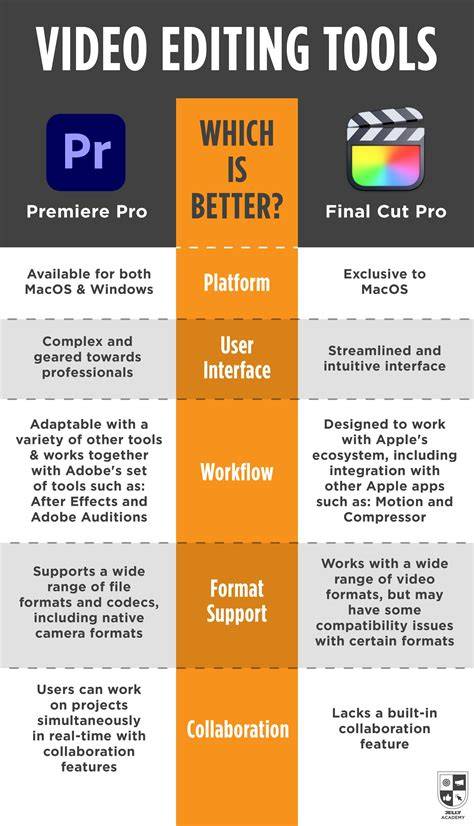
By design, each tool has strengths that can complement the other in a professional post-production pipeline. For creators leaning into Apple Creator Studio, Final Cut Pro plus Motion and Compressor provides a powerful, cohesive editing suite with advanced media management, live multicam syncing, and high-performance color and audio tools. For teams or individuals who require cross-platform access, collaboration, and a broader tools ecosystem, Premiere Pro offers flexibility, cloud integration, and a broad set of interlocking app capabilities that can scale with project complexity.
Adobe Premiere Pro vs Final Cut Pro | The Ultimate Video Editing Comparison 2025
In sum, both Final Cut Pro and Adobe Premiere Pro represent class-leading options for professional video editing. The choice depends on platform preference, collaboration needs, and how deeply you value acceleration on Apple hardware versus cross‑platform flexibility and expansive Creative Cloud integration.
| Aspect | Final Cut Pro | Adobe Premiere Pro |
|---|---|---|
| Platform | macOS, iPadOS (Apple ecosystem) | macOS, Windows (cross-platform) |
| Timeline | Magnetic Timeline (trackless) | Traditional Tracks |
| Encoding | Optimized for ProRes | Broad codec support including H.265/HEVC |
| Licensing | Perpetual $299.99 | Subscription |
| AI Features | Auto-captioning, Scene Removal, Magnetic Mask | Generative Extend, auto-captioning, Text editing |