Anyone who buys a PC for Adobe's Creative Cloud apps knows that its apps can come with some demanding hardware requirements, and they won't run smoothly on just anything. Whether you're editing images in Photoshop, cutting videos in Premiere Pro, or creating something in between with its siblings, you'll need a capable CPU and possibly even a laptop with a stylus-supporting touchscreen. Modern updates to generative AI also mean you'll need stronger components, even if much of it can be offloaded to the cloud.
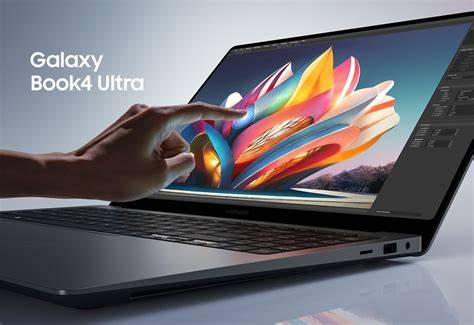
The Samsung Galaxy Book4 Ultra is a powerful laptop that can keep up with your Creative Cloud needs. No bulky tower, just one simple product.
Top contenders for Adobe Creative Cloud on Windows
Our recommendations emphasize balance between display quality, raw performance, and practical features for creative work. The Galaxy Book4 Ultra stands out for its combination of a large OLED display, 16-inch footprint, and strong GPU power, making it a versatile all‑in‑one mobile workstation. It features the Intel Core Ultra 9 185H AI CPU paired with an NVIDIA RTX 4070 GPU, a 16-inch OLED 2.8K panel at 120Hz, and 32GB of RAM with 1TB SSD storage, delivering robust performance across Photoshop, Premiere Pro, and After Effects tasks. In video editing, the resolution and color fidelity help ensure projects look their best, while the high refresh rate aids smoother scrubbing and previewing. The design is slim and attractive and it’s more affordable than some competing high-end laptops, though battery life sits around 5-6 hours on average.
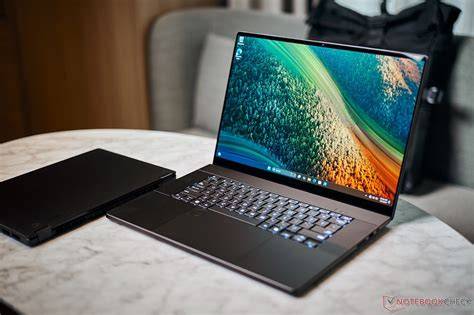
Another powerful AI-focused option is the ASUS ProArt P16. This device delivers amazing 4K OLED display quality, strong AI performance, and flexible memory and storage configurations. Specifications include Windows 11, AMD Ryzen AI 9HX 370 CPU, RTX 4060 L or 4070 L GPUs, and up to 64GB RAM with 1TB or 2TB SSDs. It’s capable of handling demanding Adobe programs while offering impressive color accuracy, which is crucial for photographers and videographers. The trade-offs are that it can reach only 60Hz on some models, and fans can become loud under load, but the display quality and AI capabilities are compelling for creative workflows.
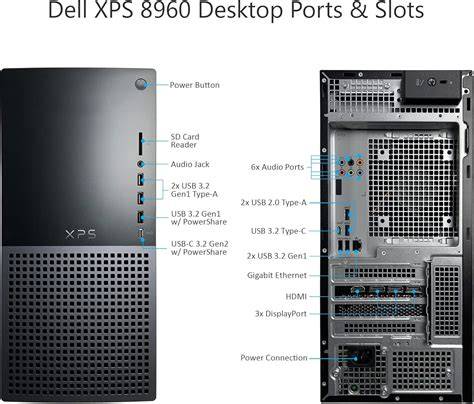
The Dell XPS 8960 Desktop Tower presents a solid desktop option for power users who need more headroom and upgradeability. It provides a wide range of CPU choices (from 14th Gen Intel Core i5 to i9 variants) and a broad GPU spectrum (RTX 3050 up to RTX 4090), with RAM options from 8GB to 64GB and storage up to 4TB. The machine excels in creative workloads due to its strong processors and GPUs, and its expandability makes it easy to tailor to evolving needs. Front-end and rear ports offer ample connectivity, including USB-C, USB-A, SD card slots, and even an optical drive on some configurations. The entry model is best avoided for intensive tasks like Premiere Pro editing, with the mid-tier i7-13700 and RTX 3070 providing a more balanced performance, and higher-end builds delivering top-tier power for expert work.
For those seeking a versatile 2-in-1 or convertible option, the Surface Pro 11 provides a powerful Windows 11 tablet experience with drawing capabilities. It features a 13-inch 2880x1920 touchscreen with 120Hz support, Qualcomm Snapdragon X Elite processors, up to 32GB RAM, and up to 1TB of storage. Its tablet form factor makes it ideal for on-the-go sketching and lightweight editing, with pen support and portability that can complement a robust desktop setup. The Pro 11 also includes two USB-C Thunderbolt 4 ports, though you’ll want to pair it with a keyboard for full laptop-like productivity.
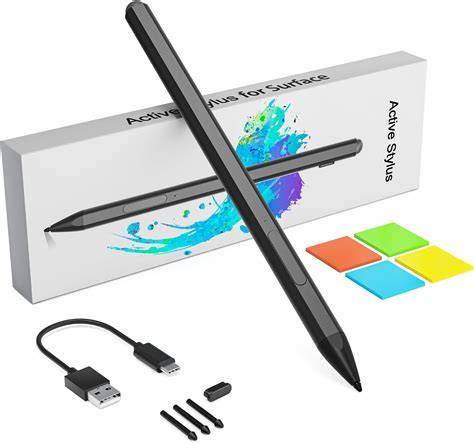
Another strong option is the ASUS ProArt PX13, which blends a 13.3-inch OLED panel with a built-in dial and a pressure-sensitive pen, turning it into a capable creative tool for drawing, photo editing, and video work. It runs on an AMD Ryzen AI 9 HX 370 processor and offers RTX 4050 L or 4060 L graphics, with 32GB or 64GB RAM and 1TB to 2TB storage. This configuration suits users who value color accuracy and tactile control for Adobe applications and related design tasks.
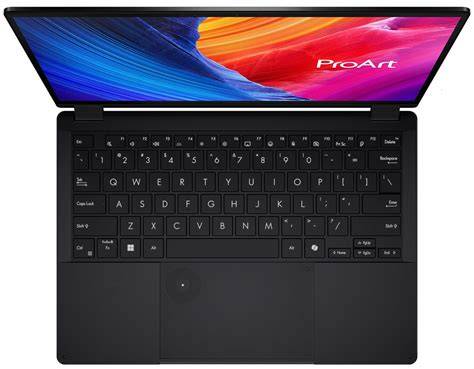
The Lenovo Yoga Slim 7x (Gen 9) demonstrates how a compact laptop can still deliver strong AI performance with Snapdragon X Elite. It handles Adobe applications with confidence, offering up to 32GB RAM and 1TB SSD storage, a 14.5-inch OLED 3K display, and HDR support. While speakers may be average and the battery life varies by configuration, it remains a compelling choice for portable work that relies on AI acceleration to streamline workflows.
How we choose the best PC for Creative Cloud
We evaluate by testing CPUs and GPUs against common Creative Cloud tasks, checking SSD read/write speeds, and measuring battery life where applicable. Adobe Creative Cloud runs well on a wide range of Windows devices, but the best overall experience usually comes from higher-end hardware that can handle Premiere Pro timelines, After Effects previews, and Lightroom multitasking with ease. NPUs (Neural Processing Units) can offload AI tasks from the CPU and GPU, providing practical local AI processing benefits for image generation and neural effects, while still preserving privacy and control over projects.
Is Windows or Mac better for Creative Cloud?
Both Windows PCs and Macs can deliver excellent results with Creative Cloud, and the choice often comes down to user preference, software ecosystem, and the specific GPU and display requirements for color-critical work. For many creators, Windows devices with high-refresh-rate, color-accurate displays and strong GPUs offer the most flexibility for custom builds and upgrades.
What RAM do you need for Adobe Creative Cloud?
You’ll want a minimum of 16GB RAM to run Creative Cloud apps effectively; 32GB is preferred for more demanding tasks like 3D rendering and heavy video editing, while 64GB can be beneficial for very large projects or multi-app workflows.
What is the best PC for Adobe Creative Cloud?
After testing various laptops and desktops, we’ve found that the Samsung Galaxy Book4 Ultra is the best PC for Adobe Creative Cloud due to its combination of large, color-accurate display, strong CPU/GPU, and overall value. If you specifically want an AI-accelerated laptop, the ASUS ProArt P16 is an excellent alternative with robust AI features and a 4K OLED display. Creativity benefits from high horsepower, excellent displays, and, when possible, local AI capabilities to speed up workflows.
Creative Cloud casts a wide net, and all of these machines will be a fine companion. Generally, you’re looking to get as much horsepower as your budget allows, especially if you’re diving into apps like Premiere Pro, because more power translates to faster renders and smoother timelines. If you’re exploring AI tasks with Creative Cloud, devices featuring an NPU can provide meaningful performance gains for local AI processing and image generation, though not all programs leverage NPUs equally.
Adobe Creative Cloud runs well on a wide range of Windows devices, but for the best experience, prioritize higher-end hardware, a color-accurate display, and good memory availability. You’ll often find the best balance in premium laptops with high-refresh-rate OLED panels or robust desktop configurations that allow future upgrades.
Recommendation grid
Below is a compact view of suggested configurations drawn from our discussions above:
- Samsung Galaxy Book4 Ultra - Windows 11, Intel Core Ultra 9 185H AI, RTX 4070, 16-inch OLED 2.8K, 32GB RAM, 1TB SSD, 5-6hrs battery.
- ASUS ProArt P16 - Windows 11, AMD Ryzen AI 9 HX 370, RTX 4060 L/4070 L, 16-inch 4K AMOLED, 32GB/64GB RAM, 1TB/2TB SSD, up to 9h30m battery.
- Dell XPS Tower 8960 - Windows 11, 14th Gen CPUs, RTX 3050-4090 range, 8GB-64GB RAM, 512GB-4TB SSD, easy upgrades.
- Surface Pro 11 - Windows 11, Snapdragon X Elite, Adreno GPU, 13-inch 2880x1920 touchscreen, 16GB-32GB RAM, 256GB-1TB SSD, up to 10h battery.
- ASUS ProArt PX13 - Windows 11, AMD Ryzen AI 9 HX 370, RTX 4050 L/4060 L, 13.3-inch OLED, 32GB RAM, 1TB SSD, 60Hz, built-in pen and dial.
- Lenovo Yoga Slim 7x (Gen 9) - Windows 11, Snapdragon X Elite, Adreno GPU, 14.5-inch OLED 3K, up to 32GB RAM, 1TB SSD, up to 17h30m battery.
Как выбрать конкретную сборку
При выборе учитывайте ваш основной формат работы: монтаж видео и эффектная компоновка проектов требуют мощной GPU и достаточно быстрой памяти; работа с изображениями и цветокоррекция выигрывают от дисплея с точной гаммой и высоким охватом цветового пространства; количество оперативной памяти и скорость хранения напрямую влияют на скорость обработки многозадачности и рендеринга.