If you're considering AfterShot Pro 3 either as a new program choice, upgrade or simply as a trial to see if it's the right one for you, we did run into some problems once it was installed. The problem we had was that when we tried to launch Corel AfterShot Pro 3, the video card driver crashed and the computer froze; forcing a manual shut down and reboot. We reported this to Corel who were such an immense help in trying to solve the problem. We even received a 45 minute call from Ottowa from a technical support specialist to try and resolve the issue via remote connection. They were unsuccessful and after lots of scouring and an appeal on social media, we found that the AMD Radeon graphics cards we use have an Evolve App which was causing the crash.
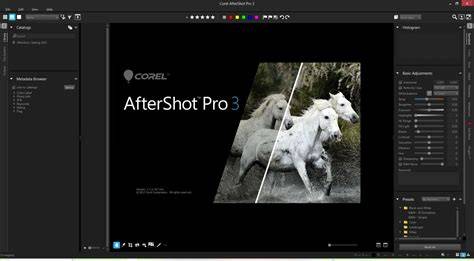
The layout of Corel AfterShot Pro 3 is essentially the same as Pro2, so upgraders won't have to fight with a new UI. The main window is still split into three sections. The left is the navigation tool. Creating a Library will enable faster location of pictures in the future and it's similar to tagging pictures in that it's extremely useful in the future, but boring as Hell while doing it. If, like us, you have a neat, methodical filing system on your computer anyway, you can arguably get away with just using the File System tab. This lists every file path on your computer so you can locate images that you wish to use with ease. Selecting a folder with pictures in will list them as thumbnails in between the left section and the preview pane in the middle.
What’s New and How It Works
As always, what we really want to know is what's new on the program and how good it is. Looking at these new features in turn, the Watermark feature is found in the Tools on the right side of the window. There's two options for loading an image in or simply writing some text. In order to obviate the need for repetition, you can save any watermarks you create for future use. You can also adjust them, skew and stretch them as you desire. Should you have a transparent background that you wish to utilise, then you need to use either a PNG or SVG file. A PNG can be saved in the Save For Web options. The Image Preset Library access point is situated next to the Watermark tab in the Tools section down the right side of the program. There are a mixture of free and paid for presets. Free ones tend to be Camera Profiles and there's also a few Plugins such as Grid (a composition aid), Channel Mixer (enhances black & white images), Perspector (Perspective Correction) and Wavelet Sharpen (recovers out of focus images) among others. There's also a couple of graduated filters which are chargeable. Outside of the Plugins, you can also choose from a selection of image presets under various themes such as cinematic, tonal, landscape, portrait, black & white, wedding, sepia and colour. These are all chargeable, so get them only as you actually need them.
Corel have invested heavily in lens correction development for this latest version of AfterShot Pro. A built-in preset correction system can compensate for barrel distortion and pincushion. However if you want more control, or if it needs more finesse, then you can use the Lens Correction Kit whereby instead of choosing the camera and lens combination and relying on the EXIF data, you can flip over to manual mode and adjust the radial correction coefficient values. This section arguably uses Brown's (Brown-Conrady) Distortion model which corrects for radial distortion when elements in the lens aren't perfectly aligned. Another new feature is a feedback button at the bottom of the “Get More” tab in the Tools section. It's located at the base of the Plugins list which is also where the modular camera profiles can be downloaded from. To (send feedback) click on the button and fill in the form.
AfterShot Pro is primarily an image processing program that acquired basic digital asset management functions that are entirely optional. This makes it possible to cover the entire Digital Photography Workflow, including file organization that must be done before cataloging. It includes certain features to facilitate the process. AfterShot Pro 3 hosts an extensive plugin system that makes it possible to add support for new cameras and lenses without upgrading software versions. Installing Corel AfterShot Pro 3 is simple, regardless of whether it works or not!
On Windows, a tiny executable downloads the software and installs it without issues. The time it takes is vastly dependent on the available Internet connection. On a 500Mbps link, it took about 2 minutes from start to finish. The Linux version completed installing quickly but was unable to start due to a vast array of dependencies on library versions which are no longer supported on the latest stable Linux release. After the application is installed, launching it for the first time prompts the user to select two folders. One folder to store catalogs and the other to store settings and thumbnails. This is a thoughtful separation which simplifies backups.
Interface and Workflow
AfterShot Pro 3 opens with an elegant interface made of a central area with resizable sliding panels on either side. On first use, AfterShot Pro arranges its panels into four columns. The left most shows input and output, either managed as a catalog or directly on the file-system. To its right, a vertical set of thumbnails appear with uniform width but variable height. The central area shows an image when selected, while the right most panel controls both keywording and image processing tools. The middle two columns may have their orientation toggled to appear as rows. The upper portion then shows the image, while a row of thumbnails with uniform height but variable width appears below. Side panels are resizable down to a minimal width and can be entirely hidden. Even the division between image and thumbnails is resizable while the size of the thumbnails themselves can be scaled.
With cataloging being completely optional, AfterShot Pro directly provides a file-system tree-view which is shown by default. Selecting any folder exclusively shows images directly inside it. Files which are not images are omitted. AfterShot Pro 3 also completely ignores very high-resolution images which is unfortunate. Importing images is easy by selecting a folder from using the standard file-system browser which appears when selecting File -> Import Photos from Folder. Once imported, the Library tab on the left most panel shows a standard hierarchical tree view that mirrors the file-system. This makes it possible to apply many settings and keywords to a tree rather than a single-level folder, something that is not always possible with other DAM software.
Considering the amount of data required to produce a hierarchical view, thumbnails appear very rapidly. After importing, the catalog is mostly immutable. One cannot remove non-empty folders or images from the catalog without removing or at least moving them on disk. Cataloging features in this application are subtle rather than front-and-center, compared to dedicated DAM software. The File System view supports minimalist set of filters limit the thumbnail view to a subset of content directly inside the selected folder. Rating, Label and Flag are the three supported filters. Rating can be filtered for equality, a minimum or a maximum between zero and five stars. Label and Flag can be filtered by equality or inequality. Searching the catalog works in a similar way.
The principal catalog breakdown mirrors the file-system hierarchy. Selecting the catalog from the Library view, allows filtering over all indexed images. Choosing a folder, restricts images to those found at any level below. AfterShot Pro 3 searches by refinement. Starting with a selected hierarchy, any number of filters can be applied to refine the shown results. The Metadata Browser shows metadata grouped by category: Color Label, Photo Info, IPTC, Keywords, Rating and Flag. Each of these categories contains specific metadata values organized hierarchically. To refine search results, select a value, possibly a keyword, and click on the Refine button. This can be repeated at will. EXIF information is found under Photo Info which only provides a limited set of tags. This compound filtering system is quite powerful and makes it efficient to refine a large set of images. All refinements compound with each other, unlike high-level filters which support union. The obviously missing feature is that there is no way to exclude images that match any metadata value.
By default, the main area of the application shows a viewer with a thumbnail column. The orientation of those two components can be toggled to have thumbnails appear in rows. There is also a mode which uses the entire area for thumbnails, which is useful when searching for images. Viewing images is as simple and intuitive as expected. Zooming is controlled by scroll-wheel or an optional slider which appears in the AfterShot Pro toolbar. Double-clicking an image instantly sets the view to zoom-to-fit. The image can be panned by dragging it with the mouse, when it is larger than the viewport. Image processing is performed non-destructively using a variety of tools, neatly organized into tabs along the right edge of the right-most panel.
The top Standard tab gathers an extensive set of common image processing functions, including control over Exposure, Highlights, Blacks, Contrast, Saturation, Vibrance, Hue, White-Balance and Sharpness. While the Standard tab offers global controls, the Color tab provides adjustment within areas of a certain color. Any primary of additive and subtractive color models can be selected to adjust its hue, saturation, luminance within a certain range of similar colors. This functionality is really useful for certain tasks, most commonly to remove reflected color. Even though the tab below it is called Tone, the Color tab includes the common Tone Curve tool. The original Bibble Pro was by far the fastest DAM program on the market. With its transformation into AfterShot Pro and acquisition of features, it remains fast by lost its substantial lead.
Importing a catalog of 25GB of images took 20 seconds plus a full 6 minutes to generate high-quality previews. This is fast but, to be fair, AfterShot Pro 3 cheated by ignoring roughly 2 GB of images. Of the 620 images available, only 567 images were imported! Searching for any subset of images is extremely quick. Each time a filter is applied, resulting images are instantly updated. There is an inexplicable lag though when selecting an image. A typical uncached JPEG takes roughly one second to appear. This gets reduced to 1/4s for recently displayed images. Once loaded though, panning and zooming an image is really fast.
AfterShot Pro 3 has a lot going for it. This exceptionally speedy digital photography workflow software covers the entire workflow with basic features and more depth when it comes to image processing capabilities. The interface of AfterShot Pro 3 is among the simplest and most intuitive on the market, making it easy to learn and become proficient with. Its application window is neatly organized and focuses on images better than most generic DAM software. While it offers extensive image processing tools, its cataloging features are rather limited. Numerous useful refinements are missing and there are no exclusions other than for Flags and Labels. With its latest release, AfterShot Pro 3 comes close to being a Adobe Lightroom Classic replacement. Its main failure is its inability to index or process high-resolution images. Outside of the slow loading of images into the viewer, this application is one of the fastest. For Linux users, AfterShot Pro 3 is pretty much the only option, when it works.
Note: For long-term relevance, it’s important to acknowledge that AfterShot Pro 3 was released in 2016, with updates through 2021, and remains a leaner alternative to full-featured editors like Lightroom in some workflows.
In the years that we've been reviewing the photo workflow software Corel AfterShot Pro, it has always been weak at importing and sharing photos, not to mention some of the editing steps in between. Although Corel continues to maintain the software with new camera model support and general bug-squashing, it hasn't released any substantial new features in quite some time. But it's not a total dud. The software goes beyond its closest competitor, Photo Mechanic, by including lighting and color adjustments, blemish removal tools, and presets. Additionally, Corel claims the current 64-bit AfterShot offers the fastest camera raw file conversion. The program now includes useful HDR tools, red-eye removal, and more. But it still falls far short of top choice Adobe Lightroom Classic's state-of-the-art raw conversion, geometry tools, and organization features.
AfterShot has one-time pricing, so you needn't worry about monthly contributions as you do with Adobe Lightroom Classic. AfterShot lists for $79.99 and is frequently discounted. A free 30-day unlimited trial is available, with no payment info required. Upgrading for existing users cuts the price by $20. For comparison, the similar workflow-only Photo Mechanic costs $139. Other programs with far more capabilities than AfterShot also cost more. Adobe Lightroom costs $9.99 per month, Capture One Pro is $299, DxO PhotoLab costs $149, and CyberLink PhotoDirector is $99.99. AfterShot is available for Windows 7 through Windows 11 and macOS 10.9 or later.
The way AfterShot imports photos could use a lot of improvement. The app's interface lacks a clear Import button, and it doesn't pop up any helpful message when you plug in an SDHC card. Nor does it have an AutoPlay option. You must navigate to File -> Import Photos from Folder to kick off an import. It can be awkward to install and begin editing, especially for users accustomed to automatic card detection in other editors. AfterShot Pro 3 provides a comprehensive feature set, but its execution emphasizes speed and simplicity over deep organizational capabilities.
New in version 3 is the highlight recovery tool, more robust lens corrections, and a flexible plugin ecosystem with a Plugin Manager. The application emphasizes speed, low footprint, and portability of edits via XMP-based sidecar files rather than a single catalog. For users who value straightforward editing, fast RAW processing, and the option to avoid subscription models, AfterShot Pro 3 remains a compelling choice, especially for on-the-go editors. However, for those needing advanced organization, collaboration workflows, or the most advanced color and tonal controls, Lightroom Classic or DxO PhotoLab may be preferable.
- Simple three-panel interface with optional file-system view and rapid thumbnail rendering.
- Lens correction tools, including manual and automatic options, plus a correction kit.
- Watermarking, presets, and extensible plugin support for cameras and lenses.
- Large-scale performance advantages due to import-free workflow and 64-bit architecture.
- Competitive pricing with a perpetual license and a 30-day free trial.
Corel AfterShot Pro 3 is available as a one-time purchase and is the cheapest option on many lists of photo editing software. Its lack of a monthly subscription can be appealing to budget-conscious photographers. The speed and simple workflow are its core strengths, while the gaps in organization, advanced editing capabilities, and high-DPI support can be limiting for power users. The final verdict often comes down to whether you prioritize quick RAW processing, portable edits, and a lightweight cataloging approach over comprehensive organizational features and the broad editing toolset found in Lightroom Classic or DxO PhotoLab.
Because AfterShot Pro 3 emphasizes speed and a streamlined workflow, many users will find it suitable for quick edits and large-catalog culling. Its non-destructive workflow and sidecar XMP files enable easy sharing of edits across systems without requiring a centralized database. For those who want a fast, affordable RAW processor with a focus on essential adjustments, AfterShot Pro 3 remains a practical option, especially for mobile or laptop editors who need speed over depth.
Usage Scenarios and Recommendations
If you’re deciding whether to adopt AfterShot Pro 3, consider your priorities: speed, portability, and a simple workflow vs. deep organization, advanced color grading, and a large plugin ecosystem. For photographers who value a fast export pipeline and light system footprint, AfterShot Pro 3 delivers strong performance. If you require robust asset management, advanced tonal control, or cutting-edge AI features, you may prefer Lightroom Classic or DxO PhotoLab. Remember to leverage the free 30-day trial to assess performance on your hardware and to verify stability with your graphics setup.
In summary, AfterShot Pro 3 remains a capable, fast RAW processor with a unique non-cataloging approach, a broad plugin ecosystem, and cost-effective licensing. It excels in on-the-go editing and quick culling, though it may fall short for users who need exhaustive organization and the latest AI-powered tools.