How to Use the Color Converter: Enter your color in any supported format (RGB, CMYK, HSL, HEX, or color name). The tool automatically converts it to all other formats in real-time. Use the color picker for visual selection, or paste values directly. Perfect for converting web colors (RGB/HEX) to print colors (CMYK) or adjusting colors in CSS.
Web to Print and CSS Development
Web to Print Conversion Convert RGB colors from web designs to CMYK for print production, ensuring accurate color reproduction. CSS Development Convert between HEX, RGB, and HSL formats when writing CSS for WordPress themes and custom styles.
Design Consistency and Accessibility
Design Consistency Maintain consistent colors across digital and print media by converting between color spaces accurately. Accessibility Testing Convert colors to different formats to test contrast ratios and ensure WCAG compliance for web accessibility.
How Do Color Spaces Work?
Different color spaces represent colors using different methods. RGB uses additive color mixing for screens, CMYK uses subtractive mixing for print, HSL represents colors by hue, saturation, and lightness, while HEX is a hexadecimal representation of RGB values. Understanding these differences is crucial for accurate color conversion.
RGB (Red, Green, Blue)
Additive color model used for screens and digital displays. Colors are created by adding light-combining red, green, and blue light at different intensities (0-255 each). RGB has a wider color gamut than CMYK, making it ideal for web and digital media.
CMYK (Cyan, Magenta, Yellow, Key/Black)
Subtractive color model used for print production. Colors are created by subtracting light-mixing cyan, magenta, yellow, and black inks (0-100% each). CMYK has a narrower gamut than RGB, so some bright RGB colors cannot be accurately reproduced in print.
HSL (Hue, Saturation, Lightness)
Intuitive color model that represents colors by their hue (0-360°), saturation (0-100%), and lightness (0-100%). HSL makes it easier to adjust color properties-you can change brightness without affecting hue, or adjust saturation independently.
HEX (Hexadecimal)
Six-digit hexadecimal code representing RGB values (e.g., #FF5733). Each pair of characters represents red, green, and blue values from 00 to FF (0-255 in decimal). HEX is compact and widely used in web development and CSS.
Color Gamut Differences
RGB can display more vibrant colors than CMYK. When converting RGB to CMYK, some colors may appear duller or shift because CMYK cannot reproduce all RGB colors. This is why web colors often need adjustment for print.
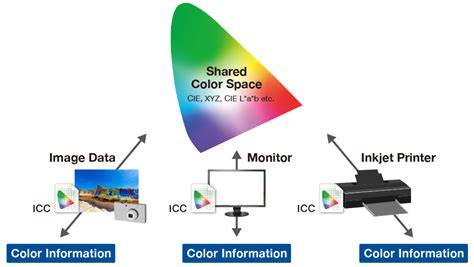
HEX is RGB in hexadecimal. Accurate CMYK comes from an ICC profile, not a formula. Formula: #RRGGBB → RGB → ICC profile → CMYK.
Practical Conversion Principles
RGB is an additive model used for screens (adding light creates colors), while CMYK is subtractive used for print (subtracting light with ink). RGB has a wider color gamut, so some RGB colors cannot be accurately reproduced in CMYK print. Screens emit light (RGB), while print reflects light (CMYK). CMYK has a narrower color gamut, so bright RGB colors often appear duller when printed. Always convert RGB to CMYK before printing for accurate results.
Color Manipulation and Hex Values
HSL is intuitive for color manipulation. Use HSL when you need to adjust brightness without changing hue, or when creating color variations programmatically in CSS or JavaScript. Each pair of HEX characters represents RGB values. For example, #FF5733 means FF (255) red, 57 (87) green, 33 (51) blue. Use our converter or parse the hex string into decimal values.
No. CMYK has a narrower color gamut than RGB. Bright, saturated colors (especially neon greens, cyans, and magentas) often cannot be accurately reproduced in CMYK and will appear duller when printed. K stands for “Key” (black). It’s called “key” because black is the key color used for text and detail in printing. The K avoids confusion with Blue (B) in RGB.
Practical Workflow with ICC Profiles
Color converter: Paste a HEX code, get press-ready CMYK values through a real ICC profile engine, with a side-by-side screen vs press-gamut preview and brand-color presets. Free, no signup, fully client-side.
What HEX to CMYK Means in Practice
HEX is RGB in disguise. A HEX code like #1DB954 is three RGB values written in hexadecimal: red 1D (29), green B9 (185), blue 54 (84). Converting HEX to CMYK is therefore RGB-to-CMYK conversion with a different input notation, and everything that matters happens in that second step: which profile, which paper, which press. Why the profile matters: The quick formula you’ll find on most converter sites treats CMYK as a mathematical mirror of RGB. Presses don’t work that way. Ink density, dot gain, paper coating, and total ink limits all change what a given CMYK recipe looks like. ICC profiles encode that behavior.
Frequently Asked Questions
- Q: How do I convert a HEX code to CMYK? Parse the HEX pairs into RGB (0-255), then convert RGB to CMYK. The naïve formula is K = 1 − max(R,G,B)/255, then C = (1−R/255−K)/(1−K) and likewise for M and Y, but real print conversion should go through an ICC profile (like FOGRA39 or GRACoL), which is what this tool does.
- Q: Why does my HEX color look different in CMYK print? HEX describes light on a screen (RGB); CMYK describes ink on paper, which has a smaller gamut. Bright greens, oranges, and saturated blues can't be reproduced exactly in process printing, the ICC profile maps them to the nearest printable color, which is what the press preview in this tool shows.
- Q: What is the CMYK value for a HEX code like #FF5733? Through the naïve formula, #FF5733 is roughly C0 M66 Y80 K0. Through a coated-press ICC profile (FOGRA39) the values shift to compensate for ink behavior. Enter any HEX in the converter to see both the numbers and a press-gamut preview.
- Q: Should I use the naïve formula or an ICC profile? For anything going to a commercial printer, ICC. The naïve formula ignores paper, ink limits, and gray balance, so its numbers print darker and duller than the screen color. This tool loads a real color engine (lcms) in your browser and defaults to a coated ISO profile.
Related Tools and Practical Tips
Related tools: Want this in your app? The converter uses an ICC-based workflow to ensure press-ready results, with profile selection and rendering intents to match printing conditions.
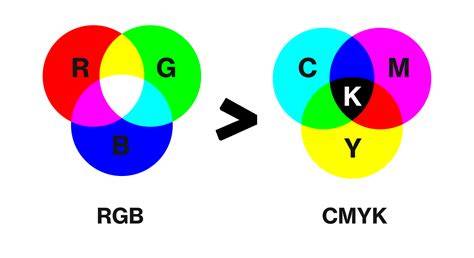
Color Spaces Image Processing - Explained with RGB, CMY, HSI, Color Models
Get Started Free. FF0000 = 255R 0G 0B = Red, and even these will look different in different RGB workspaces; e.g. if its being used in an sRGB workspace or an AdobeRGB workspace, etc.. For you to set up a consistent conversion you need to set your apps/documents Colour Settings to match what you expect to see on the web.
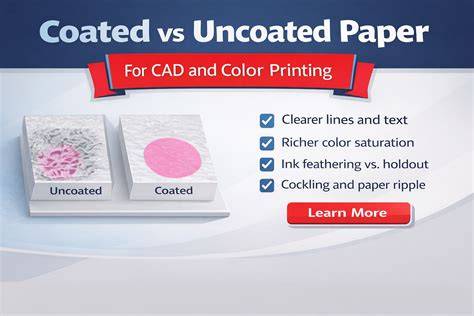
As for the the CMYK side, you can assign a "typical" CMYK profile in your apps/document, but which one to use? Are you printing to a coated paper or an uncoated paper; are you printing using offset inks or inkjet inks, etc etc etc. as the values will be different. If you're looking for typical offset CMYK values printable today on a coated stock on a modern press with modern direct to plate workflow, select something like GRACOL or FOGRA39 for a coated sheet.
Color converter: Paste a HEX code, get press-ready CMYK values through a real ICC profile engine, with a side-by-side screen vs press-gamut preview and brand-color presets. Free, no signup, fully client-side.
Conversion runs in your browser via Little CMS with the real ICC profile. Results follow the selected profile and rendering intent. Web Coated (SWOP) v2 Approx. how the CMYK ink looks once printed. HEX is RGB in disguise.
A HEX code like #1DB954 is three RGB values written in hexadecimal: red 1D (29), green B9 (185), blue 54 (84). Converting HEX to CMYK is therefore RGB-to-CMYK conversion with a different input notation, and everything that matters happens in that second step: which profile, which paper, which press. Why the profile matters: The quick formula you’ll find on most converter sites treats CMYK as a mathematical mirror of RGB. Presses don’t work that way. Ink density, dot gain, paper coating, and total ink limits all change what a given CMYK recipe looks like. ICC profiles encode that behavior.
Color Spaces Image Processing - Explained with RGB, CMY, HSI, Color Models
Notes on consistency: You need to set your apps/documents Colour Settings to match the web expectations, and for print you select an appropriate CMYK profile like GRACOL or FOGRA39 depending on paper and press.