CMYK stands for cyan, magenta, yellow and key (black), and is known as the four-color printing process. It is distinct from RGB, the other standard color model and is used in a different way. CMYK, as we mentioned above, stands for the four colors used in printing ink: cyan, magenta, yellow and key (or black). It is a subtractive color model, which refers to the way these colors each reflect or absorb light. In a subtractive color model, colors are created by subtracting certain wavelengths of light. And, when any of these four colors are combined, together they subtract various parts of the light spectrum. In printing, the four colors can be applied to a white surface to produce a very wide range of colors. For example, Cyan absorbs red light, so blue and green light is reflected. Each of these four colors absorbs and subtracts different colors and thus reflects different colors.
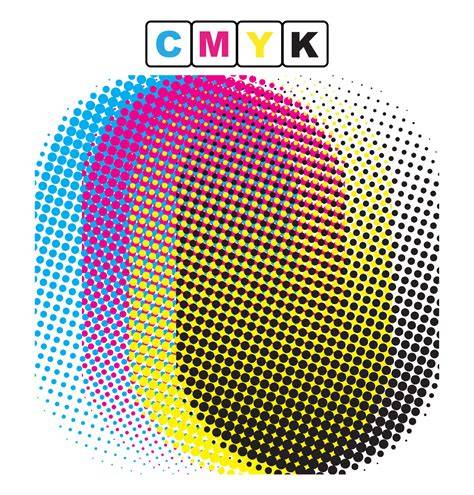
CMYK printing is a unique process that produces excellent color results. To create full-color images, printers use tiny dots of cyan, magenta, yellow, and black inks, carefully overlapping and mixing them to achieve the desired colors. During printing, these minuscule dots can be so densely arranged that they can appear as solid colors. By adjusting the quantity and overlap of these dots, printers can reproduce a wide spectrum of colors and that results in high-quality prints. Larger, closely spaced dots create darker areas, while smaller, more spaced-out dots result in lighter shades.
There are some clear advantages in printing with CMYK over printing with RGB, which stands for Red, Green, Blue. When creating a design for a screen, RGB colors will always be brighter, as these colors are created for digital images. But for printing, CMYK can reproduce colors more accurately. CMYK is also known for consistency in printing. Even if you need to print multiple runs, the finished product will turn out uniform. All these reasons have helped make CMYK the industry standard for color printing.
RGB color model combines red, green and blue to create colors. By contrast to CMYK, RGB is an additive color model, which means all colors start as black, and are changed as red, green or blue light is added on top to layer. When layers of these colors of light are mixed together at the same intensity, the result is white. In RGB color, you can change saturation and shades by changing any of the three colors. Since these changes are controlled digitally, they result in differences in the way light is seen on a screen.
The type of ink you choose depends on the specific project. Dye-based ink is made of color pigment that is dissolved in water. These are the average inks found in most inkjet printers and are the less expensive option of the two inks. Pigment-based inks contain pigment that is suspended in water and is insoluble, making it more waterproof. Pigment-based inks are more expensive to use and have a very specific application. These inks are great for outdoor displays or heat transfer paper. They are fairly stable and UV resistant, though with enough sun exposure, they will fade over a long period of time.
As accurate as CMYK colors can be in printing, there are instances where an exact match is needed in print and it cannot be achieved by mixing the four colors. In these cases, printers use what is called “spot colors” or Pantone colors. Pantone offers a standardized color matching system, so artists can select and specify precise colors, regardless of the printing method. By incorporating Pantone colors into the CMYK workflow, designers can achieve higher color accuracy and maintain consistency. A solid understanding of CMYK printing is essential for artists and designers to be able to produce high-quality printed products from their creations.
Using CMYK color mode for printing offers several advantages, especially the ability to reproduce colors more accurately and consistently, making it the industry standard for color printing. To ensure an exact color match, even beyond the capabilities of CMYK, Pantone colors, or spot colors, are another valuable tool. Knowing how to manage colour is perhaps one of the most complex aspects, but at the same time, fascinating for those involved in graphic design, and it is also one of those skills that every designer should have.
We have already discussed it in part on the Oppaca blog in an article dedicated to the most common mistakes when preparing a project for printing, which you can read here. In short, the CMYK colour method is a scheme for combining primary pigments, and since it is based on the use of four colours in Italian, it is also referred to by the term "four-colour". When we talk about the CMYK colour method, we refer to a model in which all the colours are obtained by mixing different quantities of the four pigments (cyan, magenta, yellow and black). CMY, or cyan, magenta and yellow, are the three primary colours, which teach us from an early age that by mixing them, you can get other colours, such as green, orange and purple, for example. A fourth was then added to these three primary colours, the one known as the key colour, or K, which proved necessary to obtain a complete colour print. Of course, the key colour in print today is black, but that wasn't always the case.
Technically, the sum of equal amounts of pure cyan, magenta and yellow should produce black; however, in practice, due to the impurities in the inks, it is difficult to recreate a pure black by mixing these three colours. Did you know that CMYK is not the only existing colour space? Would you like to discover another colour method? A wide range of colours characterizes the CMYK colour space, although it is limited compared to the spectrum visible to the human eye. The four CMYK colour make it possible to reproduce about 60-70% of the visible colours. The entire range of colours that can be produced using a colour model is called the gamut.
So, in summary, we said that the CMYK colour method creates many other colours when mixed, but how does all this happen? What does subtractive synthesis mean? The basic inks printed when the light hits them retain a part of the light spectrum and return the rest; that is, the colour that reaches our eyes. The more the ink absorbs light, the darker the resulting colour will be; black, for example, corresponds to the total absorption of the light spectrum, and for this reason, it cannot be defined as a colour. On the contrary, white originates from the complete reflection of the spectrum and therefore is not a single colour but the sum of all.
The CMYK colour method can be said to be an "opposite" version to another existing colour space, that is, the RGB (Red, Green and Blue) used by monitors, which is defined on the contrary as "additive". In the RGB model, the colour is produced with the light, while in the CMYK colour method, through the inks. While some rare printers use the RGB colour space, there are several practical reasons why CMYK colour printing has been and still is the dominant model. On a monitor, the combination of light of the RGB components allows the creation of quite clear and bright colours. However, when combined as inks, the same RGB components produce colours significantly darker than those visible on the screen. This is because, in print, colours are not made by light and can only absorb it rather than emit it.
The CMYK colour method is the reference model for all those projects that must go to print. Four-color printing is currently the world's most widely used standard offset and digital printing system. The CMYK colour model is preferred because it allows you to cover a wide range of colours with the least number of inks. However, as anticipated before, with the four standard CMYK colour, it is not possible to recreate all the colours visible on the screen; for this reason, to further expand the range of printable colours, three other additional inks have been introduced: orange, green and violet (or the secondary colours: orange, green and purple). Therefore, if you are designing any design intended for digital use, the RGB model, while for printing, it is good to set the CMYK colour method.
We said that in printing, the primary inks are mixed to recreate the other colours; told in this way. However, it seems they are mixed as they did with tempera and brushes as a child. We explain ourselves better. Suppose we observe a print at a microscopic level. This process, which uses particular patterns called printing screens, is called half-toning. A screen is used for each CMYK component, each at a different angle. The different angles allow you to mix the four colours visually.
After explaining all the main features of the CMYK model in the printing process, we want to give you some tips for creating the perfect print file. First, when creating the print executive, you must set the correct colour method for printing: the CMYK colour method that allows you to manage four-colour process colours. If you haven't worked with the CMYK colour profile from the start, don't worry, you can convert to the correct colour profile anytime. We can help you convert your file if we receive files in RGB. We will correct them automatically to go to print.
Well, I would say that you have reached the end of this article. You know practically everything about the CMYK colour method and how it works, and you are ready to use it in future projects. Get started for free. Get started for free.
CMYK is made up of cyan, magenta, yellow and ‘key’ - together they create all the colours you can print. With Adobe Express, you can easily create and print your designs using our printing services. CMYK is an acronym for the four colours used in a printer. When cyan, magenta and yellow are combined, they can make every colour. Cyan. Magenta. Yellow. Key. This is black ink. One of the main uses of CMYK colours is in printing. If, however, you have printed something and thought the colour looked slightly off, this will likely be because your screen was set to RGB (red, green, blue) and not CMYK. The RGB spectrum is broader than CMYK, so you will have far more colours available on screen that you can’t achieve when printing. One of the main benefits of CMYK is that it offers a true colour match and is easier to stabilise.
If you’re organising a batch of prints, this means the colour will be consistent across each print. The reliability of CMYK colours is what makes it the perfect choice for printing. A halftone is simply a group of dots. When viewed from a distance, these dots form an image. Varying dot sizes can create different tones in an image, and many tiny dots in the CMYK colours can create every shade that can be printed. The term halftone dates to the 20th century. It was a printing technique that was discovered when CMYK colours were dotted close together and they would merge and blend to create a different colour.
With printing services from Adobe Express, you can have striking designs in the palm of your hand in no time. Showcase your next event or advertise your new product launch with a bright, eye-catching flyer. Choose from one of our templates and customise it to capture your brand. Business cards are a great way to form connections and boost the visibility of your business. Share your card at networking events or give it to potential customers so they can contact you when needed. Invitations are the first things your guests will receive for your event and they set the tone. Because of this, you will want an invitation that showcases the excitement of what’s to come. Add a personal touch to a greeting card by making your own. If you’re promoting your brand or want to create a one-off T-shirt design to wear, you can even use Adobe Express to create apparel. Design and print with ease using our online tools.
The ‘K’ in CMYK means key. This is the cartridge’s black ink and provides shadows and depth. CMYK uses a few file formats. These include TIFF (Tagged Image File Format), EPS (Encapsulated PostScript), and PDF (Portable Document Format). The easiest way to convert CMYK for printing is to use Photoshop. Once Photoshop is open, you can convert an image to CMYK by clicking Image > Mode > CMYK Colour. If you’ve ever designed a logo that would be printed on business cards, flyers, or other marketing materials, then you know just how important a role the CMYK color model plays.
CMYK is a color model system that’s the foundation for all print design. Understanding this model is essential for designers because it ensures color accuracy and high-quality resolution in printed materials. Keeping color consistency with tools like Figma and familiar workflows helps designers manage color across print runs. The CMYK color model is the reference for projects that must go to print, while RGB remains the domain of screens and digital content.
The CMYK colour method is a subtractive synthesis of four primary inks-cyan, magenta, yellow and black. The four inks create a versatile gamut that covers a substantial portion of visible colors, though not all. Halftoning and screen angles enable smooth tonal variation, while real-world printing requires occasional use of spot colors to achieve exact brand hues. A solid grasp of these concepts equips designers to produce reliable, high-quality printed materials that align with original digital designs.