iPiccy online photo editor is a powerful tool with a rich toolset right in your browser. In addition to editing features, it contains a collage maker and a graphic design instrument. You can apply automatic corrections, crop and resize your photos, and beautify them with 100+ effects. The best part is that iPiccy works online, so no program downloading and installation is required. Few iPiccy alternatives can offer the same convenience.
Key capabilities of the iPiccy online editor
Online iPiccy editor offers a suite of tools designed specifically for facial enhancements. You can get rid of skin imperfections, fine-tune lighting, correct shadows, and more.
There is a vector masking feature, so you can isolate and refine specific elements of your image. Is it possible to change the intensity of edits? Yes, you can create both subtle and dramatic effects. For instance, if you choose the "Rainbow" filter, you can customize saturation. In case, you choose the "Fancy Focus" effect, feel free to resize the focus.
Can I adjust the collages? Yes, you can easily make personalized collages. You can modify templates by changing the shape of the cells, the background color, and the overall dimensions. Can I use iPiccy Online to create text and stickers? Yes. The online editor offers graphic design features, allowing you to add text, apply stickers, and use vector masks to create custom visuals. Later, you can use them for creative projects, presentations, and social media content.
Experience powerful photo editing with iPiccy Photo Editor. Perfect for beginners and professionals alike, iPiccy offers an intuitive interface to transform images with filters, retouching tools, and creative effects. Edit, crop, and enhance your photos online without downloading software. Whether you want to improve your social media visuals, create eye-catching graphics, or fine-tune personal photos, iPiccy makes it fast and easy. Access advanced editing features like background remover, collage maker, and one-click enhancements. Save time with batch processing and share your polished images directly. Editing photos become an integral part of our web life.
But what if Photoshop is too expensive for you? iPiccy has a lot of useful and powerful photo editing tools as in online Photoshop but for 100% FREE! You will be surprised with variety of image editing opportunities in iPiccy picture editor. It's a web-based application. Here you'll find over 110 photo effects, tools and filters which can easily turn any picture into masterpiece literally in several seconds. You don't need to learn Photoshop for hours anymore to apply great photo effects to your image as iPiccy has many built-in instant image effects with professional quality results. In Photoshop every photo editing starts with basic tools after opening the photo: crop, resize, straighten, color correction and other. iPiccy online picture editor has them all but even better and easier to use. You'll find all basic image edit tools right in the first tab after opening your photo from the hard drive. Use crop tool to make composition of your picture more vibrant, then you can auto fix it to automatically adjust photo contrast and brightness levels like in Photoshop. With iPiccy it's very easy to do that online.
Need to make your photo even more unique and noticeable? No problem! In iPiccy photo editor you can easily add text to photos, vector stickers and overlay another photos and textures. You work with familiar layer based designs like in Photoshop but online. Huge amount of pre-selected fonts and overlays will make your image look stunning. With 4 different styles of layouts and AT LEAST TWELVE different choices per layout, the options are truly infinite!
iPiccy's Collage Maker provides you with the tools to easily create incredible online photo collages. All you have to do is upload your photos to our Collage Maker and select your layout, after that it's just a matter of dragging and dropping the pictures you've uploaded. With so many different layout styles to pick from, your collage can tell a story that is truly your own! With iPiccy's straightforward layout and intuitive editing tools. Everything is laid out for you the second you open collage maker. You don't have to go searching for hidden options in the menu, troubleshoot locations, or waste time learning unnecessary things. It's all straightforward and right to the point, and incredibly simple. Let's also not forget the fact that anything you make in Collage Maker can be saved and re-uploaded for regular editing to add numerous different iPiccy effects (text, filters, borders, and more!) and other fine tuning.
iPiccy offers a bunch of different tools to enhance your pictures and customize your collage. Change the background color, adjust the roundness and spacing, or move your photo around inside the picture slot. Combined this with the fact that we have so many different layouts, the possibilities are endless. Step 1. Step 2. Step 3. Make whatever small adjustments you want, and save your collage! Collages are great for remembering a significant period, commemorating an event, or creating a community feeling. It’s often why you see them at weddings, anniversaries, college brochures, camps, and community events in general. Or maybe you just want to make one for fun, there isn't any right or wrong reason to make a collage!
Magic Eraser: AI Photo Editor is a professional-grade creative studio designed for the modern creator who demands desktop-level power without the monthly fees. Powered by 2026-gen neural networks, our app provides seamless object removal, high-fidelity photo enhancement, and pro-level retouching in one intuitive interface.✨ THE TRUE MAGIC ERASER (GEN-AI 2026) Our advanced AI doesn't just "blur" objects out-it reimagines the pixels behind them. • Object Removal: Effortlessly erase photobombers, power lines, and distracting shadows. • Seamless Blending: AI analyzes textures and lighting to fill gaps perfectly. • Text & Logo Eraser: Clean up your images for a professional, minimalist look. • One-Tap Cleanup: Let the AI suggest distractions to remove for instant perfection.
+2📸 PRO AI ENHANCER & RETOUCH Don’t let a blurry shot ruin a memory. Restore and upscale your photos with a single tap. • AI Unblur & Sharpen: Fix motion blur and out-of-focus shots instantly. • High-Res Upscaling: Transform low-quality images into crisp 4K masterpieces. • Portrait Retouch: Professional skin smoothing, blemish removal, and facial relighting that looks natural, not artificial. • AI Sky Replacement: Swap gray skies for breathtaking sunsets or dramatic clouds.
🎨 DESKTOP-GRADE EDITING TOOLS Designed for those who want full creative control, inspired by tools like Lightroom and Photopea. • RAW Photo Support: Edit high-fidelity RAW files with total data retention. • HSL & Curves: Precision color grading and tonal control for a cinematic aesthetic. • Selective Masking: Apply edits only to the sky, the subject, or the background. • 200+ Premium Filters: From "Film Aesthetic" to "Minimalist Gloom," curated for US & EU trends.
🚀 WHY PREMIUM USERS CHOOSE MAGIC ERASER: • LIFETIME ACCESS: Pay once ($19.99). Own it forever. No subscriptions. No hidden fees. • PRIVACY-FIRST (GDPR COMPLIANT): We process your photos on-device whenever possible.
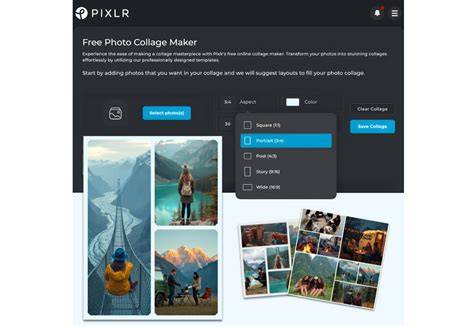
Create a collage on Ipiccy
Who is iPiccy for?
iPiccy is ideal for beginners who want an intuitive and streamlined experience, as well as professionals seeking quick online editing, collage creation, and lightweight graphic design capabilities without installing software. The blend of automatic corrections, extensive effects, and accessible collage tools makes it suitable for enhancing social media visuals, preparing presentations, and crafting personalized graphics.
Access to batch processing and on-browser editing reduces friction for daily workflows, while features like background removal, vector masking, and text overlays empower more advanced users to produce polished visuals directly in the browser. The on-demand nature of the tool, coupled with a large library of effects and layouts, contributes to faster turnaround for projects of varying complexity.
What makes iPiccy stand out among web-based editors?
- Extensive library of 110+ effects, tools, and filters with professional-grade results.
- Vector masks, text, and stickers for flexible graphic design without leaving the editor.
- Dedicated collage maker with multiple layouts and easy drag-and-drop workflow.
- On-device processing options in some workflows, aligning with privacy-friendly practices.
- Free access to many features, with premium options offering even deeper capabilities.
Whether you are improving photos for social media, producing quick marketing visuals, or assembling a personal photo collage, iPiccy provides a cohesive online platform to handle these tasks efficiently. It mirrors many popular desktop tools in a browser-based environment, enabling fast edits, creative experimentation, and easy sharing.
- Open your photo in iPiccy and explore the basic editing tools like crop, resize, and auto-fix.
- Experiment with layers by adding text, stickers, and overlays to craft unique visuals.
- Leverage the Collage Maker to arrange photos across various layouts and backgrounds.