Photoshop offers unlimited potential to photographers for editing and retouching photos. However, the downside to Photoshop is that its wealth of tools and functions can make it quite challenging to master. Whether you’re new to Photoshop or a seasoned expert, we highly recommend reading Scott Kelby’s book called The Adobe Photoshop CC Book for Digital Photographers. If you’re short on time, you can also use free Photoshop actions or, for Lightroom users, free Lightroom presets. Keep in mind, though, that if you rely on actions and presets alone, you’ll always be dependent on other photographers and companies to get the style you want.
To help you build your knowledge, here are 40 free tutorials about Photoshop effects. Part 2 in this series covers post-processing and photo editing tutorials, especially for landscape and portrait photography. Lighting is the foundation of good photography, and color isn’t far behind. A photo can have a striking composition, yet still fall short of success if it has bland colors or poor lighting. Fortunately, you can adjust both in Photoshop.
Blemish Removal: Two Modern Approaches
Remove blemishes in Photoshop two ways, with the new Camera Raw Blemishes option and Generative Fill. The Spot Healing Brush tool helps Retouch any blemishes or unwanted elements in portraits, while Camera Raw support on iPad extends editing capabilities on the go. Leave no detail untouched with Camera Raw support on iPad.
Make any pixel transparent in Photoshop with Blend If. This technique allows precise control over which tonal ranges become transparent, enabling seamless compositing and background changes. Blend subjects into new backgrounds fast? Master clean background color changes in Photoshop with two pro techniques!
Color, Tone, and Camera Raw Tools
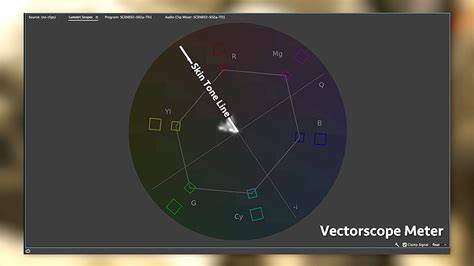
Get perfect skin tones in Photoshop with the new Vectorscope in Camera Raw. The Vectorscope provides a visual guide to skin tone ranges, helping ensure natural-looking results across lighting conditions. The Curves Adjustment tool in Photoshop can be intimidating the first time you use it, but it’s worth learning to sculpt contrast and color balance.
Movies have a wide range of cool styles and ‘looks’ that you can imitate in Photoshop. You can download bundles of cinematic Photoshop actions, but why not learn how to create your own? Another way to give your photos a cinematic feel is to create a cinemagraph. With a cinemagraph, you turn a still photo into short video clip or GIF by making one element move repeatedly. This combination of photo and video has a surreal beauty that can rivet the viewer’s attention.
AI Tools and Modern Workflows in 2026
Which AI Tool Should Photographers Use in 2026? For photographers who edit real photographs, Adobe Firefly is the strongest standalone web tool in 2026. The best generative AI platform in 2026 isn’t just about output quality; it’s about how well it fits into your actual workflow. If you’re unsure which AI to adopt, consider how well it integrates with your current tools and your editing pace.
However, the downside to Photoshop is that its wealth of tools and functions can make it quite challenging to master. Blend If and Generative Fill offer new dimensions for creative edits, while the broader AI ecosystem continues to evolve rapidly. You can tweak effects and think beyond what Instagram offers. Your photos will not only look more unique; some effects are meant to make your photos look more beautiful or have a certain vibe. Others are just plain fun.
Practical Tips for Faster, Cleaner Edits
Two ways to experiment with tilt-shift photography work. Both ways work. Though using Photoshop may feel less “authentic”, it’s still effective. If you’re short on time, you can also use free Photoshop actions or, for Lightroom users, free Lightroom presets. These shortcuts can speed up workflows, but relying on them alone can limit creative development.
There are many, many more Photoshop tutorials than what’s listed here. Everyone loves Photoshop effects. Not only are photo effects fun to create, but they’re a great way to learn Photoshop since they often introduce us to tools, commands or other features we might otherwise never know about. All of our Photoshop effects tutorials are written with beginners in mind, with easy-to-follow, step-by-step instructions.
Creative Techniques and Effects
- How to Round Corners in Photoshop 2026
- Create A Starry Night Sky In Photoshop
- How To Blend Text Into Clouds With Photoshop
- Vintage Photo Effect With Adobe Lightroom
- Rainbow Eye Color Effect in Photoshop
There are constraints in file handling, such as image dimensions; you may encounter messages like “Image exceeds maximum dimensions (8,000 x 8,000 pixels).” This can affect processing, but modern workflows offer workarounds and scalable techniques for large canvases.
Workflow and Integration with Creative Cloud Apps
We can cut unwanted elements like stray arms or photobombers from your photos. You can also adjust color and tone globally, then localize edits with selection-based tools. You can tweak the effects and think beyond what Instagram offers. {{photoshop}} and {{creative-cloud-apps}} work together seamlessly so you have everything you need to bring your next big idea to life. Use {{lightroom}} to make adjustments to your images and to keep all your photo files organized.
Tables and Data
| Feature | Impact | Best For |
|---|---|---|
| Camera Raw Blemishes | Efficient blemish removal with intact texture | Portrait retouching |
| Generative Fill | Creative background changes and object removal | Compositing and concept edits |
| Vectorscope in Camera Raw | Accurate skin tone grading | Color-critical work |
| Blend If | Selective transparency based on tonal ranges | Precise composites |
How to use camera raw's spot removal tool

If you’re unsure which approach to take, start with blemish removal and tone adjustment, then experiment with Generative Fill for creative storytelling. Lighting and color remain foundational; mastering their control through curves, color grading, and selective adjustments will elevate both portraits and landscapes.