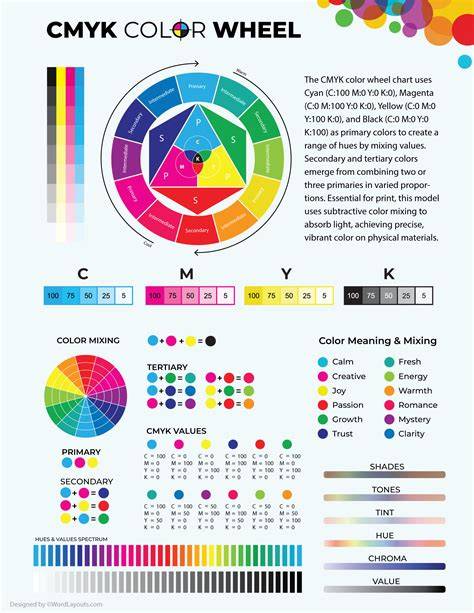
Some colors are more challenging to reproduce than others. While we cannot offer exact color matching, we can recommend these options for your designs. We displayed a base color on the left of each row. As you progress to the right, the color values gradually decrease. Please note your monitor settings may affect what you see on your screen compared to your physical prints.
Foundations of CMYK, RGB, and PMS
There are two basic categories of color types: print and onscreen. Color on the printed page is subtractive, while color onscreen is additive (more on this later). For offset printing only. Ideal for stationery. Often used in one or two-color jobs. Also used as spot colors on premium brochures in addition to four-color process.
PMS colors (also called Pantone® colors) are patented, standardized color inks made by the Pantone company. Pantone has been around for over 50 years and is responsible for the creation of the first comprehensive standardized system of creating and matching colors in the graphic community. They literally wrote the book on it. Each of the 1,755 solid PMS colors in their Formula Guide is a Pantone proprietary blend and is sold to printers either premixed or as a formula that printers mix on their premises. Designers use the color swatches produced exclusively by Pantone to pick the colors, and printers refer to the same swatches. This ensures everyone works to the exact same PMS color no matter where they are.
This standardization means most businesses and organizations use PMS colors for their branding, especially logos, to ensure the strictest color consistency across different print products and across the globe. In the past few years, Pantone has been expanding its color matching system to fashion, plastics, home and lifestyle products. Use in offset and digital printing. Ideal for full-color brochures, flyers, posters and post cards, etc.
CMYK color (also called four-color process) is actually a method whereby a combination of tiny transparent dots of four ink colors: cyan, magenta, yellow and black are printed. Different combinations of large and small CMYK transparent dots overlap each other to create a wide spectrum of colors. Whereas a Pantone ink is one solid color throughout, a CMYK color is not. When you look at a CMYK printed piece through a magnifying glass, you can see a pattern of CMYK dots and how they overlap to make the final color. If you magnify our three CMYK colors, you can see how the dots form the overall color. The cyan, magenta, yellow and black inks absorb colored light, which is why CMYK is a “subtractive” color model.
Onscreen Versus Print: RGB, HEX, and CMYK
The most commonly used color profile in the world of computers, TV screens and mobile devices is RGB. RGB is the process by which colors are rendered onscreen by using combinations of red, green and blue. RGB is the opposite of CMYK because it is an “additive” process. When you mix fully saturated versions of all three colors (red, green and blue) together, you get pure white. When you remove all three colors completely, you get black. RGB is specific to digital applications only. This includes mobile devices, computer monitors, laptops, TV and movie screens, games and illuminated signs.
A HEX color is expressed as a six-digit combination of numbers and letters defined by its mix of red, green and blue (RGB). Basically, a HEX color code is shorthand for its RGB values with a little conversion gymnastics in between. No need to sweat the conversion. There are plenty of free conversion tools online. Simply search, “RGB to HEX” to find one you’re comfortable with.
Making the conversions between color types: RGB to CMYK. Designers and printers use many tools to transition from one color profile to another. They can do this right in the graphics program they’re working in like Photoshop. Digital printers often transform clients’ RGB files to CMYK before printing using their own equipment because the conversion is specific to the output device. Every device has a very specific color gamut it works with. It’s advisable to let the print service provider do the conversion. It is however important to note that there will be a color difference in the finished product. Professional designers know this and keep this in mind when designing so there will be no surprises later.
PMS to CMYK. Whether you’re designing onscreen or converting from a PMS color to CMYK, while your graphics program will do the transition, it is advisable to actually see the final color in print. Here’s a handy graphic to refer to.
Practical CMYK Guidelines for Common Colors
Standard Black (K) in CMYK is created from shades of grey. Rich black is created by blending all the CMYK colors, resulting in a richer, more saturated tone. Red can often appear orange or rusty when printing. When this happens, you need to look at your levels of magenta and yellow. If your red looks too pinkish, you have mixed in too much magenta. Cyan and yellow will produce a green color. Set the values to equal parts and make them dense for vibrant results. As for yellow, be careful when making it darker. It can become easily more of a sage or mustard color. In CMYK, blue is one of the most challenging colors to reproduce accurately. We suggest you use even and balanced mixtures, like 100-50-0-0. Regal purple tones are CMYK friendly. Pinks in CMYK printing are all about the magenta. For stand out pink colors - the magenta levels should be high, and the yellow, cyan, and black low.
We cannot provide a realistic metallic gold finish in CMYK printing, but we can produce a flat or non-metallic metal (NMM) representation of gold. Similar to CMYK golds, you cannot also obtain a metallic silver finish in CMYK printing. Want your colors to pop off the page? Think of the Coca Cola® brand. What color do you see? If you’re like most people, you see the color red. Not just any red. Coke red. Coke spends a fortune maintaining its brand, and color is a big part of it. There are thousands of designers, developers and printers working on Coke’s packaging and marketing worldwide; and there are endless varieties of mobile devices, browsers, TVs, and printing methods that carry the coke brand. While nobody can control the variations inherent in billions of personal mobile devices and computer monitors, there are color types we use that are universal. They can also be broken down into two very important distinctions that if correctly applied, can go a long way in maintaining color consistency.
Key Color Types and Their Applications
- Print and Onscreen - PMS and CMYK for print; RGB and HEX for onscreen. PMS colors are ideal for branding consistency across physical materials.
- CMYK Process - A subtractive color system using cyan, magenta, yellow, and black inks to create a wide color gamut in print.
- RGB/HEX - An additive color system used for digital displays, with HEX codes serving as shorthand for RGB values.
Pantone color references on this page are provided for identification purposes only. Jukebox Print is not affiliated with or endorsed by Pantone LLC. All Pantone color names and numbers are the property of Pantone LLC. Color values shown are for reference only and may not exactly match the final printed result. Screen colors vary by display calibration and cannot fully replicate the appearance of physical paper stock.
Color Strategy for Branding and Print Production
Neglia Design is a full-service print and digital design company. Named after the winner of the most popular color competition held by GF Smith, Marrs Green is a rich teal-green with extraordinary depth and vibrancy. One of the most distinctive and beloved shades in the entire collection. Part of the Colorplan paper. Other Colorplan shades with similar print characteristics. Add this color to your design software or download the hi-res paper texture for presentations and client proposals. Order the Colorplan Sample Book. Seeing Colorplan on screen is helpful, but the real experience comes from holding the paper in your hands. Our Colorplan sample pack includes real printed samples so you can explore the texture, thickness, and full color range before starting your next project. Designers use the sample pack to compare colors, test white ink contrast, and choose the perfect shade for business cards, invitations, postcards, and packaging. Order the Colorplan Sample Book.
Practical Tips for Color Consistency
- Always proof colors in print under the same lighting conditions as the final environment.
- Maintain a reference swatch library (PMS and CMYK) for brand consistency across printers and substrates.
- Communicate with the print service provider about the intended use (offset, digital, packaging) to guide the color conversion process.