Imagine if you could experience and feel something - an object or a space - that’s not really there. VR is a multi-sensory computer simulated visual environment that allows us to immerse ourselves and interact with 3D worlds. 3D communication accelerates comprehension because it is much more representative of the world we live in.
Going beyond the two-dimensional canvas with a VR headset, allows users to step inside a model and view it in 1:1 scale - like you were really there. Interact with your design in real-time. Google Cardboard is an affordable Virtual Reality headset. Get it, fold it and look inside to enter the world of Cardboard.
Oculus Rift and HTC Vive made Virtual Reality the tech trend of the year. They’re the first premium VR headsets to truly take VR mainstream. With mind-blowing experiences available for download, they’ve already started to revolutionize the gaming and entertainment industries.
Kubity was one of the first industry-geared apps to harness the power of VR, and their latest plugin is out of this world. The Rift and Vive have enormous possibilities when it comes to exploring Sketchup models in 1:1 scale fully immersive VR. With just the click of a button, your 3D model appears on the table inside a virtual model room, making the transition from the ‘real world’, to the ‘virtual world’ a calm and seamless experience.
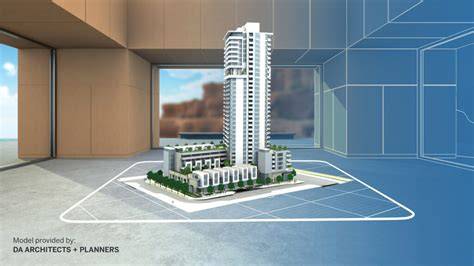
From SketchUp to a VR-ready pipeline
SketchUp models can be prepared for VR by exporting to compatible formats and using plugins that bridge the gap to immersive environments. The goal is to preserve geometries and textures while enabling real-time navigation and interaction within a believable scale. Integrations such as Kubity provide a streamlined workflow, enabling designers to push updates from SketchUp directly into a VR scene.
Key steps typically include cleaning geometry, organizing layers and materials, choosing an appropriate export format, and leveraging a VR platform or plugin that supports real-time exploration. The 1:1 scale impression is essential for accurately assessing spatial relationships, human-scale comfort, and design decisions that depend on perceivable dimensions.
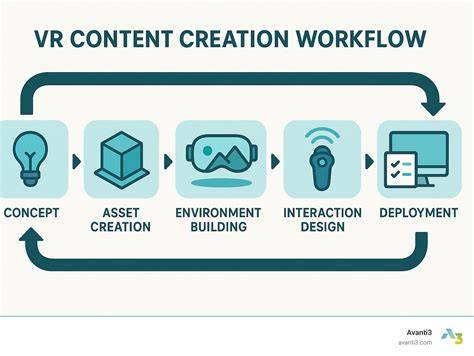
Popular VR devices and their roles
Google Cardboard offers an affordable entry point for introductory VR experiences, ideal for quick VR previews of SketchUp models. Oculus Rift and HTC Vive provide higher-fidelity experiences with room-scale tracking, expressive controllers, and more immersive environments suitable for professional reviews and presentations. Kubity’s plugins help connect SketchUp models to VR ecosystems, enabling rapid sharing and review across teams.
Choosing the right headset depends on the project needs, budget, and desired level of immersion. For rapid prototyping and stakeholder walkthroughs, Cardboard can be a practical starter. For detailed design reviews and interactive simulations, Rift or Vive paired with robust plugins deliver the best outcomes.
The BEST VR Headset in 2026! Which Headset Should You Buy? (VR Buying Guide)
Practical benefits for architecture, interior design, and product visualization
Immersive VR accelerates comprehension by letting stakeholders experience spaces at true scale, identify spatial issues early, and understand human interaction with the model. Real-time interaction allows changes to be tested on the fly, reducing cycles and enabling more informed decision-making. The ability to place a SketchUp model into a real-world context within a virtual room enhances communication and client engagement.
3D navigation in VR supports intuitive exploration: orbit, pan, and measure within the immersive scene, offering a more natural sense of proportion than static renderings. The transition from a 3D digital model to a tangible, experiential environment helps align design intents with user experience and performance goals.
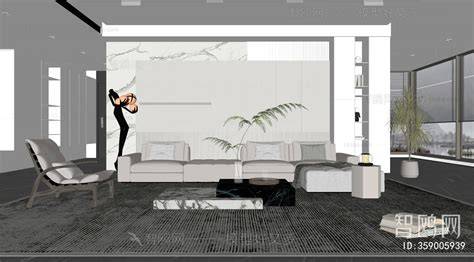
Tips for a smoother workflow
- Optimize geometry and textures to maintain frame rates in VR.
- Organize layers and groups in SketchUp to simplify export and navigation in VR.
- Test lighting and shadows in the VR environment to ensure realism and comfort.
- Use cloud or plugin-based pipelines to share models quickly with stakeholders.
With a well-prepared model, VR can transform design reviews, client presentations, and collaboration by making the unseen visible in a compelling, navigable space.
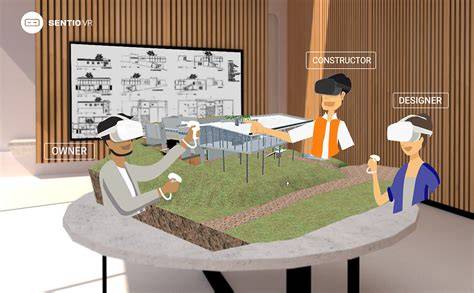
Sample workflow table
| Step | Action | Considerations |
|---|---|---|
| 1 | Prepare SketchUp model | Clean geometry, organize layers |
| 2 | Export | Choose compatible format for VR plugin |
| 3 | Load in VR plug-in | Check scale and materials |
| 4 | Test interaction | Navigate, measure, adjust |