Expand your world with a larger canvas and a smoother drawing experience.
New compatibility, new potential.
The Deco 01 V2’s screen is big, and the technology is simply amazing!
The Deco 01 V3’s expansive tablet is big and brilliant!
The stylus has been upgraded to 16,384 levels of pressure sensitivity, supports up to 60 degrees of tilt brush effect and delivers smoother lines and strokes, as well as the ability to add shading to your creations for a more natural writing and drawing experience.
Tilt:60°
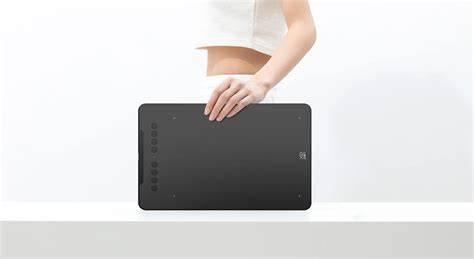
8 mm thinness of the Deco 01 V3 tablet, more lightweight and portable. Slip it into the back of your backpack for a moment of inspiration.
Three vibrant colors, for creative inspiration. Deco 01 V3 now is available in three vibrant colors. Choose your color, personalize your style, and show your unique creativity.
The Deco features eight, round, customizable express keys that fit easily to your fingertips. With its blind spot reduction design, you can find the position of your express keys efficiently and the shortcut keys can be programmed to many different software programs.
Ultra-thin. Ultra-portable. Only 8 mm thinness of the Deco 01 V3 tablet, more lightweight and portable.
A free and articulate stylus pen. The stylus works just like a real pen, no battery and no charging required!
The stylus is true-to-life with 16,384 levels of pressure sensitivity, giving it the intelligence to modify, navigate and create with a full pallet of brush and pens.
New compatibility, new potential. The XPPen Deco 01 V3 supports connections with Android devices 10.0 and above. Recommend downloading: "XPPen tools" Android application. Adapts to the aspect ratio of your smartphone screen, ensuring accurate mapping. Supports mapping on Android screens with different aspect ratios in portrait mode.
*Not compatible with foldable smartphones*
Sketch, paint, design, and edit photos on your tablet. A unit powerful enough to help you take your ideas even further, annotating directly in files and sharing their screen in real time while streaming, broadcasting, or web conferencing.
Are you someone that works on the go? Perhaps you feel that a laptop is too big for you to carry around? Try using a tablet for a change. If you are concerned over a tablet’s screen size, don’t be! XP-Pen has come up with an expansive tablet.
The Deco 01 V2’s screen is big, and the technology is simply amazing! Want to know more? Check out the XP Pen Deco 01 V2 Review.
Press enter or click to view image in full size
XP-Pen Deco 01 V2 Review: A Graphic Tablet For All
I have been using the XP-Pen Deco 01 V2 for a couple of months now. So far, I have been quite satisfied with its performance. To date, there have been a few people that asked me about my experience with the tablet. Today, I thought, “Okay. Why not submit my XP-Pen Deco 01 V2 review”.
I’m sure you’d want to know what exactly you are paying for, right? For less than $80, you can get a tablet, stylus and ArtRage Lite! That sounds like a good bundle deal to me.
Tablet Personally, I am not a fan of most drawing tablets out there. One of my concerns is the size of the screen. However, I was surprised to find out that the XP-Pen Deco 01 V2 tablet’s screen is 10 x 6.25 inches. And its thickness is only 8mm.
Stylus Before I go on, I would like to share a little fact about me. I could spend the longest time in a stationary store. Why? To pick the best pen or pencil of course. The shade, smoothness, and thickness of the lines matter to me.
Having said that, I have absolutely no problem with the pen (stylus) of the XP-Pen Deco 01 V2. The stylus delivery is smooth. It even supports 60 degrees of tilt brush effect! The lines and strokes come out looking natural. There is also an option for me to add shading!
With all these features, I’m highly motivated to convert my sketches into digital drawing.
Software Anyway, if you’re interested in graphic design, the XP-Pen Deco 01 V2 is the way to go. What’s more, is that you even get a free XP-Pen Deco 01 V2 software! Who doesn’t like free stuff, right?
In case you’re wondering, the software is ArtRage Lite. It’s an art media painting program.
It is an introductory art software that can bring value to aspiring digital artists. Some people have asked me, “Is ArtRage Lite, for XP-Pen Deco 01 V2 Chromebook compatible”? Unfortunately, no. It is only compatible with Windows and Mac OS.
Set-Up Process Moving on, the downside for the Deco 01 V2 is that the tablet is not “Plug and Play”. But surprisingly, the setup process was easy to follow through. The whole process for my XP-Pen Deco 01 V2 setup took up an acceptable amount of time.
Bascically, I just needed to connect the tablet to my computer with a USB cable. Then, I had to download and install the correct driver (Mac / Windows). It’s as simple as that!
Oh and, you might also want to check out the XP-Pen Deco 01 V2 Manual. It’s a detailed document about the tablet and stylus. It covers the features and “how-to’s” of the device.
Which To Buy: XP-Pen Deco 01 V2 vs. Wacom Intuos Some have also asked me for a comparison review. XP-Pen Deco 01 V2 vs Wacom Intuos. I’ll be covering the difference between the tablets in the following areas: active area and shortcut buttons. The stylus of the two tablets also differs in the following areas: buttons and eraser on pen.
Active Area The XP-Pen Deco 01 V2 has an active area of 10 x 6.25. Meanwhile, the Wacom Intuos offers two sizes, small (6.0 x 3.7) and medium (8.5 x 5.3). I would prefer to have a larger canvas to unleash my creativity.
Shortcut Buttons I have also considered the difference in the number of shortcut buttons. I found that that the XP-Pen Deco 01 V2 has 6 buttons available. While the Wacom Intuos only offers 4. I feel that having shortcut buttons increases my efficiency. Hence, why I would choose the Deco 01 V2.
Buttons and Erasers On Pen As mentioned earlier, I personally love shortcuts. The Wacom Intuos offers 2 buttons on the pen, while Deco 01 V2 only has 1. However, it piqued my interest that Deco 01 V2 included an eraser on the pen. These features allow me to refine my drawings in a shorter time.
I know, Wacom is known for producing quality drawing tablets. However, XP-Pen’s focus is to provide multiple features. They thrive in feature innovation. The quality of the XP-Pen tablet may not be the best, but it is good enough for me.
Final Thoughts All in all, I love the amount of thought that XP-Pen has put into their design. The size is perfect for me. I gather inspiration from my surroundings. The fact that I can take it anywhere with ease, is a big plus. Very impressed with how they could come up with so many innovative features.
Well, that’s it from me! I hope that my XP-Pen Deco 01 V2 review could help you make an informed decision. In my opinion, the XP-Pen Deco 01 V2 price point is affordable. It was the best $80 I have ever spent.
Key specifications and features
- Active area: 10 x 6.25 inches
- Thickness: 8 mm
- Stylus: 16,384 levels of pressure sensitivity, tilt up to 60 degrees
- Express keys: 6 customizable buttons
- Weight: ultra-portable design
- Software bundle: ArtRage Lite (Windows and Mac OS)
- Android compatibility: not for foldable smartphones
How to Setup XP-PEN Deco 01 V2 tablet in your PC
Setup and compatibility guidance
- Connect the tablet to your computer with a USB cable.
- Download and install the correct driver (Mac / Windows).
- Optionally review the Deco 01 V2 Manual for detailed features and how-to’s.
Which to buy compared to Wacom Intuos, focusing on active area, shortcut buttons, and pen eraser.