Adobe Bridge is a powerful and easy-to-use software that allows creative professionals and designers to efficiently organize and manage their digital assets. As a part of Adobe Creative Cloud, Bridge provides a centralized platform for viewing, sorting, and editing files across various formats, including Photoshop files, vectors, videos, and 3D assets.
One of the key features of Adobe Bridge is its ability to organize assets by renaming multiple files simultaneously, streamlining workflow and saving time. Users can assign colored labels or star ratings to files, enabling quick categorization and prioritization of assets. Additionally, Bridge supports bulk editing of filenames, metadata, keywords, and other parameters, which is essential for large projects requiring consistent organization.
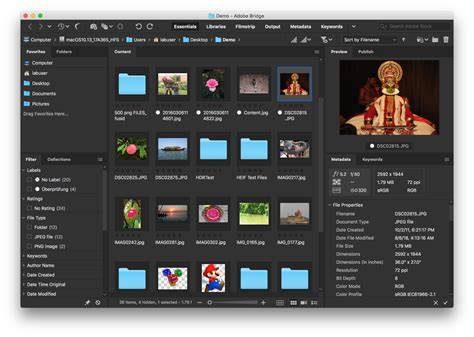
Adobe Bridge serves as an effective asset manager for files used in print, web, and video production. It keeps both native Adobe files such as PSD and PDF, as well as non-Adobe files, easily accessible. This universality makes Bridge an indispensable tool for creative professionals handling diverse assets. The software’s capability to preview most supported file formats, including Dimension files, enhances productivity by allowing rapid review without opening in their respective applications.
Integration with Adobe Photoshop and Adobe Camera Raw
Adobe Bridge and Adobe Camera Raw offer an alternative workflow for Lightroom users, enabling quick preview and minor adjustments of raw files prior to editing in Photoshop. This tight integration simplifies asset management and editing, reducing the need for multiple software toggles. Users can directly open files from Bridge into Photoshop or Camera Raw, making asset processing seamless.
Moreover, Bridge facilitates straightforward editing of filenames, metadata, keywords, and other parameters in bulk, which enhances efficiency especially when handling extensive libraries of images or assets. Its capability to preview, edit, and even publish content expedites the creative process, ensuring high content velocity.
Downloading and Using Adobe Bridge
Adobe Bridge can be downloaded through the Creative Cloud desktop app, making installation and updates straightforward for registered Adobe users. The software's intuitive interface and versatile features make it suitable for both experienced professionals and newcomers in the field of digital content creation.
By utilizing Adobe Bridge, users gain a comprehensive asset management solution that improves organization, speeds up editing workflows, and enhances overall productivity in creative projects. Its compatibility with a broad range of file formats and integration with other Adobe applications makes it an essential component of modern digital content creation pipelines.