An internet connection, an Adobe ID, and acceptance of the license agreement are required to activate and use this product. This product may integrate with or allow access to certain Adobe or third-party hosted online services. Applications and Services may not be available in all countries or languages and may be subject to change or discontinuation without notice. InDesign Server needs to be activated before it can be used. Adobe Customer Service provides assistance with product information, sales, registration, and other non-technical issues. Free troubleshooting resources include Adobe support knowledge base, Adobe Support Advisor, and more.
Overview: what InDesign Server is and how it relates to InDesign
Adobe InDesign Server is a layout and composition engine that powers automated publishing solutions. Like InDesign, InDesign Server can be driven through scripting and C++ plug-ins. InCopy, also based on InDesign, is a copyediting and copyfitting tool for use in publishing workflows. While InDesign Server does not replace InCopy, it can provide similar functionality in an automated publishing solution, often in the form of a web-based editor. Adobe releases a new version of InDesign Server shortly after every desktop release. Version numbers of InDesign Server and InDesign desktop should match for optimum compatibility.
Core purpose and architecture
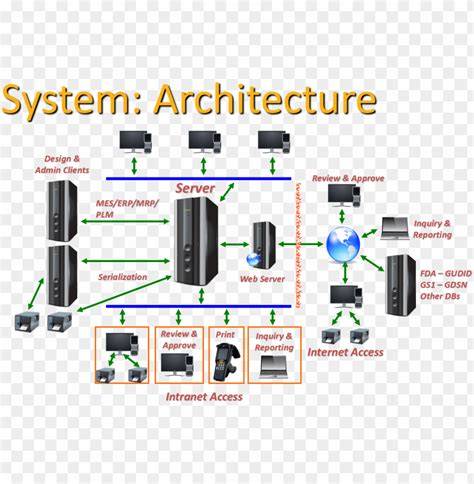
InDesign Server is a layout and composition engine. Only by combining it with other software components can you build an end-to-end automated publishing solution. Building an entire solution in-house can help you manage development costs, gain expertise with InDesign Server, and retain control over the end product. However, using technology from another partner may help you lower risks, get to market sooner, and leverage the development experience of others.
- You should have a track record of building publishing solutions and a working knowledge of some of the following: C++, scripting, SOAP, and XML.
- InDesign Server also includes support for IDML, which allows you to represent the complete richness of an InDesign document in a published XML format. This provides new opportunities for developers who have experience creating and manipulating XML. Using IDML, you can build a large portion of a solution without InDesign scripts or plug-ins.
- Adobe provides a number of developer resources at our I/O site. The SDK for InDesign and InDesign Server are essentially the same. Scripts developed on desktop can then be run on server. Developers may also find the Adobe Forums a useful resource.
Scaling, deployment, and licensing models
InDesign Server can scale to the requirements of individual businesses. Adobe does not provide load balancing any longer. The default installation for InDesign Server is to run as a single-instance license. All InDesign licenses have the rights to run multiple instances but require additional programming or to be purchased from Adobe partners. Each license can only be used on a single physical (or virtual) server. That means you cannot distribute a license across multiple virtual servers--each requires its own Server. InDesign Server is not a multi-threaded application. However, it is possible to use multiple cores and CPUs, and thus scale InDesign Server by running more than one instance of InDesign Server on a single server.
InDesign Server is designed to be a very fast server engine that, for example, can create many thousands of PDF files in an hour. However, customers and developers should understand the difference between InDesign Server and a solution powered by InDesign Server. The InDesign Server SDK contains a Performance and Scalability Toolkit, which allows developers to measure the speed of InDesign Server alone and offers a way to measure the speed of InDesign Server as part of a broader publishing solution. This toolkit includes a console to monitor and report the results of these tests, as well as prebuilt scripts that enable you to run tests out of the box.
Enrollment in the Exchange program and collaboration with partners can help enterprises scale more predictably. The server-based architecture supports running on Windows or macOS infrastructure and deploying in cloud or on-premises environments. The server runs as a headless process and exposes SOAP-based web services for remote document generation through JavaScript and ExtendScript APIs. Scripts and plugins written for desktop InDesign run on the server, enabling reuse of existing investments.
Licensing specifics and lifecycle considerations
Are there any limits to the number of users that can use InDesign Server? InDesign Server is a server-based product. It differs from Named User Licensing or any other consumable model. Customers managing licenses via the CC Admin Console will see appropriate versions; older versions may require different SKUs or VIP upgrades. Installation on various platforms is permitted, but customers should review Adobe Help files for further information. Copies of InDesign Server can be made for disaster recovery and/or backup in accordance with the End-User License Agreement (EULA), but they cannot be used for live production unless the production server fails.
Upgrading from one major version to another allows coexistence for a grace period (up to 90 days) but only one version can be used in production at a time. Cloud or VPN usage within an internal network is acceptable as long as licensing terms are not violated. A license per CPU or per enabled instance is required, and proof of partitioning may be requested by Adobe's audit rights. The Premium license model is required to host solutions for multiple customers/consumers on the same server. In other words, a single server can host multiple clients only under appropriate licensing, and always within Adobe’s terms.
Cross-platform interoperability and development workflow
The cross-platform SDK enables three operational modes: production-ready UI components for deployment, engine APIs for custom interface construction, or headless operation for automation workflows. The native cross-platform engine delivers consistent rendering across browser environments, mobile applications, desktop platforms, and Node.js server infrastructure. InDesign Server supports SOAP-based web services for remote document generation and allows multi-instance deployment to increase throughput. The SDK ensures that scripts and plugins developed for desktop InDesign run on the server.
Template-driven automation with IDML-based templates allows data-driven document generation. JavaScript scripting populates placeholders, applies styles, and adjusts layouts dynamically. Data merge functionality combines templates with data sources for personalized document generation. InDesign Server can be deployed in cloud environments (AWS, Azure, Google Cloud) or on organization-controlled infrastructure, enabling flexible deployment patterns without external service dependencies.
Comparison with IMG.LY and other capabilities
IMG.LY provides comprehensive editing and automation across video, design, and print; InDesign Server focuses exclusively on server-based print document automation. InDesign Server does not include built-in AI capabilities, nor does it handle video editing or multimedia composition. IMG.LY offers more extensive cross-platform SDKs with UI, custom, and headless modes, whereas InDesign Server provides server-only, headless engine functionality with a primary emphasis on layout automation.
Design capabilities and templating
Advanced design capabilities include CMYK and Pantone color handling, professional typography controls, data merge from XML/databases/spreadsheets, and multi-page document support with master pages and layers. Exports include PDF, EPS, PostScript, JPEG, and other production-ready formats. Templating uses adaptive layout patterns, open template definitions, and data-driven content population. InDesign Server uses traditional INDD templates for automation, while IMG.LY offers broader adaptive and cross-context templating in its SDK.
Asset management and file format support
Asset management in InDesign Server relies on file system access and external DAM integrations; there is no built-in stock library. File format support is exhaustive, including PSD, AI, INDD, SVG, PNG, JPEG, and various production formats. Export formats cover print-ready and digital publication needs. IMG.LY provides integrated asset management with direct stock provider connections and unified interfaces, further enhancing cross-context workflows.
Interactive editing versus automation
InDesign Server is headless and designed for automation. It processes documents programmatically through SOAP web services, with no user interface. Interactive editing features are present in desktop/InDesign contexts, while InDesign Server provides core layout automation capabilities for batch processing, catalog generation, publishing pipelines, and template-driven document creation. The contrast highlights dedicated server-based automation as the primary product focus.
Security and governance considerations
InDesign Server licenses require compliance with CPU-based and partitioning-related audit rights. Internal networks and cloud deployments must adhere to licensing terms, including installation controls, user access governance, and audit readiness. Partner integrations and custom workflows should include secure data handling, access controls, and versioning to protect publishing pipelines and templates.
Table: Core distinctions at a glance
| Aspect | InDesign Server | IMG.LY | Desktop InDesign |
|---|---|---|---|
| Primary focus | Server-based layout automation | Interactive editing + automation | Desktop design and publishing |
| UI | Headless | Production-ready UI + headless | Full UI |
| AI capabilities | No built-in AI | AI-enabled features | Limited AI depending on plugins |
| Licensing model | CPU/instance-based | Per-project or per-seat depending on integration | Named User / per-seat |
| Asset management | External DAM integration | Integrated asset management | External or built-in options |
Note: The InDesign Server SDK includes a Performance and Scalability Toolkit to measure speed within a broader publishing solution, along with a console for test results and prebuilt scripts.
Use cases by industry and architecture patterns
Cross-platform SDK with production-ready UI components supports applications embedding editors for end-user content creation and infrastructure automation for programmatic content generation. Server-based automation is ideal for print production automation, catalog generation, publishing pipelines, and template-driven document creation, designed for organizations requiring InDesign capabilities in automated workflows without manual desktop editing. The server runs headless on organization infrastructure or cloud platforms and exposes SOAP-based APIs for integration with external systems (databases, CMS, marketing platforms).
Best practices and recommendations
Consider partnering with an experienced vendor or system integrator to design and implement an end-to-end automated publishing solution, balancing internal development effort with leveraging partner expertise. Track record in publishing workflows, solid knowledge of C++, scripting, SOAP, and XML is essential. Use the SDK’s Performance and Scalability Toolkit to quantify throughput and identify bottlenecks in your automation pipeline. Plan for appropriate licensing per CPU/instance, ensure licensing compliance, and design robust disaster recovery and backup strategies within the EULA framework.