The article explores why many in the creative space should consider switching to Creative Cloud (CC) and what CC brings to modern workflows, including libraries, exclusive apps, mobile workflows, typography, collaboration, backward compatibility, reliability, updates, and pricing considerations.
Creative Cloud Libraries
CC Libraries offers the ability to store any creative assets-color swatches, images, vectors, and even Character Styles-in the cloud for use across programs. The changes saved in the cloud sync back to all applications where the assets appear. Earlier this year, a major addition enabled searching the Adobe Stock Library from within CC Libraries, allowing users to preview stock photos in-app and decide on purchases without leaving the workflow.
Exclusive Creative Cloud apps
Since the transition from Creative Suite, many applications have emerged that significantly enhance productivity. Experience Design provides an all-in-one wire-framing and prototyping platform for UX designers to view, test, and hand off to developers. Adobe Animate, formerly Flash Pro, supports animation across web platforms and serves designers, illustrators, and animators with new capabilities for motion design.
Mobile application workflow
CC members can leverage a connected workflow beyond desktop via apps like Adobe Comp CC, Capture, and Spark. Comp CC enables gesture-based layout creation on mobile devices; Capture lets you extract swatches, patterns, and brushes from the real world; Spark enables quick video editing and the creation of customized social posts. Assets from the cloud libraries sync back to desktop environments, maintaining continuity across devices.
Typekit
Since Adobe acquired Typekit, creatives can search and use thousands of fonts with commercial licenses included in Creative Cloud. Fonts from the foundry are usable across client projects, and typography can be showcased in portfolios or blogs within the Typekit ecosystem.
Community collaborations
For teams, Creative Cloud provides tools that keep everyone aligned. Private Creative Cloud Library folders enable streamlined sharing of assets, colors, layouts, and entire libraries, supporting a cohesive collaborative environment.
Backwards compatibility down to CS3
Some fear that CC might not recognize older Creative Suite files. Adobe has addressed this by ensuring backwards compatibility for major applications like Photoshop, Illustrator, and InDesign, extending support down to CS3, with up-saved workflows to CC where applicable.
Crash recovery
A common frustration is losing progress due to crashes. Adobe has addressed this with recovery features in recent updates, helping to restore work even after unexpected shutdowns, reducing the risk of data loss during crashes.
Constant updates to software features
Adobe continuously adds features to CC applications, enhancing workflows and saving time. Notable examples include Artboards in Photoshop, GPU Performance in Illustrator, and EPUB support in InDesign, all of which can fundamentally change how designers work.
Pricing models and value
The Creative Cloud pricing model can be controversial, with the most comprehensive All Apps plan currently around $52-$69 per month depending on promotions and plan terms. The article notes that for freelancing or students, discounts can make CC a compelling value. While some find CC more expensive in the long term, the subscription provides access to the latest features, cloud storage, and seamless updates. A comparison with the traditional Creative Suite pricing suggests that over extended periods, CC can offer competitive or even lower costs depending on upgrade paths and plan selections.
Pricing history and user considerations
Creative Cloud replaced Creative Suite in 2013, switching from perpetual licenses to a subscription model. This shift made software more accessible for new and growing studios, while also introducing ongoing costs. The discussion acknowledges that ownership concerns persist for some users who preferred one-off payments, but emphasizes that CC delivers continual updates and cloud integration that CS could not match in later years.
What’s included and how to choose a plan
When considering CC, evaluate the specific apps needed for your goals, the value of cloud-based workflows, and whether a single-app, photography, or all-apps plan best fits your workflow. Free trials and help resources can help users understand how CC apps integrate with each other. For those exploring alternatives, options like GIMP, Inkscape, and DaVinci Resolve are mentioned as potential considerations, though they may not offer the same seamless integration as CC.
Historical perspective and user experiences
The article reflects on personal experiences with Adobe software and the evolution from CS to CC, highlighting affordability issues for students and the long-term cost considerations for professionals. It notes that many creatives initially disliked the subscription model but came to appreciate ongoing updates and easier access to the latest tools, ultimately valuing the time savings and productivity gains CC offers.
- Creative Cloud Libraries: cloud-based asset storage and cross-application synchronization with Stock integration.
- Exclusive CC apps: UX design, animation, and motion tools that extend beyond CS capabilities.
- Mobile workflow: Comp CC, Capture, Spark for on-the-go creation and seamless desktop syncing.
- Typekit: expansive font access with licenses across projects.
- Collaboration: shared libraries for teams to stay aligned.
- Backward compatibility: support for CS3+ files to CC workflows.
- Crash recovery and reliability: reduced risk of lost work.
- Ongoing updates: continuous feature enhancements across apps.
- Pricing considerations: plans, discounts, and long-term cost comparisons.
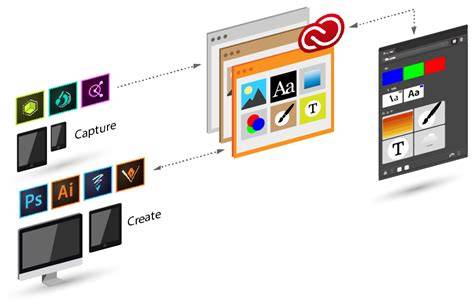
Infographic showing CC Libraries integration across apps and cloud syncing.
Visual guide to Comp CC, Capture, and Spark in a connected workflow.
Video overview of CC advantages for teams and individual creatives.
In closing, Creative Cloud represents a sustained evolution from the Creative Suite, prioritizing collaboration, cloud-based assets, and continuous updates that align with modern digital workflows.