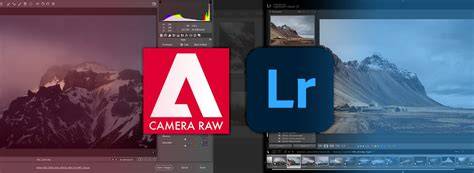
I recently purchased a copy of Photoshop Elements v.9 to prepare to teach a course on shooting and editing raw files. In order to keep the course and required software affordable for those who don't want or need the full power of Photoshop CS5, I thought I'd use Elements instead. In reviewing Elements, I found vast differences in the Adobe Camera Raw (ACR) processor that is part of both programs. You can probably spot them for yourself using these screen grabs, but I'll do a rundown of them in a video as well. (Click to enlarge the previews.)
When you first see each of the ACR windows they look the same. In fact I deliberately put different photos in there so you wouldn't confuse the two. This video shows you the differences. Maybe. I know I've written in the past that you don't need Photoshop, but maybe some of you do. I suppose if you had never used Photoshop you wouldn't know what you were missing.
I'm a huge fan of the raw imaging work flow, so as an alternative, I suggest you use Adobe Lightroom, or Apple Aperture if you want to really make the most out of those raw files. Lightroom has the same raw work flow features as Photoshop's version of ACR. So if you have Photoshop CS6 you really don't need Lightroom, but if you want to save a few hundred bucks and don't need all that CS6 super power, you could get a Lightroom and Elements combination for under $200. (I recently got my Lightroom for only $130 when I purchased a new camera at Vistek.) Keep your eyes peeled for deals out there. Aperture is now selling for about $80 in the Apple App store which is very competitive with both Photoshop Elements and LR.
FYI - Here's a screen grab of the Lightroom develop window, because I knew you'd ask! You can see that it looks much different at first glance, but all the features of ACR Photoshop CS5 are in there. Plus with Lightroom there's a whole slew of pre-sets. The last piece of advice I have for you is to try each of the programs before you make your final choice. All four of the image editing programs I've written about here can be downloaded for a 30 day free trial.
Understanding the ACR Experience Across Platforms
ACR in Photoshop CS5/CS6 offers a mature workflow with extensive control over exposure, white balance, color grading, lens corrections, and local adjustments. In contrast, Elements provides a lighter, sometimes simplified set of controls, which can be advantageous for beginners or quick edits. Lightroom emphasizes non-destructive editing with a robust cataloging system and an emphasis on batch processing and presets, while Aperture (historically for macOS) offers strong organizational tools and similar raw adjustments.
Key differences often observed include the layout of the develop/RAW adjustment panels, available sliders and presets, and how non-destructive edits are managed across each program. The result is that the same RAW file can look different depending on the chosen pipeline, especially when it comes to highlight recovery, shadow detail, and color rendition.
Practical guidance for educators and students
For teaching shooting and editing RAWs on a budget, a workflow combining Lightroom and Elements can cover most classroom needs. Lightroom provides powerful RAW processing with batch editing capabilities, while Elements can handle essential edits and quick adjustments without the full price tag of CS5/CS6. If you already own CS6, Lightroom may be redundant, but it remains a cost-effective alternative for learners who are not seeking full Photoshop capabilities.
When evaluating software options, it is valuable to test all contenders before committing. A 30-day free trial exists for each of the major programs discussed, enabling students to compare interface familiarity, responsiveness, and the quality of RAW processing in real-world editing tasks.
Considerations for classroom setup
Ensure computer hardware supports smooth RAW processing, particularly for higher-resolution files from modern cameras. Plan a demonstration sequence that shows differences in color grading, noise handling, and dynamic range adjustments across the different software. Provide students with source RAW files and side-by-side demonstrations to illustrate how same adjustments can yield different visual results depending on the workflow.
Table: Quick feature snapshot
| Program | Raw processing depth | Non-destructive edits | Presets / Looks | Cataloging |
|---|---|---|---|---|
| Photoshop CS5/CS6 ACR | High | Yes | Extensive | Integrated with Bridge |
| Photoshop Elements | Moderate | Yes | Limited | Lightweight |
| Lightroom | High | Yes | Vast presets | Robust cataloging |
| Aperture | High | Yes | Moderate | Strong organization |
Ultimately, the best approach depends on budget, teaching goals, and students’ needs. If mastering RAW development with extensive control is essential, CS5/CS6 with ACR remains a powerful option. If accessibility and affordability drive the choice, Lightroom paired with Elements offers a compelling, practical path for learning non-destructive RAW workflows and effective image editing.