Introduction: Adobe Photoshop is a household name in the world of digital design, photography, and image manipulation. But not everyone realizes that Adobe actually offers two versions of Photoshop: Photoshop (part of the Creative Cloud suite) and Photoshop Elements (a more lightweight, beginner-friendly version). While both carry the trusted Photoshop brand and are designed for editing photos, their target audiences, feature sets, and pricing models are very different. Understanding the distinction between these two can help you choose the version that best suits your skill level, creative needs, and budget. This article explores the key differences between Photoshop Elements and full Photoshop, offering a side-by-side comparison across features, use cases, system demands, and pricing. We’ll also show how the XPPen Artist Ultra 16 can support both beginner and professional users in their creative journey.
Photoshop Elements for Hobbyists
Photoshop Elements is Adobe’s entry-level photo editing software aimed at hobbyists, beginners, and casual users. It provides a streamlined experience that focuses on simplicity and ease of use.
One of Elements’ standout features is its three editing modes: Quick - Ideal for one-click fixes like red-eye removal, cropping, and auto color correction. Guided - Step-by-step tutorials for tasks such as skin smoothing, background replacement, and creating collages. Expert - A more advanced interface with layer support and custom edits for those ready to dive deeper.
Key Strengths: Beginner-friendly interface; Guided Edits that teach as you go; Automated enhancements using Adobe Sensei AI; One-time purchase (no subscription required); Lightweight and faster to run on modest hardware.
Elements is perfect for: Photo hobbyists who want to enhance family or vacation photos; Beginners interested in basic graphic design or social media posts; Students and educators on a budget; Anyone who wants Photoshop branding without the complexity. It’s a great way to get into image editing without feeling overwhelmed by hundreds of tools and menus.
Full Photoshop for Advanced Editors
In contrast, Photoshop (Creative Cloud version) is designed for professional photographers, digital artists, graphic designers, and advanced users who demand complete creative control.
Photoshop offers: Layer masks and blending modes; Smart Objects for non-destructive editing; Vector shape tools and typography control; Custom brushes and actions; AI-powered tools like Generative Fill, Sky Replacement, and Neural Filters; Integration with other Adobe apps like Illustrator, Lightroom, and After Effects. Photoshop is used in a wide variety of fields: High-end photo retouching, Branding and logo design, Web and app UI design, Digital painting and concept art, Marketing, publishing, and advertising. It’s the go-to software for professionals because of its power, flexibility, and ecosystem support. But it also comes with a steeper learning curve and requires a Creative Cloud subscription.
Feature Breakdown
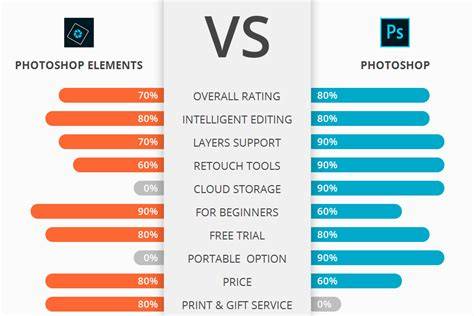
- Guided Edits vs Full Control
- Interface: Beginner-friendly vs Pro-grade interface
- Editing Modes: Quick, Guided, Expert vs Full-Featured workflow
- Layers: Basic vs Advanced with masks and effects
- RAW Editing: Basic via Camera Raw vs Full Camera Raw features
- Brushes and Tools: Limited preset brushes vs Full customization and third-party support
- Actions & Batch Processing: No vs Yes
- Generative AI Tools: Some auto-enhancements (Adobe Sensei) vs Full AI toolkit (Generative Fill, Neural Filters)
- 3D & Animation: Not supported vs Available (limited 3D features)
- Integration with Adobe Suite: Standalone vs Full integration
- Learning Curve: Low vs High (steep at first)
Guided Edits in Elements are perfect for users who want results without mastering all the tools. If you're on a budget or dislike subscriptions, Photoshop Elements is the clear winner. But if you need ongoing updates, professional features, and integration with other Adobe apps, Photoshop justifies its higher cost.
Upgrade Path and Use Scenarios
Many users start with Elements and “graduate” to full Photoshop as their skills and needs evolve. Here’s a breakdown of typical user profiles:
- Who Should Use Photoshop Elements: Photography hobbyists who want to enhance vacation/family pictures; Students and casual users creating flyers or school projects; Retirees or scrapbookers working on creative photo albums; Social media enthusiasts creating simple graphics.
- Who Should Use Photoshop: Professional photographers editing RAW files and retouching portraits; Graphic designers working with multi-layer compositions; Digital painters and illustrators using custom brushes; Marketers creating ad campaigns, mockups, or print assets.
If you outgrow Elements, Adobe provides a natural transition path. Your familiarity with Elements' interface and basic tools will make the Photoshop learning curve less intimidating.
XPPen Artist Ultra 16 for Both Beginners and Pros
Whether you're just starting out in Elements or crafting intricate artwork in full Photoshop, your hardware plays a huge role in your creative flow. The XPPen Artist Ultra 16 is a high-end drawing display designed for creators at all levels.
Why It’s Ideal for All Skill Levels: 4K OLED Display (3840×2160): Stunning clarity and color depth for editing and illustration; 16,384 Levels of Pressure Sensitivity: Whether you're sketching in Elements or retouching in Photoshop, every stroke feels natural; 1 ms Response Time: Draw with no perceptible lag, even in high-res files; Color Accuracy: 99% Adobe RGB and 98% Display P3-ensures what you see is what you get; Dual Styluses: Comes with two stylus options-X3 Pro and X3 Pro Slim-so you can choose based on your grip and workflow; Multi-Touch Support: Use gestures to zoom, rotate, and pan your canvas intuitively; Eye Comfort Tech: TUV-certified blue light filtering and anti-glare coating help you work longer without strain.
Whether you’re editing family portraits in Elements or producing high-concept art in Photoshop, the XPPen Artist Ultra 16 offers the precision, comfort, and color fidelity needed for professional-quality work.
Practical Recommendation
In short: Photoshop Elements is best for beginners and casual users who want simple tools, helpful tutorials, and a low one-time cost. Photoshop is built for power users and professionals who need full creative control, advanced editing features, and integration with Adobe’s creative ecosystem. There’s no one-size-fits-all answer-your choice depends on your experience level, editing needs, and budget. For those just beginning their creative journey, Photoshop Elements paired with a device like the XPPen Artist Ultra 16 can make learning both fun and effective.