Final Cut Pro, Apple's premiere video editing software, targets both working professionals and consumers who want more power for their video editing projects than iMovie provides. The Mac-only app bridges these two worlds well and works magnificently once you get to know it. Final Cut Pro offers fantastic organization tools, snappy performance, and plenty of top-notch effects that can elevate your video productions. You now have two ways to buy Final Cut Pro: You can make a one-time payment of $299.99 on the Mac App Store or sign up for Apple's new Creator Studio subscription, which costs $12.99 per month or $129 per year. That low subscription price also gets you Logic Pro, Pixelmator Pro, and more. You can install Final Cut Pro on multiple Macs, and you receive updates via the App Store. Apple offers a 30-day trial, which requires only an Apple Store account. For comparison, Adobe's competing Premiere costs a minimum of $22.99 per month, with just a seven-day trial.
DaVinci Resolve, similar to Final Cut Pro, carries a one-time price of $295. DaVinci Resolve's perpetually free version is extremely capable, however. The standalone Ultimate edition of CyberLink PowerDirector goes for $139.99, while a subscription version costs $79.99 per year. If you want motion graphics and encoding to many output formats, you need to fork over another $49.99 each for Apple's Motion and Compressor ancillary applications. DaVinci Resolve includes these capabilities. Premiere's After Effects motion graphics tool requires a separate $22.99-per-month subscription, but its Media Encoder utility is part of the single-app subscription price. The iPad version of Final Cut Pro requires a $4.99 per month or $49 per year subscription, unless you opt for the Apple Creator Studio suite.
Alongside Creator Studio, Apple recently announced new features for its media editing applications, including Final Cut Pro. The macOS edition is now on Version 12, whereas the iPad edition is on Version 3. Here's what's new: Beat Detection. This new capability leverages AI from the video editor's audio stablemate, Logic Pro, to analyze your video's music track and display a Beat Grid, letting you align video cuts to the music's beats for a polished result. Premium Content. Apple adds 60 dynamic titles and transitions, 14 graphic elements, and countdown animations and timers to set the pace. Transcript Search. This takes advantage of the program's ability to generate caption tracks automatically from speech in your video clips. With it, you simply type in words or phrases, and the program takes you to the part of the timeline with the specific dialogue. This feature requires an Apple silicon Mac. Visual Search. An even more impressive tool than transcript search, this feature uses AI to analyze what's going on in a video clip. Just type something like "car speeding by" or an activity like "dancing," and Final Cut Pro takes you to the relevant place in the timeline. It could save you a lot of time applying keyword tags to your clips. This tool also requires an Apple silicon Mac.
The iPad version of Final Cut Pro gets several new features, too: Background Export. This capability lets you work in other apps on your iPad while a long video export is in progress, keeping you apprised of progress via Live Activities notifications. External Monitor Playback. Even desktop video editing sometimes benefits from viewing a project on a large external monitor. This update brings that option to Final Cut Pro on the iPad. Montage Maker. One of the major features that arrived with the Creator Studio is available only in the iPad version of Final Cut Pro. It analyzes your media and cuts it down to the most interesting bits, matching the clips to the beats of the soundtrack. Multiple Clip Selection. Sometimes you want to apply the same effect to multiple clips at once. This is a pretty standard video editing feature in desktop software, and now it's available on the iPad.
Missing among the new tools in Final Cut Pro are generative AI features, like those in Premiere and even in consumer-level products like PowerDirector. The closest to these are the auto-captioning and Magic Mask features, but those are a far cry from generating video content based on text prompts. You can, however, use Apple Playground-generated images (but not video) in your Final Cut projects. Final Cut Pro requires a hefty 6.5GB of local storage. The program requires a machine running macOS 15.6 or later, which means no MacBook older than 2018. It also requires a Metal-capable graphics card for Intel-based machines and a minimum of 8GB RAM. (Apple recommends 16GB.) As mentioned, Final Cut Pro runs natively on Apple silicon Macs, and some features require this type of chip. Unlike Adobe Premiere and DaVinci Resolve, which run on macOS and Windows (and Linux in the latter's case), Final Cut Pro is for Apple devices only.
Final Cut Pro Libraries let you keep assets together for use in multiple projects. They combine the previously discrete Events and Projects panels. Libraries are similar to the Catalogs in Adobe Lightroom in that they are databases that you can back up to a separate drive and receive automatic backups. Libraries are a major part of organizing your assets, but you must first import media before you can use them. Each import session places media into an Event in the source area. At import, you can tell Final Cut to copy the event media to a specific Library. You can also have the program analyze video for color balance, excessive noise, stabilization, and the presence of one or more people. The app auto-tags content based on this analysis. Final Cut Pro can automatically tone-match SDR and HDR files so that you can work with both types in the same project. It can also fix audio issues. Final Cut Pro supports expanded color spaces like those that approach Rec. 2020, including the DCI-P3, which current iPhones and iMacs use. It also accepts the H.265 codec (aka HEVC), which minimizes the file size of 4K and 360-degree footage while maintaining resolution. That's in addition to standard video formats such as AVCHD, HDV, MPEG-4 H.264, and XAVC. However, Final Cut Pro doesn't work with the open-source MKV and OGG formats. Of course, the app supports Apple's ProRes Raw format, which is analogous to Adobe's DNG raw still camera file format. It gives you access to all sensor data and allows for more leeway in adjusting lighting and colors compared with compressed formats. Atomos recorders support the format, as does the DJI Mavic 3 Pro drone.
Controls in the Inspector panel let you adjust the color temperature, exposure offset, and ISO of ProRes Raw content. If you've chosen to analyze the clips, the program can create Smart Collections based on the type of shot (long, close, or medium) or whether the shot is stable or unstable. In my quick test, it created a People folder, with Group, Medium Shot, and Wide Shot Smart Collections below it, and a Stabilization folder with Excessive Shake and Steady Shot groups. Final Cut Pro can import and export both projects and events in XML format. This means professional video editors can round-trip their work between video editing software and other apps, such as DaVinci Resolve, a standard in pro video color correction. The same holds for organizing projects in Square Box System's CatDV, which lets teams of professionals organize clips. On the other end of the spectrum, you have the ability to import iMovie projects you started on a mobile device.
In addition to its automatic clip organization options, Final Cut Pro includes manual keyword tagging. Much like a good photo workflow app, the video editor makes entering frequently used tags simple-you can even use keyboard shortcuts. Tagging in Final Cut Pro still isn't as sophisticated as in Adobe Lightroom, but Premiere can use tags only through the separate Adobe Bridge manager (though it does offer lots of metadata fields along with face detection). One very cool keyword tagging option in Final Cut is the ability to apply a tag to just part of a clip. You can also rate, reject, or star a clip from icons below the source tray. Transcript and Visual SearchNew drop-down options from the search box let you choose these two AI-powered tools. For the transcript search, you don't even need to create a transcript first; it just finds the spoken words in the footage. You can select between Includes (for an exact term) or Is Related To (for a broader search) options. I searched for the word "school" in a demo video I shot about Copilot Pages, in which the demonstrator was using the feature to organize and enhance class notes. The tool found the relevant clip section and let me shunt it into the timeline, keeping just a bit of space around the word for context. However, it didn't find instances of the demonstrator saying "Copilot," since he spoke that word with an accent. The visual search tool was also somewhat hit or miss. It correctly found moments in my source video files that included images of a soccer match and of a PC. But it couldn't find a waterfall or a woman speaking, even though I had footage of a female friend talking at Niagara Falls.
For collaborative editing, Final Cut Pro supports XML files and locking. You can export Final Cut Pro ProRes or H.264 content as proxy files at 50%, 25%, or 12.5% of the original size, allowing remote editors to access huge projects more efficiently. Adobe Premiere, however, offers more collaboration options with its Team Projects and Productions, which enable simultaneous editing with conflict resolution features. It also sports a Share for Review feature to give non-editing stakeholders a sign-off capability. Premiere also has deep Frame.io integrations for collaboration, though Frame.io also works with Final Cut Pro as a plug-in.
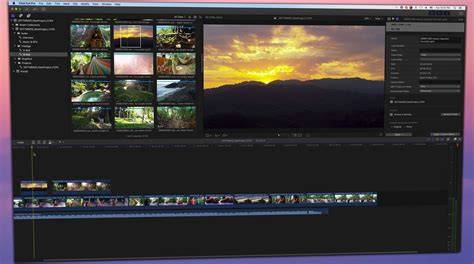
The app’s interface sports a consistent dark gray that keeps the content front and center. Four preset window layouts in Final Cut include Default, Organize, Color & Effects, and Dual Displays (this isn't available if you don't have dual displays). You can also create custom workspace layouts. You can't, however, undock panels to make them float-free, as you can in Premiere. Although the Final Cut Pro timeline looks similar to iMovie with its Magnetic Timeline, the pro program packs vastly more editing power. The standard three-pane view appears: source clips top-left, preview top-right, and timeline across the bottom, with a timecode indicator below the preview window. There’s now an option to scroll the timeline as your movie plays. You won't find track numbers along the left edge of the timeline. Final Cut Pro calls tracks lanes, and you can add as many as you like, unlike with PowerDirector and Pinnacle Studio.
Final Cut still makes excellent use of keyboard shortcuts, such as for changing back and forth among the trim, select, blade, and range selection functions. Good old J, K, L, I, and O still work as you expect. You can display an on-screen keyboard showing them all and edit key functions to taste. You also need to use keyboard shortcuts to simply get to the beginning or end of a clip or movie because there are no buttons for these functions in the video preview window, like in most video editing applications. Adding clips to the Magnetic Timeline is a simple dragging operation, and clips snap to neighboring ones or the start (you can use a Position cursor tool). You can also use buttons at the bottom that let you insert or append clips to a sequence in your timeline (the keyboard shortcuts W and E do this, too, but there's no context menu option for it).
The first button on the left connects a clip you enter with the existing nearby clip above the main track, which Apple calls the Storyline. This Connected Clip means that whenever you move the main clip, the one added after will stay in the same relative position on the timeline. But if you drag a clip so that it overlaps another, that second clip scoots out of its way, dropping down to create a new overlapping lane beneath it. Another concept unique to Final Cut Pro is that it categorizes clips into Roles. Roles define what clips are for, like video, titles, dialogue, music, and effects. Final Cut gives you precise, intuitive, and impressive tools for arranging and trimming clips. You can trim and split in the timeline or right in the clip's iMovie-style source entry. You can easily mark any selections on a clip as a Favorite. Double-clicking a clip brings up the Precision Editor. Here, you can trim either end with a simple click-and-drag. A Blade tool splits the clip in two at the edit point. I like the Region Selection tool, which lets you mark in and out points to select part of a clip. I do, however, miss PowerDirector's multi-trim tool, which lets you mark multiple in and out points to easily remove undesirable bits in the middle of a clip. Still, Final Cut Pro lets you do this kind of multiple sub-clip selection in the source panel. It also lets you easily make ripple, trim, roll, slip, and slide edits. Edits are nondestructive, meaning you can always restore a part of a clip after you trim it.
One of Final Cut Pro's unique features, Compound Clips, lets you group together clips, audio, and effects so that you can move them as a unit and keep everything in sync. It effectively declutters the timeline by showing just a single clip for the compound. You can easily expand the Compound clip at any time for further tweaking. Another clever innovation that lets you save space on the timeline is Auditions. When you drag a new clip on top of one already in the timeline, you get the option of adding it as an Audition. It puts a little spotlight icon in the clip entry, which, when you click it, opens a viewer/chooser for as many Audition clip options as you added.
Say you shot five takes for an opening scene for your wedding video. This Auditions viewer lets you create a simple way to line up comparisons of all your choices. Just open the Audition window, select a track, and then play the overall video with the auditioning clip in place. Change clips and repeat until you see which one works best. Once your clips are all in place, you can fine-tune and bling them with Final Cut's rich collection of color tools, effects, text tools, and transitions. You can access these in the lower part of the interface and apply them to craft a polished, professional look.
Final Cut Pro makes it easy to create polished, pro-quality videos across Mac and iPad. Search visual moments with Visual Search, grab the perfect sound bite, and connect up to four iPhone or iPad devices to sync footage. Montage Maker automatically selects the best visual highlights from your footage and cuts them to the beat of any song. Final Cut Camera lets you capture in ProRes RAW for maximum flexibility in shaping your video’s look and extending detail in highlights and shadows.
Questions? Apple Creator Studio is an all-in-one subscription to a suite of creative apps with powerful AI features that build on Apple Intelligence. Final Cut Pro, Motion, and Compressor give you smarter, faster ways to craft and cut videos. Pixelmator Pro lets you easily edit images and create striking graphics. Logic Pro and MainStage help you produce, perform, and perfect your music. On your Mac or iPad, you can download Apple Creator Studio, which includes Final Cut Pro (Mac and iPad), Motion (Mac only), and Compressor (Mac only), from the App Store. Final Cut Pro is included in your subscription to Apple Creator Studio, which also includes Logic Pro, Pixelmator Pro, Motion, Compressor, and MainStage. In addition, Apple Creator Studio comes with enhanced versions of Keynote, Pages, Numbers, and Freeform that include premium templates, a library of high-quality, royalty-free photos and graphics, and powerful intelligence features. You can try Apple Creator Studio free for 30 days. $129 per year. $29.99 per year. A one-time purchase will still be available, but access to some of the premium content is available only to Apple Creator Studio subscribers. Yes. For the optimal experience, full functionality is available with macOS 26, iPadOS 26, and iOS 26. Apple Creator Studio requires an Apple Account and an internet connection to subscribe. Final Cut Pro for Mac requires macOS 15.6 or later, 8GB of memory (16GB recommended), a Metal-capable graphics card (Intel-based Mac computers only), and 7.2GB of available disk space. Some features require a Mac with Apple silicon. Compressor requires macOS 15.6 or later, 8GB of memory, and 1.2GB of available disk space. Apple Immersive Video processing requires 32GB of memory (64GB recommended).
Why Final Cut Pro X Stands Out, and Where It Fits Among Competitors
Final Cut Pro X is a professional non-linear video-editing application that evolved from its early Macromedia roots into a native 64-bit powerhouse. It supports a wide range of formats, offers advanced multicam editing, 360-degree video editing, and a robust set of color, effects, and audio tools. Its Magnetic Timeline, Roles, and Compound Clips provide a unique workflow that emphasizes speed, organization, and non-destructive editing. While it excels on Mac and iPad, it remains distinct from cross-platform rivals by design-optimized for Apple hardware and software integration, with seamless XML import/export for interoperability.
In testing and reviews, Final Cut Pro X has often been praised for its performance, organization features like Libraries, and automatic analysis and tagging. It also features deep color tools, ProRes RAW support, and HDR/Rec. 2020 workflows, enabling high-quality color grading and media management. However, some professional editors still lean toward Adobe Premiere for its broader cross-platform ecosystem, richer collaborative tools, and stronger AI-powered motion graphics options through After Effects. DaVinci Resolve remains a strong contender for those prioritizing built-in color correction and a robust free tier.
Key Capabilities and Workflows
- Magnetic Timeline with multi-clip connections and precise trimming tools.
- Roles and Sub-roles for granular organization of video, dialogue, music, and effects.
- Compound Clips and Auditions to simplify complex timelines and compare options.
- Smart Collections, automated analysis, and keyword tagging for efficient media management.
- Support for ProRes RAW, HDR, Rec. 2020, and a broad range of standard formats.
- XML interchange for round-tripping projects with other apps and studios.
- Export and collaboration options via XML and proxy workflows, with some limits compared to Premiere.
- iPad integration with Montage Maker, Background Export, External Monitor Playback, and more.
For users weighing price and value, Final Cut Pro offers a one-time license and a subscription option through Creator Studio, with the latter bundling additional Apple creative apps. The choice between Final Cut Pro, Premiere, and Resolve depends on platform preferences, collaboration needs, AI-assisted features, and the depth of motion graphics and color work required for a given project.
Still, the core strengths of Final Cut Pro X-speed, organization, and a powerful, non-destructive editing model-make it a compelling option for Mac-only editors who want professional-grade results without leaving the Apple ecosystem.