Interested in digital art? Craft your masterpiece with stunning reality using renowned dry, wet, and blending media. Select color your way. Looking for even more brushes for particular workflows?
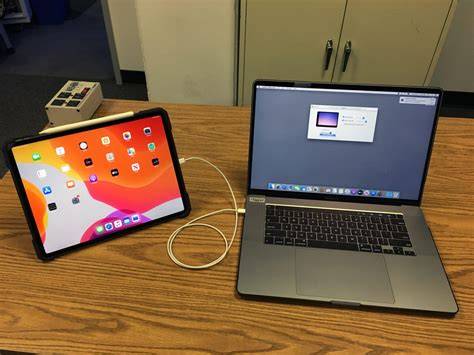
Painter Essentials is an absolute steal for artists starting out or refining their craft, offering powerful tools and streamlined workflows that integrate smoothly with macOS. Improve your overall Mac workflow in big ways by leveraging features such as Sidecar on macOS to use your iPad as a secondary display that mirrors your Mac desktop. This setup expands your canvas and enhances ergonomic versatility, letting you work more intuitively with your favorite brushes and media.
Enjoy AI Auto-Painting presets that leverage Core ML and the powerful new Apple Vision Framework technology to determine areas of focus in a photo and intelligently paint details generating natural-looking paintings with a greater sense of depth and focus. By painting with more detail in the areas of interest, and using larger more gestural strokes in the background, the results more closely resemble what a trained artist can achieve. Choose from 10 new AI Styles to experience auto-painting with stunning artistic results on the Mac.
Begin by selecting a landscape or portrait-oriented document right from the New Image dialog, then refine your composition with the enhanced user interface. See new features like a dark theme, tool highlights, new icons and more, which together contribute to a more efficient and engaging creative process. The harmonies include complementary, light monochromatic and dark monochromatic color options that dynamically create balanced color swatches from your chosen color, helping you narrow down the perfect painting colors quickly and confidently.
Painter Essentials showcases a tour of the enhanced user interface and a variety of demonstrations from experts in the field. Painter Master Elite Don Seegmiller demonstrates a variety of unique brushes that glow, jitter, shatter, distort and add decorative brushstrokes. See how to use the Color Selector in Painter Essentials, including new features like circular grabbers and a split color and clone painting preview. Painter Master Elite Cher Pendarvis demonstrates the benefits of using a pressure-sensitive drawing tablet with Painter Essentials, highlighting how hardware and software work together for a natural drawing experience.
For beginners, you can create your first pencil sketch in Painter Essentials, learn how to find and use various pencil media types and keep them organized in a custom palette. You can also learn how to create a simple pen and ink sketch in Painter Essentials, with tips on using various pen brushes and organizing them in a custom palette. The program also teaches you how to blend colors like a master using glazing brushes that allow opacity to build up smoothly along your brushstrokes, enabling richer depth and more nuanced transitions between tones.
Key features and how they empower your art
- AI Auto-Painting presets with Core ML and Apple Vision Framework for intelligent focus and depth.
- 10 new AI Styles for automatic painting with professional results on Mac.
- Harmonies and color sets that simplify color selection and ensure balanced palettes.
- Advanced media types including dry, wet, and blending brushes for versatile textures.
- Improved workflow on Mac, including Sidecar integration for a larger, flexible workspace.
- Enhanced user interface with a dark theme, clearer tool highlights, and new icons.
- Expanded brush demonstrations from Master Elite artists, showcasing glow, jitter, shatter, and decorative strokes.
- Color Selector enhancements with circular grabbers and split color previews.
- Support for pressure-sensitive drawing tablets to enrich drawing precision and control.
Practical workflows to maximize productivity
Use Sidecar on macOS to extend your desktop to an iPad, effectively turning it into a secondary display for painting sessions that benefit from extra screen real estate. This setup is particularly useful when managing multiple layers, brushes, and palettes at once. The AI Auto-Painting presets guide your process by intelligently identifying focal areas in photos, allowing you to invest detail where it matters most and keep broader gestures in the background for depth and balance.
Experiment with 10 AI Styles to compare how different stylistic approaches transform a base image into painterly results, then fine-tune with the harmonies to create color relationships that feel cohesive. The new dark theme can reduce eye strain during long sessions, while streamlined contextual menus and layer adjuster options speed up routine tasks. When working with layers, you’ll notice improved information dialogs that help you stay oriented as you build complex compositions.
For those exploring traditional media emulation, Painter Essentials offers a robust set of brushes that mimic real-world dry, wet, and blending techniques. Glazing brushes, for example, allow opacity to build up gradually along your strokes, producing smooth color transitions and more sophisticated tonal modeling. The Color Selector enhancements, including circular grabbers and a split color preview, help you achieve precise color decisions without interrupting your creative flow.
Portraits, still life, and landscapes: AI-assisted realism
AI Auto-painting presets have added powerful new algorithms to provide richer, more natural looking results for portraits, still life, and landscape type paintings from imagery. By painting with more detail in the areas of interest, and using larger gestural strokes in the background, the results more closely resemble what a trained artist can achieve. This makes it easier to produce polished, gallery-ready work even if you’re still mastering traditional brush techniques.
Whether you’re aiming for a photographic likeness or a painterly interpretation, you can tailor the process with 10 AI Styles and a set of harmonies that dynamically balance color choices. The New Image dialog simplifies the creation of landscape- or portrait-oriented compositions, helping you set the initial direction before delving into detailed layerwork and brush customization.
Tips from masters: brush techniques and palettes
Painter Master Elite Don Seegmiller demonstrates a variety of unique brushes that glow, jitter, shatter, distort and add decorative brushstrokes, providing a practical reference for exploring texture and movement in digital painting. Cher Pendarvis highlights the benefits of using a pressure-sensitive drawing tablet with Painter Essentials, showing how pressure dynamics can influence line quality, opacity, and stroke variation. These demonstrations reveal how to blend colors effectively using glazing brushes that build opacity progressively, enabling nuanced color relationships and depth.
For beginners, creating a simple pencil sketch serves as a gentle introduction to media types and palette organization. Learn how to locate and categorize pencil textures, then assemble a custom palette to streamline your workflow. In addition, the pen and ink sketch workflow offers practical tips for leveraging line work and brush behavior to achieve crisp contours and expressive marks.
AI Car Painting: The Free Method You Need to Try
Tables and quick-reference data
| Feature | Benefit |
|---|---|
| AI Auto-Painting presets | Depth and focus added automatically in portraits, still life, landscapes |
| AI Styles | 10 distinct artistic outputs for diverse workflows |
| Color harmonies | Complementary and monochromatic palettes for balanced swatches |
| Sidecar integration | Expanded workspace via iPad as secondary display |
tags: #corel #painter #essentials #software