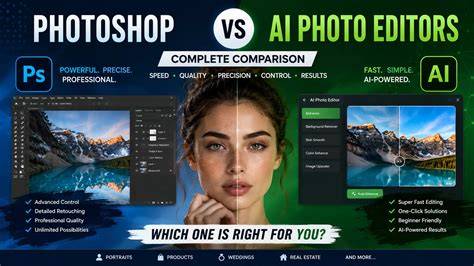
For years, Adobe Photoshop has been the go-to traditional photo editor, powering everything from marketing visuals to complex creative projects. But today, new AI tools are shaking up the industry. With generative AI features like generative fill, generative expand, and text prompts, you can now edit photos in a few clicks without the steep learning curve of Photoshop. So, which option should you choose-AI photo editing or Photoshop? Let’s break it down.
Photoshop: The Industry Standard
Photoshop has dominated photo editing for decades, and for good reason. It’s a creative cloud staple, giving designers, photographers, and businesses powerful editing features and full control over every photo and image.
- Pros of Photoshop
- Pixel-perfect image editing for professionals
- Huge library of features including background removal, graphics creation, and advanced editing features
- Compatible with other Adobe apps and workflows
- Cons of Photoshop
- Not beginner-friendly
- Time-consuming for simple edits like removing backgrounds or cleaning up objects
- Paid-only, no free version unless you count limited trials
AI Photo Editing: Simplicity With Smart Results
Modern AI photo editors like starryai make editing images accessible to everyone. You don’t need to know layers, masks, or advanced shortcuts.
When to Use Each
Use Photoshop if you need advanced features, full control, or are working on professional print projects. Use AI photo editing if you want to edit photos fast, remove backgrounds, or generate new images for social media and creative projects.
For example: Need to replace a background? AI gets it done instantly. Want to fine tune shadows and highlights for a print project? Photoshop is still the best.
The Future of Image Editing
The gap between Photoshop and AI photo editing is closing quickly. With generative AI tools, you can now create stunning photos and images in seconds. AI tools like starryai already offer features once exclusive to Adobe Photoshop, but with an easier workflow. Expect more new tools, smarter prompts, and better automation to keep making AI a game changer in photo editing.
Try Editing Photos with AI Today
With starryai, you can:
- Open the Edit Tool
- Upload your photo
- Enter a prompt (e.g., “remove background” or “replace with a beach scene”)
- Click generate and watch AI transform your photo
Whether you want to remove distractions, swap in a new background, or simply experiment with creative projects, you’ll get professional-level results in a few clicks.
Bottom line: Photoshop is still the most powerful traditional photo editor for professionals. Adobe Creative Cloud gives graphic artists and photographers the creation and editing tools they need to realize their visions. Adobe Photoshop and Illustrator both work with images, but they are very different applications. Illustrator is a graphic design application. Graphic designers use Illustrator to create vector graphics. Vector images and graphics are made of points, lines, shapes, and curves based on mathematical formulas rather than a set amount of pixels, and therefore can be scaled up or down while maintaining image quality. Vector art can appear on everything from enormous banners to wallet-sized business cards, and everything in between. Designers using Illustrator can create graphics and images freehand, using a stylus and digital drawing tools.
Photoshop is the industry-standard photo editing software, and the go-to application for everything from small retouching changes to mind-bending photo art. Photoshop is where editors crop photos, adjust photo composition, correct lighting, and make any subject imaginable look its absolute best. Photoshop images are raster graphics. Unlike vector images, they are pixel-based. Illustrator and Photoshop are both part of Adobe Creative Cloud and are designed to work together. Photoshop files can incorporate assets made in Illustrator, integrating an image created as a vector file into a raster file. And the opposite is true too - a graphic design project in Illustrator can easily fit into a larger photo project in Photoshop. Creators can link Illustrator files to Photoshop files. Because the files are linked, a change to the Illustrator file will also show up in the Photoshop file referencing the vector. Creators can do this with multiple files. DIY store web pages, for instance, could show t-shirts, coffee mugs, stickers, and other merchandise, all displaying the same logo. The Photoshop images of the merchandise can all reference the same Illustrator file where the logo lives. Explore more about how to import Illustrator images into Photoshop, and even learn how to transform vector images.
“AI vs Photoshop” is the wrong question if it implies one button replaces an entire image-production discipline. AI wins at fast semantic changes: remove, replace, expand, restore and generate variants. Photoshop wins when every edge, layer, color value, type treatment and revision must be controlled. The Photoshop vs AI debate is most useful when framed as AI image editing vs Photoshop for a defined deliverable. The central difference between AI and Photoshop is inferred change versus explicit control. A dependable AI photo editing workflow uses inference for broad changes, then deterministic finishing where accuracy matters. An AI editor interprets intent. Tell it to remove a tourist, change the season or rebuild missing background and it predicts plausible pixels. Photoshop is a control environment: selections, masks, layers, curves, blend modes, type, vectors, channels and color management. AI can identify a subject, reconstruct occluded texture and create a clean background faster than manual cloning in many ordinary photos. Difficult edges, transparent materials, reflections and repeating architecture still need review. Semantic editors can relight and extend scenes, making them effective for social crops and campaign variants. The failure mode is global drift: face, product, text or perspective changes along with the background. AI restoration estimates missing detail and suppresses noise quickly. That makes old-photo cleanup and low-resolution web assets accessible, but generated detail may not be historically or forensically accurate. AI can produce alternate seasons, props, palettes and compositions before a designer commits to a manual composite. It is strongest as a proposal engine. Photoshop remains superior when revision instructions are spatial and exact: move this object 12 pixels, change only the cyan channel, preserve the clipping path, update one line of legal copy, or deliver a layered file another designer can audit. The Topaz Sharpen AI vs Photoshop decision illustrates a broader rule. Specialist AI can detect motion blur, focus softness or noise and produce a strong automatic correction. Photoshop offers controlled sharpening, masking and integration with the rest of the composite. Review restoration at 100% and at final display size. Look for plastic skin, ringing halos, invented eyelashes, repeated texture and crunchy edges. A technically sharper image can be less believable. Define the delivery requirement. Protect the original. Use AI for the broad semantic task. Reject structural errors early. Finish with masks, layers and color tools. Run output QA. For a simple background transformation, Media.io Photo Background Changer can serve as the fast AI stage. AI lowers the skill threshold for a first result, not the judgment threshold for a publishable result. Designers still need composition, light, anatomy, typography, color and an understanding of when an image is lying. Compare total production cost: subscription, credits, rerenders, retouching, version management and client revision time. Photoshop can look expensive until a project needs twenty deterministic changes. AI is replacing Photoshop tasks, not the need for image-editing expertise. Speed comparisons are meaningless unless the result meets an acceptance standard. Test AI editors with transparent hair, glass, jewelry, repeating patterns, readable packaging, reflections and skin texture. For commercial work, classify errors by risk. A slightly different cloud can be harmless; a changed product label, skin tone, logo or architectural feature may invalidate the asset. Keep the original, the AI output and the manual corrections as separate assets. In Photoshop, place the generated result as a new layer or smart object and reveal only the sections that pass inspection. Use masks for reversibility, adjustment layers for color and named groups for client revisions. Record the prompt and tool version in the layer notes or project documentation. Browser AI editors are a strong fit for quick social images, background cleanup, marketplace listings, internal mockups and users who do not need layered source files. Specialist tools also deserve a place in the workflow. Denoisers, sharpeners and upscalers can solve narrow technical problems better than a general editor. However, each additional AI pass can invent texture or amplify artifacts. AI does not eliminate image-editing knowledge; it changes where that knowledge is applied. Editors need to diagnose realism, write bounded instructions, judge generated detail, manage versions and understand commercial risk. The strongest operators can move in both directions: they know when a prompt will save twenty minutes, and when opening Photoshop immediately will be faster than negotiating with a stochastic model. AI editors infer a new result from instructions and context. Photoshop gives explicit pixel, vector, layer, mask and color controls. It is faster for object removal, background changes, expansion, quick restoration and concept variants. Specialist restoration tools can outperform general sharpening on difficult blur or noise, while Photoshop offers more control and integration.
When you purchase through links in our articles, we may earn a small commission. Generative AI is neat, but it isn’t perfect. It’s only good for very specific needs, and even then it still requires manual touch-ups. There are things I just can’t do because I don’t know how to do them, and AI is nice for those bits. AI is also nice for quick little tasks where I don’t care for perfect results, like prototypes and ideations. Generative AI is fantastic for quickly whipping up concept art and creating fun digital props for a roleplaying game. Creating an image of my tabletop RPG characters stylized like it’s on a terminal screen? But for me? That’s where generative AI’s usefulness ends. I don’t use it to create sprawling vistas or gigantic works of art. Why would I? Sure, it might be impressive from a technical standpoint that AI tools can create those things out of thin air. At their core, large language model AIs just aren’t capable of understanding anything meaningfully. Even when I do need generative AI, the lack of accuracy, precision, verisimilitude, and ability to follow specific instructions kills its usefulness. One time, I was making a character portrait for one of my players in an upcoming Alien RPG tabletop game. I struggled a lot with that one. I mean, I just wanted the character to have his fingers splayed in the right way. But could AI do it? Oh boy, could it not. I tried upwards of 10 different prompts to get it to understand that I wanted three fingers up on one hand and two on the other, splayed to create the impressions of “W” and “Y” letters. Sometimes it made the hands face the wrong way. It never got the number of fingers right, and it never splayed them in the right way. After trying-and failing-to get the AI generating what I wanted for close to 20 minutes, I gave up and just made it myself using the first generated image as a reference. I cloned one of the fingers, moved into the right spot, adjusted the lighting, blended the layers, and it came out great. Okay, fine. You might say that I built upon the original creation put forth by the AI. Yes, I’m glad it gave me that initial design to work with, and it was easier to edit that than create the same thing from scratch. But as a final product? It failed to do what I needed. More often than not, it’s just quicker for me to make edits manually. With AI, I have to think about how to prompt the AI correctly and making sure the AI will interpret my instructions the exact way I intend to get what I need from it-not something else, not something that gets it right in one area but randomly changes something in another area, not the right image but with an overhauled art style. And that’s my main problem with today’s generative AI: it takes so much time to fix what it creates that I might as well have done it myself in the first place. Now, if you’re an individual and you don’t know the first thing about Photoshop, then AI can be a tool to get you halfway there. Indeed, there are a million quick little things I still use Photoshop for where it only takes me a few seconds to do. These are all important tasks I do every single day, and there’s no way I’m going to 1) trust an unreliable AI to do what I need done correctly, or 2) waste all that GPU time, electricity, and water on something I can do faster and more effectively with existing software. There’s probably an end game sometime in the next decade or two where generative AI will be able to do what I do well enough… and I might end up losing my niche altogether. Some even think that’ll happen to everyone and we’ll have to contend with a post-work world. For now, AI tools can help. They’re useful, but they have limitations. I use AI for fun, novelty, and unimportant stuff. I’ll spin up some images and videos to send my friends, or inspiration for our next roleplaying session, or a quick concept for a creative project. But when it comes to anything critical, anything that demands specificity, anything that could land me in hot water if it contains mistakes, anything I can already do myself in no time? I’ll just do it myself. No way I’m going to entrust any of that to an unreliable AI that won’t listen to instructions and will instead inject a bunch of its own hallucinations.
tags: #artificial #intelligence #vs #photoshop