Image background removal has become a go-to for photographers, designers, marketers, and even creative users. Welcome to the world of AI background removal, where the power of artificial intelligence makes image editing faster in a few seconds. However, removing backgrounds from images can be a boring and time-consuming task, especially when you’re dealing with complex images. Popular tools like Pixelbin.io, Erase.bg, and many more produce clean visuals with just a few clicks. When choosing the best AI background removal for your needs, consider speed, accuracy, and ease of use. I picked the 15+ best background removers based on their effectiveness, popularity, and ease of use. The tools I’ll be covering have been selected based on hands-on testing where possible and user feedback ensuring that you get the most accurate information to enhance your image editing workflow. To help users find the best image background remover, I reviewed 16 popular options through hands-on testing and in-depth research, focusing on accuracy, usability, features, quality, speed and value. Get ready to find the best tool for your business or personal needs. You'll also find the best tool to improve your visual content and speed up your work.
A software tool called an AI background remover uses algorithms based on artificial intelligence to automatically find the main subject in a picture and separate it from the background. This enables users to remove the background for a transparent export or in many tools replace it with a new one easily. Popular AI background removal tools like Erase.bg, Pixelbin.io or many others offer an effortless solution for creating professional quality images. AI background removal offers a quick and accurate way to polish pictures-whether you’re optimizing product shots for e-commerce platforms like Amazon and Shopify, designing engaging visuals for social media, or perfecting personal photographs. Background removal software has become an essential tool for creating professional-looking images.
Top AI background removers: overview and capabilities
Pixelbin.io AI background removal provides a simple and responsive experience. Simply upload your image, and with one click, the advanced AI automatically removes the background. Pixelbin.io uses AI to automatically detect and select the main subject of an image allowing generally accurate background removal. Once processed you can download the image in various formats like PNG, JPG and HEIC depending on your needs. Ideal for e-commerce photos, social media content or fun personal projects this web-based tool is a quick, trouble-free solution. With its editing features and API, Pixelbin is a strong option for teams and professionals needing automated image editing.
For quick on-the-go background removal Erase.bg is a viable option and it is an AI-powered background removal tool that supports single and bulk image processing. Erase.bg uses AI to detect subjects and remove backgrounds automatically though very fine details (hair, fur semi-transparent objects) can sometimes require manual refinement. The tools support various image formats like PNG, JPG, JPEG, WebP and HEIC and supports high-resolution images with maximum file size and resolution limits depending on the plan. It is an online background removal solution for images. Photographers, designers, and e-commerce businesses widely use it.
Remove.bg is a popular AI background remover that stands out for its speed and simplicity. Remove.bg delivers results in just a few seconds, usually with impressive accuracy, though very complex edges may require manual touch-ups. You can upload an image, and the tool will remove the background in just a few seconds with impressive accuracy. With a single click, users can automatically remove backgrounds from images, making it an ideal tool for those who need to edit photos quickly. It performs impressively with human subjects and products, though very fine details like hair or smoke may need refinement. It also supports batch processing, which means you can edit multiple images at once, which saves time and increases productivity. However, this feature requires a paid plan. Free users get low-resolution downloads and a limited number of free monthly credits.
Pixelcut is an AI photo editor that makes pro-style edits fast and accessible. Results are usually excellent, though a very complex edge may need minor manual refinement, and some advanced or batch features are part of the Pro Plan. Key features include automatic background removal and a mobile-first design (iOS and Android).
Photoroom is a popular online background remover available on the web and mobile offering AI-powered cutouts with just one click. Like other tools it also provides simple drag-and-drop interface and instantly removes the background from your image. It not only removes backgrounds but also offers tools to design and customize your images. Photoroom has an active and easy-to-use picture editor that uses AI to get rid of backgrounds automatically.
Pixlr’s powerful AI tools edit and create images and designs directly in the browser, whether on mobile or desktop. A free tier is available, while advanced features require a paid subscription. Pixlr caters to beginners and professionals both. Pixlr’s background remover works like magic instantly erasing backgrounds-the image formats like JPEG, PNG, and BMP. You can save images with transparent backgrounds or fill them with black or white.
Cutout.pro offers advanced AI tools for automatic background removal in both images and videos, supporting batch processing and an API with bulk features typically available in paid or enterprise plans. Cutout.pro is a comprehensive online platform that offers a wide range of photo editing services with a strong emphasis on background removal and image improvement. Cutout.pro produces high-quality results for product photos, portraits, and social visuals; very tricky edges may still require refinement.
InPixio’s background removal uses AI-powered technology to remove backgrounds quickly. Upload an image and AI will process it within seconds. For HD-quality image editing and other premium features, users have to purchase a paid plan. It is available for use on the web, on mobile devices, and for desktop use. Whether you’re a photographer, designer, or social media user, InPixio simplifies the editing process with its user-friendly interface and powerful AI capabilities.
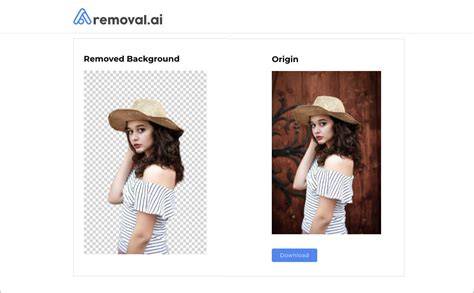
Removal.AI is an online background remover that uses AI to automatically detect and remove image backgrounds. It typically processes images within a few seconds, depending on file size and complexity. The AI automatically removes the background within seconds, generating a transparent cutout preview.
Slazzer is an online AI background removal service that uses machine learning models to produce professional-quality cutouts quickly for many images; results and speed vary by image complexity and plan. Slazzer automatically detects the subject and commonly produces smooth cutouts; very complex images may need manual refinement. Processing typically completes in a few seconds for standard files. Users can drag and drop the image into the editor and wait as the background is removed automatically.
Clipping Magic is a powerful AI background remover that stands out for its fine-tuned control and interactive refinement tools. Users can refine the edge with feathering, smoothing, hair handling and erase/restore brushes. It offers bulk processing through paid plans or API access, useful for businesses handling many images. A typical workflow includes uploading an image and previewing the automatic cutout side-by-side with the original.
Picsart provides a dynamic creative suite that integrates advanced AI technology to facilitate photo, video, and design editing. It allows easy background changes with Picsart’s background changer and includes templates for ads, logos, and social posts, along with a collage maker and AI-powered picture enhancer. The workflow often starts with selecting Create > Image Tools > changer background option.
ClipDrop uses AI to remove backgrounds quickly and often produces professional results; it handles hair better than many tools but may still need manual refining for very fine or tricky edges. Users can upload a picture to obtain a transparent PNG and also use built-in tools to change the background to a different color or image.
Canva offers a built-in background remover tool as part of its design platform (Pro plan). The removal is solid for standard subjects but less precise on fine details than dedicated tools. The real advantage is workflow: remove the background and immediately drop the cutout into social templates, ad banners, or marketing assets without leaving the app.
Fotor provides an AI-powered background remover that is simple to use. The tool is available online, on desktop, and on mobile, with premium features behind a paid plan. It can produce high-quality cutouts with smooth edges for many product, portrait, and graphics uses; very fine details may still require refinement.
FocoClipping is an online AI-powered tool that removes image backgrounds with just a click. It supports high-resolution output up to 3000x3000 pixels on paid plans, while free users may face limits. It offers a user-friendly interface with one-click removal for portraits, products, and graphics and also provides manual tools for complex images.
How AI background removal works
AI background removal typically follows clear steps: analyzing the image, identifying the subject, and separating it from the background. Deep learning and computer vision are used by a background remover to look at a picture and separate the main subject from the background. The AI segments the subject creates a digital mask to separate it and then removes or replaces the background often making it transparent. This process is based on image segmentation where AI divides an image into segments to distinguish the foreground subject from the background. Deep learning a type of machine learning that uses neural networks to look at and understand visual data is the main technology behind AI background removal. Tools like Pixelbin.io and Erase.bg reduce the time spent on background editing compared to manual methods often cutting editing time from various minutes to just a few seconds per image.
The users first upload an image to the AI background removal tool. The tool’s algorithms analyze the image, identifying the edges and boundaries of the subject within it. The AI tool uses the information to create a mask or selection of the subject, which requires a digital outline of the subject's edges. With the subject selected, the AI tool can then remove the background, replacing it with the transparent or solid colored layers, depending on the user’s preferences. The users can refine the cutout, making any necessary changes to the edges or boundaries of the subject.
Benefits and considerations
Benefits of background remover include AI-powered accuracy and batch processing, which are essential for ecommerce catalogs and professional workflows. There are free versions with limitations, but paid plans unlock full-resolution outputs, batch processing, and commercial rights. The edge quality matters most for difficult subjects: hair, fur, transparent materials, and wispy fabrics require careful handling to avoid halos or jagged edges. For many users, starting with a free tool provides a low-risk path to test a workflow, then upgrading as volume, quality, or post-editing needs grow. The right tool is the one that matches post-removal needs, whether you want transparent PNGs, AI-generated backgrounds, or a full editing workflow in one platform.
In addition to background removal, many tools offer upscaling, background replacement, and creative editing within the same ecosystem. This enables photographers and designers to move quickly from cutout to composed scenes, catalogs, and marketing materials without exporting to separate applications. The choice often comes down to volume, required output formats, and whether you need an integrated editing pipeline.
For example, some solutions emphasize batch scalability and API access for automation, while others focus on mobile-first product photography with built-in templates. The ecosystem around background removal is rich and continually evolving, with new AI features such as AI-generated backgrounds and inpainting options extending what you can accomplish in a single tool.
Best options by use case
- Fast, transparent PNGs for product listings: Remove.bg or Erase.bg.
- Mobile-focused product photography with templates: Photoroom or Pixelcut.
- Integrated editing workflow in design apps: Canva Pro or Adobe Express.
- Batch processing and API automation for large catalogs: Slazzer or Cutout.pro.
- Full editing workspace after removal (replace, inpaint, upscale): igly.ai or Pixelcut.
Start with a free tool if you’re just getting started, then upgrade when your catalog or content needs exceed free tool capabilities. If you want background removal plus lifestyle shots, model photos, and product videos from one platform, explore Blend or Pixelcut as part of a broader visual workflow.
Practical tips for best results
- Provide well-lit, high-contrast source images to improve edge accuracy.
- Test multiple tools on tricky subjects (hair, fur, glass) to compare results.
- Leverage batch processing when dealing with large catalogs to save time.
- Consider post-processing refinements for complex edges using manual editors where needed.
Infographic idea: Comparison of top tools by edge quality, speed, and batch support.
Video idea: Quick tutorial on using AI background remover for e-commerce product photos.
Adobe Photoshop 2025 tips and tricks Remove Background
| Tool | Best For | Free Tier | Key Strength | Typical Delivery |
|---|---|---|---|---|
| Pixelbin.io | Teams, automation | Limited | Accurate subject detection, API access | PNG/JPG/HEIC |
| Erase.bg | Single/bulk removals | Yes with limits | Fast, easy UI | PNG/JPG/WEBP |
| Remove.bg | General removal, API | Limited | Speed, hair detail | HD options via credits |
| Photoroom | Mobile-first ecommerce | Yes with watermark | Templates, staging | PNG/WebP |
In summary, background removal is a foundational step in modern image workflows. The best tool for you depends on your post-removal needs: transparent cutouts, AI-generated backgrounds, or a full editing workflow. Start with a free option to validate your process, and scale up to paid plans as your catalog grows or your output quality demands increase. For a balanced choice with broad capabilities, igly.ai provides a compelling combination of fast removal, replacement options, and an integrated editing workspace.
tags: #best #upscaler #and #background #remover