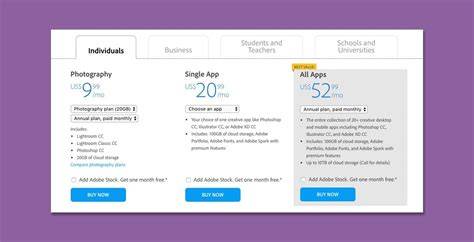
Knowing how to buy Adobe Photoshop can be a little confusing. There’s no simple one-time purchase option. So you have to choose a subscription. But figuring out which one is best for you might take a bit of time. Students and teachers can get some good discounts. There are plans for business or educational establishments. If you’re buying for yourself, then your main decisions are what apps to buy. There’s a cost saving for an annual purchase. And you can commit to a year and spread that cost over 12 monthly payments. But be aware that there is a substantial early termination fee if you cancel before the year is up. If you’re not sure that you’ll get value for money, you can always start with a free trial. Then pay monthly while you assess your usage.
Adobe Photoshop is the most well-known photo manipulation app in the world. It has even become a verb, applied liberally and sometimes inaccurately, everywhere you look. For Photoshop on its own, you can choose an annual or monthly subscription. Many photographers like Adobe Lightroom as much as Photoshop, if not more. Adobe has you covered with the Creative Cloud Photography plan. Both options include Lightroom Classic for mobile and on the web. Photoshop comes as an app for desktop and iPad. If you are a teacher or student, then you’re actually better off getting the educational price for Adobe Creative Cloud All Apps. It’s the same price as the Photography plan but includes all 21 Creative Cloud apps.
Like any of its apps designed for creatives, Photoshop lives in Adobe’s Creative Cloud. This is a suite of programs that cover everything from Adobe Illustrator to Adobe Audition. There are 21 apps in the cloud, and the easiest way of accessing them all is to pay for the All Apps subscription. It’s cheaper than paying for three individual subscriptions. First of all, there’s Photoshop itself, of course. And the product is improving all the time. Among the features included in all subscriptions are new AI capabilities. The AI features, currently in Beta form, allow you to create backgrounds and images with text prompts. Background removal can be as simple as one click on the image. As well as the headline Photoshop app, your subscription comes with some other benefits. First of all, there’s Adobe Fresco, an iPad editor for raster and vector graphics. Then there’s Photoshop Express for Mobile.
One area where Photoshop leads the way is the vast number of presets and training courses available. Adobe provides access to their own tutorials. You probably want to ask yourself if it’s worth it. There’s no doubt that the costs are quite substantial. But it’s also clear that Photoshop is popular for a reason. If you’re still not sure, then you might want to check out what you can do with Photoshop before you download the free trial. I understand from a very reliable source that CS6 and Lightroom 4 will be the last Photoshop software that will be available to actually purchase and own. In other words...You will not be able to purchase the software either on a disc or download that is yours to use indefinitely once you purchase the product. It will only be available via the cloud and everyone will be required to pay monthly license fee to use the product. This will allow all upgrades as long as you pay the fee...but if you cease to pay the fee, the software will be deactivated. If this is the case...and I believe it is...THIS SUCKS! I have been Adobe user since I purchase the CS2 Creative Suite and used Lightroom since it's inception. I have not purchase every upgrade, but have done so when I felt the changes warranted an upgrade. If Adobe insists on this business model, I will probably use one of the other photo editing product available on the market. There are several that will do most everything Adobe's software provides. I do not want to change...but Adobe's changes will force me to do so.
- Choose your plan: All Apps vs Photography vs Single App, with considerations for student/teacher discounts and business/educational plans.
- Decide between annual vs monthly payments, noting the annual savings and potential early termination fees.
- Consider free trials to gauge value before committing to a monthly subscription.
- Explore AI features and additional benefits such as Fresco and Photoshop Express included with subscriptions.
- Weigh the inevitability of cloud reliance and ongoing updates against the desire to own software outright.
The guidance above reflects a mix of mainstream options and user experiences. While Photoshop remains a leading tool for photo manipulation, the subscription model and the breadth of Creative Cloud apps offer flexibility for different needs-from hobbyists to professional studios. The decision often hinges on whether access to the full Creative Cloud suite and ongoing updates outweighs the cost and the shift away from ownership.