Christmas portraits sneak up on us every single year. Spoiler alert: I drop the ball at scheduling a “pro” photoshoot basically every Christmas. And I never get holiday cards sent out in time. I don’t mention it often, but for several years in college, I was a family studio portrait photographer. It was hard. Usually, the perfect portrait backdrop is already set up right in your living room anyway so why not go for it!
Kids especially can feel more comfortable in their own home, especially those with special needs who need a little extra comfort. Every year, I use our tree as an opportunity to get a pretty shot of our girls, but the best part is I can sneak it in when they’re in a good mood or not sick with a cold. We can work a DIY photoshoot into our super busy schedule. For this year’s, Robert and I wrangled the kids into their Christmas jammies right after church on Sunday to get the job done in 5 minutes using my iPhone. You can make your kids’ photos as laid back and candid as you’d like.
(See that cookie in little Regan’s hand in the photo below? Bribery doesn’t hurt, ya know?)
Tip: When photographing people, avoid harsh sunlight streaming directly through windows (at sunrise or sunset). You want natural light to be soft not glaring. Check out this super professional diagram I made so you see what I mean.
Plan to include Christmas photo props to help kids engage. Add a pretty wrapped gift box or some ornaments that they can interact with to get candid shots. If your kids aren’t in the mood to sit and smile at the camera, a prop can be a good distraction to get some sweet expressions. Keep poses natural and let your subject lead the way.
People look their best in photos when they feel comfortable. Try sitting in front of the tree, standing in front of the tree, interacting with ornaments on the tree or presents underneath; throw in dancing and silly faces and have fun with it. Shooting kids overhead to get a birds-eye view is an easy Christmas photo idea for young family members, especially babies who can’t sit up yet. Always try to shoot at eye level with your subject. For adults, photograph them from just slightly above eye level to decrease the look of double chins.
If you’re using a mobile phone, clean off your phone’s camera lens before you start and avoid touching the lens until your photo session is finished. Turn on your Live Photo option in your camera settings so you can get an added bonus of sweet moments on 3 second video. Shoot directly from your camera, not any apps that can decrease the quality. You can adjust the exposure if your phone is auto-brightening the picture too much. Use a mobile phone tripod, if possible. Or if anything, prop up your phone on something in the room, and set a timer, if possible, to avoid camera shake. If you have a smart watch, just click your phone’s camera button from your watch.
Set your aperture (f/) to the lowest setting your lens will allow for that dreamy, blurry effect. Next, set your shutter speed to 1/200 or higher. Now that you have those two settings, you can adjust your ISO depending on how much light you need. If you only have a cell phone, you can get the Adobe Lightroom App to use these settings on an iPhone or an Android too. Because you’re shooting at a wide (low number) aperture, it will cause a blurry effect in your background and Christmas lights will have that dreamy, soft look. I use Adobe Lightroom for editing my photos from my DSLR on my Macbook, but if you’re using a cell phone, you can use the Adobe Lightroom mobile app again for adjusting.
To create a more evenly lit photo, plan your edit workflow and experiment with a few apps. I hope that helps! And I hope it allows you to capture precious moments with family and loved ones this season. Think you’ll try your own Christmas photoshoot this holiday season? Even if you don’t do Christmas card photos, having some sweet holiday portraits each year to treasure forever is so worth it.
Disclaimer: This blog is for general informational and inspirational purposes only, based on publicly available information and personal insights. Images-whether of models, screenshots, or products-are for illustrative purposes only and do not depict actual subjects, scenarios, or views described. We do not intend to offend or conflict with any societal, cultural, religious, or political values.
The holiday season is filled with joy and cherished memories. One fantastic way to capture those special moments is through Christmas photography. “Christmas isn’t just a day; it’s a frame of mind.”- Kris Kringle. Whether you want to capture the joy of opening presents, the warmth of family gatherings, or the sparkle of the Christmas lights, you need some skills and techniques to make your photos stand out. In this guide, we will outline how to take and edit Christmas photos, providing insights and tips to help you create stunning and magical images that will be treasured for years to come. Whether you’re a beginner or an experienced photographer, this guide will equip you with the knowledge and techniques to capture the beauty and spirit of the holiday season.
Plan Your Christmas Photoshoot and Editing
Before you start taking photos, you need to do some planning and preparation. Planning is an essential step for capturing and editing Christmas photos. It helps you save time, avoid stress, and reach your desired goals. Here are the things to consider when planning your Christmas photoshoot:
- Start with a Concept: Decide on a concept for your Christmas photos. Think about the mood you want to convey, the story you want to tell, and the overall message you want to communicate.
- Pick Date and Time: Schedule your photoshoot well in advance and choose a date and time that works for everyone. Try to capture the golden hour when the light is warm and soft.
- Plan Location: Choose a location that suits your theme and style-your living room with a decorated tree, an outdoor snowy setting, or a cozy fireplace with festive decorations. Ensure the location is safe, accessible, and has enough space for your equipment and props.
- Plan Setup: Prepare props, backdrops, and elements that enhance the festive atmosphere. Consider lighting conditions and arrange decorations to ensure optimal lighting.
- Coordinate Outfits: Plan outfits in a color scheme that complements the holiday theme to create a cohesive look.
- Plan Capturing Candid: Include candid moments to reflect genuine joy and emotions of the season.
- Pay Attention to Composition: Learn the rules of thirds, leading lines, and symmetry. Try different angles and perspectives to add depth.
Helpful note: If you plan to capture from different angles, this can add variety and storytelling to your Christmas photos.
How to Take Christmas Photos
Now that you have planned your photoshoot, you are ready to take some amazing Christmas photos. Here are guidelines on how to take Christmas photos that will wow everyone:
- A) Camera Settings:
- White balance: Set to match the color temperature of your light source.
- Exposure: Adjust exposure to control brightness and darkness.
- Shutter speed: Use a fast shutter speed to freeze motion or a slower one for motion blur; use a tripod or remote trigger to avoid camera shake.
- Aperture: A large aperture creates a shallow depth of field for dreamy backgrounds; a smaller aperture creates more depth of field.
- ISO: Use low ISO to reduce noise in low-light situations.
- B) Lighting: Use natural light when possible (window light or outdoor light) and bounce light with reflectors. Use artificial light when needed (flash, continuous light, fairy lights, candles). Consider light direction (front, back, rim, side, or top).
- C) Composition Techniques: Rule of thirds, leading lines, framing, and experimenting with angles.
- D) Poses and Expressions: Use props to add interest; capture candid moments; group poses with warmth and affection; practice expressions beforehand if needed.
To capture a range of moods, you can shoot various scenes: self-portraits beside a table of treats, cozy indoor scenes by the fireplace, or tree-based interactions with ornaments. For groups, embrace, hug, or kiss to express family closeness and joy.
How to Edit Christmas Photos
You can make your pictures look better by editing them with the right tools. Here are guidelines on how to edit Christmas photos and make them more festive and magical:
- Know Editing Software and Techniques: Use professional software like Adobe Photoshop or Lightroom, or user-friendly options like Fotor, Pixelied, or Picsart. Basic edits include crop, rotate, resize, adjust, and filters to set mood.
- Enhancing the Festive Mood: Use advanced editing techniques such as bokeh overlays, snowfall effects, color adjustments, and focal glow to emphasize holiday magic. Adjust opacity to keep subjects in focus.
- Outsource if Needed: If you want a flawless finish, consider professional editors like Cut Out Image for affordable enhancements.
- Capturing and editing on mobile: Lightroom Mobile offers tools to adjust lighting, remove distractions, and fine-tune colors on the go. Generative Remove and Cloning help clean up clutter or photobombs. Holiday-inspired presets help create a cohesive holiday vibe.
Examples of editing approaches include applying one-click Lightroom presets for quick improvement, and using color grading to shift emotional tone. You can also layer elements, add a focal glow, and apply textures to enrich the image without overwhelming the subject.
Remember, the goal is to preserve the natural feel while enhancing festive mood. A polished but not overworked look often feels most authentic for Christmas memories.
Lightroom for mobile can refine your festive moments without needing to retake shots. If you’re posting on social media, consider a coordinated set of edits using matching colors and fonts to create a visually cohesive feed. The idea is to tell a mini-story: start with a cozy indoor edit, move to a snowy outdoor transformation, and finish with a holiday card design.
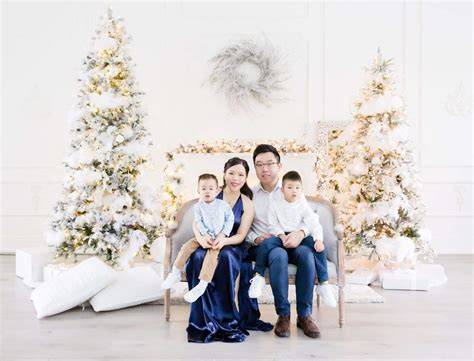
How to Plan Coordinating Outfits for FAMILY PICTURES | Easy Outfits for Family Photos
Whether you shoot with a phone or a DSLR, the right editing workflow can transform imperfect captures into treasured memories. The key is to plan, shoot with comfort and natural expressions, and edit to enhance warmth and holiday spirit.
<поделить таблицу>| Aspect | Tip |
|---|---|
| Lighting | Soft natural light; avoid harsh direct sun; use reflectors |
| Subjects | Keep poses natural; eye level for kids; slight above for adults |
| Camera Settings | Aperture low; shutter 1/200 or higher; adjust ISO as needed |
| Editing | Crop, color grade, bokeh, snowfall, focal glow |