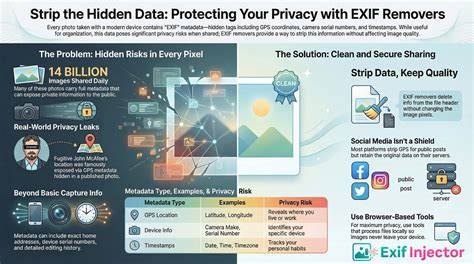
Removing EXIF metadata from images is a practical step to protect privacy when sharing photos online. EXIF data contains metadata like camera settings, GPS location, timestamps, and device information, and removing it helps prevent unwanted disclosure of personal details.
What EXIF data includes and why you should remove it
EXIF data contains metadata such as camera model, date and time taken, GPS coordinates, and author information. This metadata can reveal where you live, work, and travel. Privacy Alert: A single photo can contain your exact GPS coordinates, accurate to within a few meters. EXIF (Exchangeable Image File Format) is a standard for storing metadata in image files. Removing EXIF data protects your privacy when sharing images online and ensures that sensitive information does not travel with the image.
Essential data like image orientation and color profiles are preserved, so image quality and viewing experience remain intact after removal. Pro Tip: Even if you crop or edit a photo, the original thumbnail in EXIF data may still show the uncropped version. Our tools are designed to remove the sensitive metadata while keeping the image visually unchanged.
What gets removed and what stays
The tool removes camera information, GPS coordinates, timestamps, device models, software details, and other embedded metadata from your images. It can also handle multiple images at once, without file size or quantity restrictions. This ensures that sensitive data does not accompany the image when you share it across platforms.
In addition to photos, the principles apply to other media; you can remove metadata from audio, video, PDFs, and documents as needed. The process is designed to be fast, secure, and private, with processing happening locally in your browser for images, so there is no upload to servers.
How to remove EXIF data from images
- Select your image or drop it into the upload area.
- The tool automatically enables EXIF data removal.
- Choose your output format if needed.
- Click "Process and Download" to get your image without metadata.
The interface supports a wide range of image formats including JPG/JPEG, PNG, TIFF, RAW, HEIC/HEIF, WebP, and more, and can output to several formats as well. It also supports processing multiple images simultaneously for convenience.
Viewing EXIF data before removal
You can view the EXIF metadata of your images using an EXIF Data Viewer tool to see what information will be removed from your images. This helps you make an informed decision about which metadata to strip.
Safety, privacy, and local processing
Are my images safe and private? Absolutely! All image processing happens locally in your browser. Your images are never uploaded to our servers or shared with third parties. This privacy-first approach ensures that metadata is removed without exposing your files to external risks.
Using the EXIF Editor for selective removal
Can I remove only specific EXIF tags instead of everything? Yes - an EXIF Editor can target specific data fields such as GPS coordinates or timestamps while preserving other metadata that you might want. This level of control is useful for photographers who wish to retain certain technical details for compatibility or archival purposes.
Formats and versatility
The tool supports input formats including AVIF, APNG, BMP, GIF, HEIC/HEIF, ICO, JPE, JPEG XL (JXL), JPG, and many RAW formats (CR2, CR3, NEF, ARW, DNG, ORF, RAF, etc.), as well as output options like AVIF, BMP, GIF, JPEG XL (JXL), JPG, PNG, SVG, TIFF, and WebP. It also extends to video and document formats when needed, enabling broad privacy protection across media types.
Table: When to remove vs. selectively keep metadata
| Scenario | Metadata Removed | Notes |
|---|---|---|
| Sharing personal photos online | GPS, timestamps, camera settings, device info | Preserve orientation and color profiles |
| Professional photography portfolio | GPS coordinates, timestamps | Keep camera settings if needed for technical insight |
| Public documents or PDFs | Author, date created, and embedded metadata | Removes sensitive information |
| Metadata-heavy media | All embedded metadata | Ensures privacy across media types |
FAQ
- What is EXIF data and why should I remove it? EXIF data contains metadata like camera settings, GPS location, timestamps, and device information. Removing it protects your privacy when sharing images online.
- Will removing EXIF data affect image quality? No, removing EXIF data only strips the metadata and doesn't affect the actual image pixels or visual quality.
- Are my images safe and private? All processing happens locally in your browser; images are not uploaded to servers or shared with third parties.
- Can I process multiple images at once? Yes, you can upload and process multiple images simultaneously without size or quantity restrictions.
- Can I view EXIF data before removal? Yes, use the EXIF Data Viewer to see what will be removed.
Дополнительные возможности и частые вопросы на сайте
There are tools to remove metadata for various file types beyond images, including audio, video, PDF, and other documents. You can also erase metadata from remote files via URL uploads. The service emphasizes speed, security, and a completely free, unlimited approach to metadata removal.