If you’re reading this, chances are your artwork is RGB (red, green, blue). That’s okay if it’ll always be displayed on a screen. But if you want to print your design with the highest quality and sharpest images, you have to convert it first to CMYK (cyan, magenta, yellow, key/black). The reason for this is colors on a screen differ from those on printed materials. Screen colors are lit up, while printed colors rely on ink, making some colors appear slightly different. Proper proofing can ensure quality printed results.
RGB vs CMYK: how they create color
The difference lies in how the two models create colors. RGB is an additive color model, primarily used in electronic displays such as computer monitors, television screens, digital cameras, and smart phones. CMYK is a subtractive color model. Unlike RGB, CMYK colors create a spectrum by absorbing light rather than emitting it. It absorbs light, becoming darker with more ink, leading to black.
Two primary color models used in the digital and printing world are RGB and CMYK. RGB is used for digital displays, offering vibrant colors by combining red, green, and blue light. In contrast, CMYK is utilized for printing, using cyan, magenta, yellow, and black ink to produce accurate colors on paper. For digital projects, stick with RGB, and for printing, convert your files to CMYK to avoid color discrepancies.
RGB color space proves to be an excellent choice for web design and digital graphics. Its ability to utilize the additive nature of light, combining Red, Green, and Blue, results in a vast spectrum of vibrant colors that look captivating on screens. Designers can leverage this versatility to create eye-catching visuals, dynamic banners, and striking social media graphics. While RGB is perfect for digital design, it poses challenges when translated directly to print media. The fundamental differences between the additive RGB and subtractive CMYK color spaces can lead to unexpected color shifts and disappointing results in printed materials.
Why CMYK matters for printing
CMYK is the standard color model for printing and reproduction processes, including brochures, posters, and other printed materials. Printing industry machines are built to recognize CMYK. If you don’t switch, that’s okay. Our prepress team will do it for you as it is literally impossible to print in RGB. When you print an RGB image, the printer will automatically convert it to CMYK using its in-built conversion process, which may not preserve the colors as you intended. This critical stage in the printing process determines how accurately your colors will appear on the finished product.
Converting to CMYK yourself, you can manage and adjust the colors to get as close as possible to the desired effect before printing. In print speak, certain bright shades seen on a digital screen simply can't be reproduced with standard printing inks. They are "out of the color gamut". By converting to CMYK, you gain control over how the final print will look, reducing surprises at the press check.
Color gamut, proofing, and color management
RGB devices can display a broader gamut than CMYK-capable printers. Neon colors and some vivid blues and greens may not exist in the CMYK spectrum, leading to color shifts after conversion. Soft proofing uses color profiles, often ICC profiles, to simulate how colors will look when converted for print. A hard proof is a physical test print. Calibrating displays and printers is crucial to maintaining color consistency in your workflow. Color management systems map colors between devices to improve predictability.
When planning for print, Pantone or spot colors can supplement CMYK limitations. Pantone provides a vast array of fixed colors that can reproduce hues beyond standard CMYK. Pantone recently changed how their matching system works within Adobe Illustrator, which can complicate workflows, but many designers still rely on Pantone for precise color matching.
Practical guidance for designers
For digital projects, RGB is the go-to choice due to its wider gamut and luminous quality. For printing, convert your files to CMYK to avoid surprises. As a rule of thumb: design in RGB for screen assets, then convert and proof for print to ensure color fidelity. When preparing artwork for print, you should convert RGB to CMYK before printing to see for yourself some of the subtle color shifts. What’s crucial with making the switch from RGB to CMYK is preserving color accuracy and getting consistent, repeatable results.
Be mindful that certain colors cannot be reproduced in CMYK. If you’re working with branding, consider Pantone spot colors to preserve brand integrity in print. In logos intended for multiple media, it’s common to design in RGB first and then convert to CMYK for printed applications, ensuring a consistent identity across digital and print.
Color conversion: from RGB to CMYK
To convert RGB to CMYK, professional software offers a dedicated workflow. In Photoshop, the color mode can be changed via Edit > Convert to Profile, selecting the Destination Space and ensuring Flatten Image to Preserve Appearance if needed. In Illustrator, select all objects and adjust color modes accordingly. InDesign, color mode is managed during export with appropriate presets. The printer will convert RGB colors into CMYK, but the result may differ from the on-screen appearance, so soft proofing is invaluable.
The RGB-to-CMYK conversion can involve subtle adjustments because some hues shift during conversion. It’s important to fine-tune these colors to preserve the vibrancy and accuracy of your original design. The more you work within a particular color mode, the better you’ll get at predicting how the design file will translate to an end product.
Printing considerations: inks, blacks, and halftoning
In CMYK, colors are measured in percentages. Rich black uses black plus percentages of cyan, magenta, and yellow to achieve deep, uniform black areas, while standard black relies on 100% K. Subtractive halftoning (screening) creates continuous tones by varying dot size and spacing, enabling a broad perceived range of colors with four inks. Some presses can combine process colors with spot colors for special effects.
CMYK is a subtractive color model: white is the substrate, and black results from the combination of inks. As more ink is laid down, less light reflects from the surface, producing darker tones. This is fundamentally different from RGB, where white is produced by light emission and black is the absence of light.
Workflow and practical tips
For brands that require consistent color across print and digital media, establish a color management workflow with ICC profiles, and calibrate displays and printers regularly. When to use CMYK: for designs you plan to print, including business cards, posters, stationery, flyers, brochures, product packaging, menus, and banners. For digital projects, RGB remains the appropriate choice to maximize on-screen vibrancy.
Canva and other design tools increasingly provide CMYK options for print-ready exports, while programs like Figma support CMYK workflows via plugins or alternate export paths. Transitioning from RGB to CMYK can involve subtle adjustments, but with careful proofing and color management, you can maintain consistent color across media.
Summary of key contrasts
- RGB: additive color model, light-based, ideal for screens, broad gamut, colors may not reproduce in print.
- CMYK: subtractive color model, ink-based, ideal for printing, more limited gamut, requires color management and proofing.
- Proofing: soft proofs (ICC-based on-screen simulations) and hard proofs (physical prints) help ensure color accuracy before mass printing.
- Color management: ICC profiles and calibration are essential to map colors correctly between devices.
Images and videos to support understanding
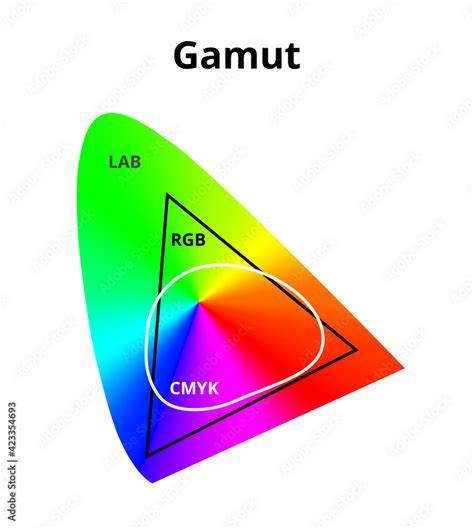
Diagram illustrating additive RGB and subtractive CMYK color spaces and the concept of color gamuts.
How to Convert RGB to CMYK in Photoshop (No Color Loss!)
Short video explaining the practical effects of converting RGB to CMYK for print projects.
Table: common color models features
| Aspect | RGB | CMYK |
|---|---|---|
| Color space | Additive, light-based | Subtractive, ink-based |
| Primary colors | Red, Green, Blue | |
| Typical use | Digital screens, web, TV | |
| Printing | Converted to CMYK for print | |
| Gamut | Broader on-screen, varies by device | |
| Proofing | Soft proofing uses ICC profiles | |
| Common issues | Neon/brighter colors may be out of gamut in CMYK |