Learn how to combine the power of the Magic Wand and the versatility of the Selection brush to select portions of your Painter image based on color. This 3-part tutorial series will introduce you to Painter’s Fluid Paint brush controls and show you how to customize other brushes to use Fluid Paint. This tutorial introduces you to Painter’s Oil brush categories and explores the various qualities, properties, and settings for many of the brushes.
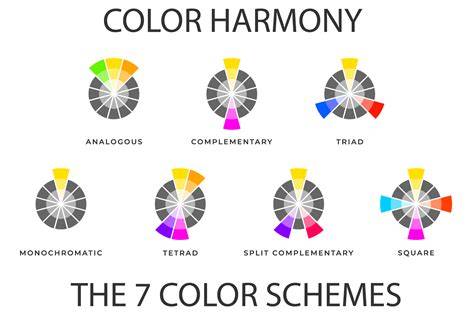
In this recorded webinar, Painter Master Elite Aaron Rutten shares his tips and tricks for how to use his favorite Painter features and more. See how easy it is to create the ideal color palette with Painter’s color selections tools: the Color Wheel, Mixer Palette and color sets and harmonies. Learn how to use the Wacom desktop center and Painter’s brush tracking utility to optimize the pressure sensitivity of your stylus for your personal touch.
This tutorial will teach you about the new Sumi-e Watercolor brushes introduced in Painter 2022 with a quick sumi-e painting demonstration. Take advantage of the new ability to mix dry media with watercolor to create stunning paintings that are not possible in the traditional world or in previous versions of Painter. In this tutorial, we’ll review the many performance enhancements in Painter that are designed to give you the best possible painting experience.
Quickly choose most used brush sizes from Painter’s new library! Easily add, reorder, delete and change size preview to accommodate your workflow. Enjoy new and enhanced brushes in Painter’s streamlined library. Easily find, filter and favorite beloved brushes from within the Brush Selector. Learn how to filter Painter’s Watercolor Compatible brushes from the Brush library and paint with dry media types on Watercolor layers to achieve mixed-media looks.
In this tutorial, you will learn how to increase the level of complexity in your sketches and bring them to life with details, lighting, edges and more. Painter Master Elite Don Seegmiller shows you a fun way to create intricate metallic jewelry, using the Liquid Metal and Bevel World dynamic plugins. Watch and learn as Painter Master Skip Allen takes one of his existing ink wash paintings and uses Clone Tinting to add exciting color to the landscape. In this tutorial, Painter Master Elite Karen Bonaker will show you how to use AI styles to quickly build a lovely base for your paintings.
When using a drawing tablet and stylus, you can use brush tracking to adjust Painter to make the brushes more responsive to your touch. Learn how to set up the perfect canvas by choosing the layer type, color profile, and other options in the enhanced New Image dialog in Painter 2021. See how to paint on any layer type right from the New Image dialog plus take advantage of many other user-requested layer improvements in Painter 2021. This tutorial provides an overview of the new clone tinting feature in Painter 2021 and shows the basics of mixing colors with a clone source. This tutorial will introduce you to the AI styles in Painter. See how easy it is to transform your images into stylized paintings.
In this 1-hour recorded webinar, artist Davey Baker shares the techniques and tips he finds most useful for creating environment designs in Painter. Painter Master Harvey Bunda demonstrates his techniques for creating an epic character in this 1-hour webinar. In this webinar, Painter Master Melissa Gallo shows you how to create a landscape painting from a reference photo using just one brush. Painter Master Borislav Mitkov shares his process for creating game characters, from initial ideas to the final concept. Painter Master Brigid Ashwood share her Painter tips for creating fantasy illustrations, in this 1-hour webinar.
Painter Master Robert Stacy explains his concept and design process when creating robots, mechs, and drones. In this webinar, Painter Master Dominick Saponaro takes you through his painting process using a live demonstration, with tips on using color effectively. Learn how to take your sketch from value to full color with tips from Painter Master and instructor Cliff Cramp. Painter Master Lawrence Mann shares his tips and techniques as he walks you through the process of painting a mythical dragon head with flames. In this webinar, Painter Master Brian Pollett demonstrates his techniques for painting from a live model. Painter Master Aaron Rutten gives a step-by-step demonstration for creating a still life painting, from sketch to final painting.
Join Painter Master Michael Bast on a journey through his outstanding portfolio of work with plenty of helpful tips to jump start your art creations. See how Painter Master Justin Buus starts with a simple ink splash and goes on to create refined artwork from it. Artist Caroline Julia Moore demonstrates her techniques for creating stunning image enhancements and transforming photos into ethereal masterpieces with ParticleShop brushes. Painter Master Elite Skip Allen showcases his Painter 2019 custom layout, and how he uses watercolor and thick paint to create a mixed media landscape. In this webinar, Painter Master Elite Karen Sperling shares her secrets for getting started with photo painting, art theory, and how to paint backgrounds. In this beginner Painter webinar, artist Mohamed Taa’eb shows you how to use a photo reference as inspiration to create a pencil portrait illustration.
You’ll learn many valuable tips from Painter Master Elite Doug Sirois, as he demonstrates in detail his process for creating a fantasy illustration. In this webinar, Painter Master Elite Marilyn Sholin demonstrates her techniques for painting soft and gentle portraits and creating backgrounds. In this Painter webinar you’ll witness the real-life forensic art of reconstructing a face from a skull, demonstrated by top forensic artist Natalie Murry. In this webinar, artist Isis Sousa shares her secrets of the important fundamentals for painting realistic skin and hair - from color to texture. Learn how to achieve rich, natural media pastel effects, luminous color and textures by using painting techniques such as blending and scumbling.
Follow along with Painter Master Elite Karen Bonaker and learn how to paint a magical landscape painting in the style of Bob Ross using Corel Painter. In this webinar, Painter Master Elite Heather Michelle Chinn shares her everyday hacks for painting fur and creating animal art from photos. Elite Painter Master Collin Chan shares some of his fundamental techniques for painting celebrity portraits using Painter 2020 stock brushes. Painter Master Elite Don Seegmiller shares his time-saving tips using some lesser known features of Painter to create a Halloween-themed image. In this webinar, Painter Master Michelle Web guides you through the process of creating a promotional movie poster from concept to finished design. See how life imitates art!
In this webinar recording, Painter Master Brian Pollett shares his techniques for creating mimetic art using patterns and symbolism. Get time-saving tips for creating buildings and working with Painter’s FX brushes as artist Davey Baker demonstrates how to paint an evening cityscape. In this webinar, Painter Master Aaron Rutten presents a landscape painting demonstration using the new Thick Paint Compatible brushes in Painter 2021. In this recorded webinar, Painter Master Isis Sousa will walk you through the process of painting an Autumn-inspired fantasy character using Painter. Painter Master Elite Karen Bonaker demonstrates various techniques to add texture to your paintings in this 1-hour Winter Fantasy fine art session.
In this webinar on demand, illustrator Isabelle Staub demonstrates her favorite Painter features and preferred brushes for painting stylized portraits. In this recorded webinar, Painter Master Elite Collin Chan teaches fundamental painting techniques for creating fine art portraits from scratch. In this recorded webinar, Painter Master Davey Baker takes you step-by-step through the process of making creating magical fantasy art. In this recorded webinar, Painter Master Elite Aaron Rutten shares his tips and tricks for how to use his favorite Painter features and more. In this tutorial, Painter Master Elite Cher Pendarvis demonstrates a selection of paper textures in the Woven texture pack on a abstract painting. In this tutorial, Painter Master Elite Cher Pendarvis demonstrates how to use the Rough paper textures to subtly enhance elements in a landscape painting. In this tutorial, concept artist Davey Baker demonstrates how he uses a few paper textures from the Sci-fi texture pack to bring life to his characters.
By Don Seegmiller In the fifth tutorial in this Getting Started course for illustrators, Painter Master and professional illustrator Don Seegmiller will give you an introduction to Painter X3, and how to best use it to create your masterpieces! In this tutorial, you will learn how to: Open up the Make Paper tool. By Don Seegmiller In the fourth tutorial in this Getting Started course for illustrators, Painter Master and professional illustrator Don Seegmiller will give you an introduction to Painter X3, and how to best use it to create your masterpieces! Learn how to use the Paper Panel, how to apply paper textures to the canvas and layers, and how to adjust your brush strokes for the texture.
Forensic artist Natalie Murry shows you how to import mugshots or other photos into Painter and draw directly on top of them to hone your skills. In this tutorial, forensic artist Natalie Murry teaches you how to accurately portray a subject’s ancestry when creating a composite sketch. Learn how to use reference images of individual features from different mugshots and knit them together into a cohesive and believable face. This tutorial offers insight into how facial muscles work and change during the aging process, and how to portray this in your forensic art. This Painter webinar you’ll witness the real-life forensic art of reconstructing a face from a skull, demonstrated by top forensic artist Natalie Murry.
Get to know more about what makes Mike tick and how he is constantly trying to defeat the natural predator - the blank sheet! See how Mike uses Painter to turn his sculpt into an illustration by painting details to make the illustration look more realistic. The final step in Mike’s sculpting and painting workflow is to add extra details, such as wrinkles and seams in the clothing. Follow Cliff Cramp’s step-by-step tutorial and learn how to achieve professional fine art results when painting a digital seascape in Painter. The Wacom Art Pen allows for full barrel rotation on many Painter brushes, producing stunningly realistic brushstrokes with just a turn of the stylus.
In this tutorial, we’ll show you how to streamline your color selection process in Painter using color harmony options that can also be saved as color sets. Learn how to use the layer enhancements in Painter 2020 to access commands right from the panel and avoid accidentally painting on hidden layers. Check out the Fast brush categories with 26 refined brushes that were built to push the boundaries of Painter’s performance optimizations. Grab your previous brush with just a click or a shortcut from a custom palette, and paint with the eraser, dodge, burn and clone tools without any lag time. Painter 2020 makes color selection a breeze, with 6 new color harmonies and a new Temporal Color Wheel menu with left-handed mode and other options. Learn how to use Painter 2020’s revamped property bars, flyouts and palettes for brushes and tools to put the most important controls at your fingertips.
Painter Master Elite Don Seegmiller explores the new Pattern Pens and patterns in Painter 2019, that will spice up your canvas with graphic visionary strokes. Get to know some of the brush variants in the Natural Media brush library, and how Painter Master Elite Justin Buus uses them to keep a traditional mindset. This video showcases the power of the Screen Merge Mode using the Soft Screen and Clouds Screen Glazing brushes first introduced in Painter 2019. Painter Master Elite Cher Pendarvis introduces you to the Soft Round and Hard Round brushes, 2 of the Real Wet Oil brushes available in Painter 2019 and up. Get a tour of the Thick Paint brushes in Painter 2019 and some tips from Painter Master Elite Karen Bonaker as she uses them to create a painting.
Concept artist Magdalena Proszowska gives you an in-depth look at the tools and techniques she uses to create captivating characters. Painter Master Elite Skip Allen shares his tips for working with layers and brush settings to make thick paint run on canvas. In this tutorial, Painter Master Elite Cher Pendarvis shows you how to create a custom selection brush from sections of your artwork. When you enable random grain rotation, Painter will slightly rotate the grain in each stroke, creating a more natural and organic look to your work. See how easy it is to fill with a texture - just choose a selection brush, create a selection on your image and select a texture to fill it with.
Painters throughout history have explored color harmony and brush dynamics. Painter Master Aaron Rutton shows off 3 new blenders: Fractured Blender, Stencil Oily Blender and Speckle Diffuse Blender. Painter Master Don Seegmiller demonstrates the new Thick Texture brushes using cover and source blending. In this tutorial, Painter Master Justin Buus shows you how to use the new Texture Synthesis feature in Painter 2018. Watch this step-by-step demo from Painter Master David Harrington and learn his tips and tricks for creating content art. Painter Master Cher Pendarvis demonstrates how to use the enhanced dropper tool to sample more than just one pixel. Painter Master Cher Pendarvis shows you how the enhanced property bars put important brush controls right at your fingertips.
Watch as Painter Master Hector Lujan creates a fantastic new sketch to help show off the new Manga Workspace in speed painting style! Learn how to use the new Interactive Gradient tool in Painter 2017 to create 3-dimensional shading on an image. Painter Master Jason Maranto shows how to use the new glaze brushes to easily create comic style color and lighting effects. Let Painter Master Cher Pendarvis show you how to use the new Glazing brushes in Painter 2017 for fine art projects. Painter Master Cher Pendarvis shows us how to use Dab Stencils to add fine details plus light and texture effects. See how Painter’s physics-inspired Particle brushes can be used to produce unreal brushstrokes that spring, flow, glow and gravitate onto the canvas.
Learn how to work with the Particle Smoke brush to draw smoke, and ways to alter the effect using layers and softening. Artist Jason Maranto walks you through the Particle Flow Flare brush and explains how to tweak the settings to give it maximum impact. Artist Jason Maranto shows how to use the Particle Flow Sparkler Glow brush to create a beautiful starry sky and other uses...
Practical structure and workflow notes
Start by applying color to all shapes and forms, then use Multiply to deepen shadows and bring unity to the scene. Create separate layers for Figures, Backgrounds, and Shadows to manage color and lighting non-destructively. Duplicate layers and Collapse them when ready to work on the final Painting layer, then add highlights and light effects to enhance depth. Use softer brushes for facial areas and blend with subtle tools like Grainy Water Blender to integrate shading smoothly. Layer-based approaches and precise lighting play a crucial role in achieving believability in the scene.
To optimize your brush performance, explore Painter’s newer library features, such as quick access to commonly used brush sizes, color harmonies, and color sets. Utilize tablet features like brush tracking and the Wacom Art Pen rotation to achieve more natural strokes. Experiment with Sumi-e Watercolor brushes for a painterly, ink-wash look, and mix dry media with watercolor to expand your technique possibilities.
For beginners and seasoned artists alike, the tutorials cover essential workflow elements: setting up the canvas, choosing layer types, using the New Image dialog, leveraging AI styles, and applying textures and paper textures to enrich paintings. The series also showcases how to build and adapt a custom brush for Fluid Paint, how to create a custom selection brush from artwork sections, and how to achieve richer color dynamics through color selection tools and layered strategies.
As you progress, you’ll encounter expert demonstrations on specialized topics: building complex lighting and edges, painting environments and landscapes, and constructing character and creature designs. The inclusion of Bob Ross-inspired landscapes, fantasy scenes, and environmental studies demonstrates Painter’s flexibility across genres and styles. The tutorials collectively emphasize practical, repeatable techniques that you can apply to your own projects in Painter.
- Color selection tools: Color Wheel, Mixer Palette, color sets and harmonies
- Brush controls: Fluid Paint, Oil brushes, Sumi-e Watercolor
- Pressure sensitivity and tablet optimization: Wacom Desktop Center, brush tracking
- Selection tools: Magic Wand, Selection brush, color-based selections
- Layer strategies: new image dialog, layer types, cloning, blending
- AI styles and style transfer for base painting
- Texture and paper textures to enrich digital canvases
- Example projects: landscapes, portraits, fantasy scenes, cityscapes
Additional media to enhance understanding
Colour Harmony - 10 Minutes To Better Painting - Episode 5