The scalable vector graphic, or SVG, might be common, but it's far from the only vector file format available. There are many options to choose from for graphic design software, like CorelDRAW or Adobe, and vector file formats, like SVGs, CDR, and AI. Some vector file formats are proprietary, belonging to a specific software developer, like the CDR, which is CorelDRAW’s native file format. Even if you're not using CorelDRAW or Adobe, common proprietary formats are now widely supported across most graphic design programs.
In your design career, there's a good chance that you'll encounter different vector files. The biggest difference between vector file types is in how data is stored. All vectors involve some text-based storage with mathematical equations to display the graphics properties. These equations correlate to points on a cartesian plane or mathematical coordinate system. As values in the equations are changed, mathematical rules force all values to remain in exact proportion.
Despite this fundamental similarity, there are some key differences in storing data within different file types. For example, a PDF format stores many different types of objects, including vector graphics, in one document. The catch is that PDF files only store the raw binary code in a protected format, making it challenging to isolate images from a PDF file. CorelDRAW files are compressed and stored as a Zip file.
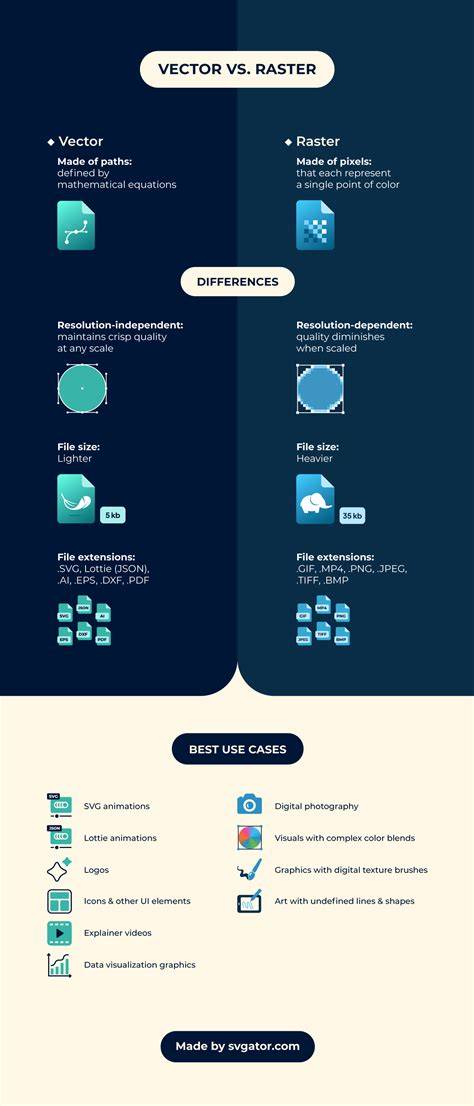
In contrast, raster files are stored as pixels rather than equations, and as these pixelated images are resized, they lose clarity. Various vector file formats are superior for providing crisp, clear images with the flexibility to resize and rescale the artwork as needed. Not all vector file formats are equal. Scalable vector graphics, or SVGs, are the most common vector format for web design.
This universal vector file type is officially the open standard across the world wide web. While the SVG format is perfect for displaying vectors on the web, printing isn't this format's strongest suit. You'd be better off converting to a PDF or EPS file when you're ready to print. This format is designed for screen displays. It’s supported by most browsers and easily displays on any screen size with the image clarity attributes of vector graphics.
Encapsulated PostScript files, or EPS, predate the SVG by more than 15 years. In 1982, Adobe created the EPS format to incorporate images into large format printing. The goal was to provide a lossless format that enabled text to be enlarged and resized without affecting the image quality. For designers creating posters and billboards that featured artistic typography, it was a solution to an image quality problem. EPS files are open source and used in many professional printing outputs.
It may be a legacy technology that is slowly being replaced, but you'll find plenty of outputs for this file type still in use today. EPS files are the best choice for sharing vector artwork like logos and icons with your clients, other designers, or a printer. CorelDRAW software programs use a proprietary file format - CDR. CDR files are specifically designed for compatibility inside the CorelDRAW suite of products. When working with CDR files, you'll find all the functionality of other formats is intact, providing you with a user-friendly and intuitive experience.
Like CDR files for CorelDRAW, the AI file type is specific to Adobe Illustrator. Adobe intended AI files to functionally replace the older EPS files from decades past. Another familiar file extension you've probably seen around is the portable document file or PDF. The PDF file type is another standard file format for everything from text documents to forms and graphics. While the PDF file format is compatible with vectors and rasters, it is more commonly associated with vectors. PDF files are a great option when you're ready to print your designs or you want to display a finished document on digital channels.
But, PDFs aren't the best choice if you plan to edit your designs later. There are several types of vector files, each with their own benefits and compatibilities. It will be your job as a vector designer to choose the right one for a given task based on client requirements or desired output. Sometimes your image assets will be vectors and sometimes they will be rasters. If you only have the latter, it’s important to know how to vectorize an image to get the quality that you need.
What is a vector? - David Huynh
Key formats at a glance
SVGs remain the dominant choice for web graphics due to their scalability and compatibility across browsers. EPS serves well for high-quality printing and sharing with printers and other designers. CDR is CorelDRAW’s native format, preserving full feature sets when working within CorelDRAW. AI files are the standard for Adobe Illustrator workflows and often serve as a bridge between design teams using different tools. PDFs offer versatile, print-friendly containment for both vector and raster content, though they can be less convenient for editing directly.
When choosing a format, consider the task: web display, printing, collaboration, or archiving. For responsive web graphics, SVG is often ideal; for professional printing, EPS or PDF might be preferable; for CorelDRAW-centric workflows, CDR ensures maximal compatibility with Corel tools; for Illustrator-centric pipelines, AI maintains fidelity with vector features. In some projects, vectors and rasters coexist, and vectorization of rasters becomes a practical technique to achieve the required quality.
| Format | Best Use | Pros | Cons |
|---|---|---|---|
| SVG | Web vectors | Scalability, browser support | Printing limitations |
| EPS | Large-format printing | Lossless scaling, open standard | Editing can be less convenient |
| CDR | CorelDRAW projects | Full Corel feature support | Proprietary |
| AI | Adobe Illustrator workflows | Industry-standard, flexible | Proprietary |
| Print-ready documents | Vectors + rasters, widely supported | Editing is limited |
This overview helps designers select the right vector format for a given project, balancing compatibility, editability, and output quality. Not every asset needs to be a vector at all times, and sometimes vectorization of raster images is a practical path to achieve the desired clarity and scalability.