Try Acrobat Pro with a 7-day free trial. Questions? The Adobe Acrobat Pro free trial gives you 7 days of full access to Acrobat Pro features that allow you to edit PDFs, send unlimited e-signatures, compress files, convert files, and access cloud storage. The free trial gives you the complete Acrobat Pro experience, without restrictions. To start your Adobe Acrobat free trial, click the 'Start free trial' button, sign in or create a free Adobe account, and choose your plan. Your access to Adobe Acrobat Pro will begin immediately, and you can download the desktop app or use it in your browser right away.
Adobe Acrobat offers plans for individuals, teams, and enterprises. The best plan for you depends on how often you work with PDFs and which features you need, such as the ability to edit, e-sign, share, or access AI-powered tools. Yes, you can cancel your Adobe Acrobat free trial at any time during the 7-day period without being charged. After the 7-day free trial ends, your Adobe Acrobat subscription automatically converts to a paid plan at the rate shown at sign up. During the Adobe Acrobat free trial, you can work with PDFs and convert to or from Word, Excel, PowerPoint, JPG, PNG, TIFF, and HTML files.
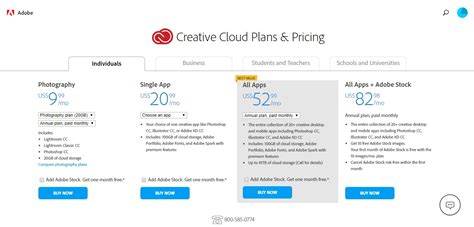
UPDATE - You can still get a 14-day free trial of Creative Cloud for teams, but Adobe now requires a form of payment to be entered to begin the trial… If you cancel anytime during the two-week free trial period, then you won’t be charged. But, you definitely don’t need to have a team, group, or company to use the Teams edition. Anybody can sign up for this, even just a single person. During the free 14-day tryout period, you’ll get full access to over 20 Creative Cloud desktop apps, including Photoshop, Illustrator, InDesign, Acrobat, Animate, Premiere Pro, After Effects, and more. Of course, if you wish to continue with Creative Cloud for Teams - or with a standard Creative Cloud for Individuals plan - then you can sign up at anytime during or after your free trial period. Pretty much everyone can get this Creative Cloud for Teams trial, regardless of whether you have a paid Individual subscription, or even if you are a non-subscriber with just the free level of membership. Another advantage of this offer is that Teams users can create their own custom Managed packages to download the 2024 standalone installers and/or previous versions - with updates included - for use wherever you want, on any computer. What’s New in Creative Cloud 2024? Free Adobe Stock! Don’t need full Cloud?
- 7-day free trial of Acrobat Pro for full access to editing, e-signatures, compression, and conversions.
- 14-day Creative Cloud for Teams trial with access to 20+ desktop apps and managed packages.
- Option to cancel anytime during trial periods without charges.
- Plans available for individuals, teams, and enterprises based on usage and feature needs.
How the Acrobat Pro Free Trial Works
The free trial provides the complete Acrobat Pro experience, with no restrictions during the trial period. You can sign in or create a free Adobe account, choose a plan, and start the trial immediately. Access can be via desktop application download or through a browser. During the trial, you can convert PDFs to and from Word, Excel, PowerPoint, JPG, PNG, TIFF, and HTML. You can also edit, compress, and share PDFs and use e-signatures freely. If you decide to cancel, you can do so anytime within the 7 days without charges. After the trial ends, the subscription automatically shifts to a paid plan at the rate shown during sign-up.
Creative Cloud for Teams vs. Individuals
Creative Cloud for Teams offers a 14-day free trial that includes access to over 20 desktop apps such as Photoshop, Illustrator, InDesign, Acrobat, Animate, Premiere Pro, and After Effects. You can sign up even as a single person, and you don’t need a team, group, or company to use the Teams edition. During the trial, you can also create custom Managed packages to download 2024 standalone installers and/or previous versions with updates included. If you prefer ongoing access after the trial, you can either continue with Creative Cloud for Teams or switch to an Individual plan later.
What’s New and Additional Options
What’s New in Creative Cloud 2024 includes features and enhancements across apps, plus the potential of Free Adobe Stock in some offers. The trials are designed to let you evaluate the full capabilities of the suite before committing to a paid plan. If you don’t need the full Cloud, there are lighter options and single-app subscriptions that can fit different workflows and budgets.
| Trial length | Access | Key features |
|---|---|---|
| 7 days | Acrobat Pro (desktop or browser) | PDF editing, e-signatures, compression, conversions |
| 14 days | Creative Cloud for Teams | 20+ desktop apps, custom Managed packages |
Start with the free trial to explore the full capabilities and determine the best plan for your needs, whether editing PDFs alone or leveraging a broader Creative Cloud toolkit for teams or enterprises. You can cancel during the trial, and later decide on a paid plan that matches your workflow demands and budget.