DaVinci Resolve is the world's only solution that combines professional 8K editing, color correction, visual effects and audio post production all in one software tool! DaVinci Resolve 19 is a major new update which adds new AI tools, over 100 feature upgrades such as IntelliTrack AI, Ultra NR noise reduction, ColorSlice six vector grading, film look creator FX, multi source editing, new multipoly rotoscoping tools, new Fairlight AI audio panning to video, ducker track FX and ambisonic surround sound plus new features in Blackmagic Cloud for large customers.
DaVinci Resolve 19 introduces powerful new DaVinci Neural Engine AI tools and over 100 feature upgrades. Editors can work directly with transcribed audio to find speakers and edit timeline clips. Colorists can produce rich film like tones with the ColorSlice six vector palette and produce cinematic images using the new film look creator effect which emulates photometric film processes. In Fairlight, the IntelliTrack AI can be used to track motion and automatically pan audio. VFX artists in Fusion have an expanded set of USD tools plus a new multipoly rotoscoping tool. The new Organizations app in Blackmagic Cloud enables larger companies define a single organization or company. Now customers can create groups or teams and quickly share projects to an entire group rather than one by one. Customers can also manage storage access, share Presentations, and create a single sign on. It also lets customers buy or rent DaVinci Resolve Studio licenses. This makes it easier for companies to assign and manage the allocation of licenses within large groups.
For editors, improvements to the transcription workflow make it possible to edit clips based on the transcribed text directly on the timeline. Yes, you can use DaVinci Resolve on a budget PC, but with limitations. The free version works well for basic editing if your system meets the minimum specs: a decent multi-core CPU, at least 16GB of RAM (32GB preferred), and a dedicated GPU with at least 2 - 4GB of VRAM. While the interface can seem overwhelming at first, Resolve is quite beginner-friendly once you understand the layout. DaVinci Resolve is widely praised for its color grading tools, built-in Fusion for motion graphics, and Fairlight for audio - all in one app. It's particularly strong for filmmakers and editors who want advanced features without needing multiple programs.
- DaVinci Resolve Studio vs Free: Resolve Studio includes the AI Neural Engine, additional Resolve FX, powerful noise reductions, text-based editing, and higher resolutions/frame rates.
- Platform and compatibility: Resolve runs on macOS, Windows, and Linux, with iPadOS version available and collaboration via Blackmagic Cloud.
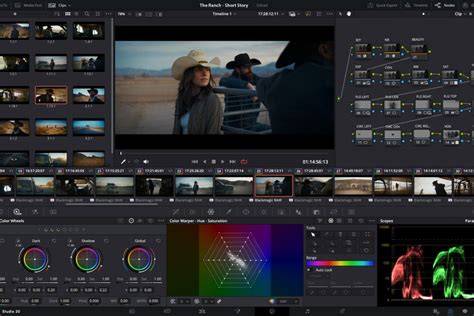
- Workflow and pages: Resolve is organized into pages (Cut, Edit, Fusion, Color, Fairlight, Media, Deliver) each tailored to a stage of post production.
- Hardware and control: Blackmagic offers a range of control surfaces and panels, designed to speed up color, editing and audio work.
DaVinci Resolve is widely known for its integrated suite: the Cut and Edit pages cover editing; Fusion provides advanced visual effects and motion graphics; Color is the industry-standard color grader; Fairlight handles audio post production; Media and Deliver manage import, organization and export. The software remains a favorite for editors seeking an all-in-one solution without switching between multiple programs.
Key Studio 19 Features and AI Enhancements
The DaVinci Neural Engine powers AI tools across the suite. IntelliTrack AI enables precise tracking for effects and stabilization in Color and Fairlight. ColorSlice six vector grading palette enables subtractive color processing to adjust density, saturation and hue with clear visualization. The Film Look Creator emulates photometric film properties such as halation, bloom, grain, flicker, gate weave and vignetting for cinematic results. The new multipoly rotoscoping tool in Fusion consolidates masks into a single list, speeding up rotoscoping tasks.
Fairlight gains AI audio panning to video, ducker track FX for auto level adjustments between music and dialogue, ambisonic surround sound support, and an AI-based dialogue separator FX to rebalance dialogue against background sounds. The IntelliTrack AI also appears in Fairlight to automatically pan the audio as it follows moving subjects in space. In addition, the new organizations features in Blackmagic Cloud simplify collaboration for large teams by defining groups, managing storage access, sharing project Presentations, and enabling single sign-on. The Studio edition adds even more tools and performance benefits, including AI-driven features and enhanced processing power.
Live Collaboration, Multi-Source Editing, and Cloud Enhancements
DaVinci Resolve 19 beta and related updates introduced multi-source editing and a new multi source viewer that lets users see all live cameras or clips with a common timecode in a single multiview screen. Editors can scrub, play and select shots to add to the timeline or switch live from any available angle. A Point of Interest (POI) marker helps capture significant events during live playback, with replay palettes and stinger transitions to signal changes between live and replay. The new Organizations app in Blackmagic Cloud enables larger companies define a single organization or company and quickly share projects with an entire group rather than one by one. It also supports license management and cloud-based collaboration for large teams.
For storage, Blackmagic Cloud improves access control and sharing across large teams, while new features in the cloud workflow simplify distributing projects and assets to multiple users. In addition, there is support for DaVinci Resolve Replay, live media sync into bins for editing while cameras are recording, and streamlined project sharing for teams.
System Requirements, Editions, and Open Platforms
DaVinci Resolve can be run on budget hardware, though performance varies by system. The free version supports basic editing on systems meeting minimum specs (multi-core CPU, 16GB RAM minimum, 32GB preferred, dedicated GPU with 2-4GB VRAM). The Studio edition unlocks higher resolutions, frame rates, and advanced tools. Resolve runs on macOS, Windows, and Linux, with iPadOS support introduced earlier and ongoing integration with hardware control surfaces for professional workflows.
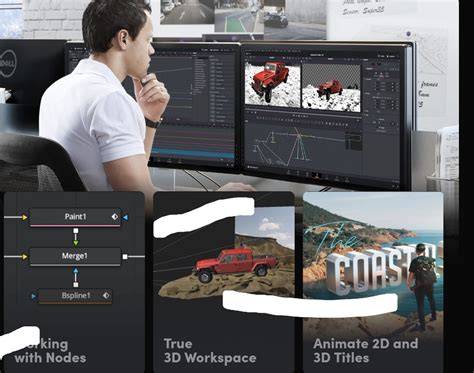
Resolve’s architecture centers on pages: Cut, Edit, Fusion, Color, Fairlight, Media, and Deliver. Each page provides specialized tools, from fast multicam editing and live playback to cinematic color grading, advanced VFX, and robust audio post-production. Fusion’s node-based workflow and USD tool expansion accelerate complex composites; Fairlight hosts a full-featured audio workstation with hundreds of pro tools and AI-assisted enhancements.
DaVinci Resolve is also praised for still-image workflows with the Photo page, bringing Hollywood-level color tools to photography. The software supports native RAW workflows from major camera brands, live capture tethering via Blackmagic Cloud, and a broad ecosystem of Open FX and third-party plugins for expanded capabilities. For those seeking a more tactile workflow, Blackmagic offers a range of control panels and devices, including the DaVinci Replay Editor and various color panels and keyboards designed to speed up the editing process.
Pricing, Availability, and Ecosystem
DaVinci Resolve Studio, which unlocks additional tools, textures, and higher performance, is available for purchase. Fusion Studio 19 updates accompany Resolve Studio, with extra tools for VFX and 3D workflows. Blackmagic Design also continues to offer free access to DaVinci Resolve, allowing new users to learn the same professional tools used in Hollywood production, with a paid upgrade option for advanced features.
Starting from NAB updates and Open Beta periods, Resolve 19 and its Studio version emphasize AI-driven workflows, more granular control of multi-user collaboration, and expanded toolsets in color, VFX, and audio. The ongoing development roadmap includes further enhancements to AI features, Dolby-level sound capabilities, and deeper cloud-based collaboration across enterprise teams.
8 Mind-Blowing DaVinci Resolve AI Tools
The free version remains a strong starting point for learners and hobbyists, while professionals can leverage Studio for higher-end capabilities. The software’s integrated approach continues to attract filmmakers and editors seeking an all-in-one post-production solution that can scale with project complexity and team size.