Fusion in DaVinci Resolve is a powerful feature designed for visual effects artists, broadcast and motion graphic designers, and 3D animators. It provides a node-based interface for compositing, creating motion graphics, and adding visual effects to video content. The node-based workflow makes it easier to quickly build sophisticated effects and correct or replace parts of a shot, without the constraints of traditional layers.
Fusion is built into DaVinci Resolve and offers a true 3D workspace for compositing and creating cinematic visual effects and advanced broadcast motion graphics. It is ideal for adding 3D models, objects, text or particles to footage, and it supports VR and 3D workflows, making it a comprehensive solution for high-end post-production.
How Fusion Works: Node-Based Thinking
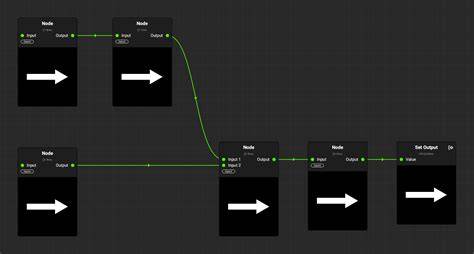
Fusion uses a flow chart called a node tree that visually maps out how effects are connected and work together. Nodes are like building blocks that represent effect tools, generators, transforms, masks and more, with no confusing stacks of nested layers. You build effects by stringing nodes together one after the other. The MediaIn node represents the clip from the edit timeline, and the MediaOut node represents the final output.
There are five simple operations in the Fusion workflow that form the basis for all work: merge images together, insert effects, use masks to isolate effects, adjust settings, and fine tune animations with the spline and keyframe editors. The merge node lets you layer images in 2D or in a true 3D workspace. You can add a tool by dragging it from the toolbar into the node tree and connect it between MediaIn and MediaOut.
In the Inspector, you adjust the selected tool’s properties and animate them over time using keyframes. The spline (curve) editor and keyframe editors provide detailed control over motion, speed, and easing. Masks, rotoscoping with bezier and B-spline shapes, and planar or 2D tracking enable precise integration of effects with live action.
Core Capabilities of Fusion
Fusion includes hundreds of 2D and 3D tools for visual effects and motion graphics. It supports 3D modeling and rendering, with the ability to import 3D models or entire scenes from applications like Maya and 3D Studio Max via FBX or Alembic. The 3D merge tool allows an unlimited number of objects, lights, and cameras in a scene, while advanced lighting tools let you place ambient, directional, and point lights with adjustable color, intensity, falloff, and shadows.
Tracking is a key strength: advanced 3D camera tracking, planar tracking, and rock-solid 2D tracking enable precise placement of graphics, screens, or signs onto moving surfaces. Delta Keyer removes green/blue screen backgrounds for clean keys, with pre-matte, matte, fringe, and tuning controls to refine results. Planar tracking is ideal for replacing screens or signs, and the 3D camera tracker recreates camera motion in 3D space for realistic composites.
Rotoscoping and masking tools allow detailed isolation and manipulation of subjects within a shot. The vector paint tool supports creative and corrective painting, including cloning out unwanted elements. Text can be created in 2D or 3D, with extensive controls for font, size, alignment, spacing, kerning, leading, and shading, including gradients, outlines, and glows. Text 3D adds extrusion and beveled edges with texture and reflection options.
Fusion excels at motion graphics: you can create lower thirds, animated titles, and infographic graphics that integrate seamlessly with the timeline. Templates and macros enable brand consistency and reusable work; a composition can be saved as a macro with exposed parameters for use on the Edit or Cut pages. You can also import multi-layer Photoshop files and composite them with live action.
Particles, physics, and simulations add realism and atmosphere. You can create particle systems with emitters and renderers and dozens of particle-specific nodes to simulate gravity, turbulence, friction, and more. Environmental atmospheric effects such as fog, mist, rain, and smoke benefit from GPU acceleration for immediate feedback and interaction with the scene.
Fusion’s 3D capabilities extend to surface properties, reflections, and lighting, with support for multiple lights and shadows. Volumetric effects operate in 3D space and can use deep pixel data to move realistically around 2D elements. Deep pixel compositing speeds up workflows by carrying XYZ metadata in 2D EXR renders, enabling efficient compositing without loading massive geometry every time.
Integration, Automation, and Workflow
Fusion connects tightly with the rest of DaVinci Resolve. You can move between Edit, Fusion, and Color with a single click, and you can design templates that can be reused on the Edit or Cut pages for efficient broadcast workflows. Scripting and automation are supported via Python and Lua, enabling live data-driven graphics and automated titled sequences (for example weather forecasts, sports scores, or headlines) using external data sources.
GPU acceleration (Metal, CUDA, OpenCL) ensures fast feedback and rendering. Resolve FX and FusionFX plugins expand capabilities, while network rendering lets you distribute render jobs across multiple machines without per-node licensing fees. Fusion Composer templates (macros) expose controls on the Edit page for brand consistency and rapid production.
Fusion Connect lets editors on DaVinci Resolve and Avid Media Composer send clips to Fusion from their timelines, creating a linked, automated workflow for VFX and motion graphics collaboration. In shared storage environments, teams can work on VFX in Fusion while others continue editing, with timeline review and approval workflows supported by Resolve’s color management and scripting APIs.
Practical Uses and Scenarios
Whether you’re enhancing a feature film, crafting broadcast graphics, or building a full set of cinematic visual effects, Fusion provides a comprehensive toolset. You can clone out unwanted objects, replace signs, or place characters into 3D scenes. Infographics and motion graphics can be animated with precise control, using the spline editor and keyframes to achieve organic motion. Rotoscoping and masking enable creating feature-film quality composites with careful edge refinement and feathering.
For 3D workflows, you can import external 3D assets, light them, and render within Fusion, or use projection tools to render scenes quickly without complex 3D geometry. The 3D workspace supports cameras, lights, and surfaces, and enables real-time feedback thanks to GPU-accelerated rendering. A complete pipeline is possible in a single application: editing, color correction, visual effects, motion graphics, and audio post production.
In addition to power, Fusion emphasizes flexibility and speed. Node versions allow quick experimentation without duplicating work, and node-based composition keeps projects scalable as complexity grows. The MediaIn and MediaOut nodes provide clean integration with the timeline, enabling efficient previews and iterative refinement during production.
Visual References: What You Can Achieve with Fusion
Fusion features a true 3D workspace for compositing, with depth-like capabilities for text, objects, and particles. It supports 3D camera tracking for realistic camera movement and planar tracking for replacing signs or screens. Particles, lighting, and volumetric effects create atmospheric scenes, while rotoscoping and masking deliver precise edge control. Text and graphics can be designed in 2D or 3D, with advanced shading and materials. Templates, macros, and scripts enable scalable workflows across teams and projects.
In practice,Fusion lets you design cinematic visual effects and broadcast-quality motion graphics directly inside DaVinci Resolve, making it possible to produce complex shots quickly and efficiently without switching between disparate software packages.
DaVinci Resolve 17 FUSION - 3D Camera Tracker (Lesson 12)
DaVinci Resolve is the world’s only all-in-one solution for editing, color, VFX, motion graphics and audio post production. The Fusion page is where you can let your imagination run wild and create cinematic visual effects and motion graphics with hundreds of tools, a robust 3D workspace, and a fast, flexible node-based workflow.
Whether you work solo or as part of a large collaborative team, Fusion enables you to build, save, and reuse complex compositions as templates or macros. This capability helps maintain brand consistency across multiple projects and speeds up production when delivering broadcast-ready graphics and effects.
The result is a streamlined post-production environment where editing, color correction, visual effects, motion graphics, and audio post production coexist in a single, efficient interface. Fusion’s capabilities range from quick fixes to high-end cinematic effects, all accessible within DaVinci Resolve.