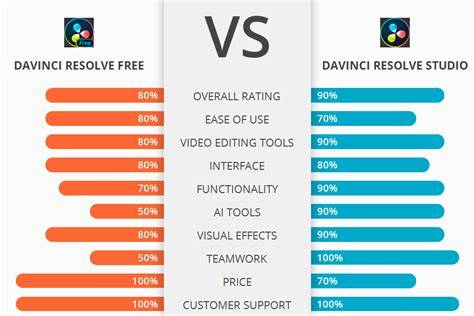
Blackmagic Design’s DaVinci Resolve is a powerful editing, video effects, and sound production suite used by everyone from big Hollywood productions to YouTube content creators. You can get the free version, or pay $295 for the Paid Studio version. You might be wondering who the free version is for. What are the differences between the free and the paid Studio version? We are here to guide you through all of the differences!
Why is there a free version of DaVinci Resolve?
This is pretty clever marketing on behalf of Blackmagic Design. Resolve is used as an attractive gateway into the Blackmagic Design ecosystem. The thinking of CEO Grant Petty is that once you really get to know Resolve, you will also be interested in the hardware they offer, such as the speed editor, color grading panels, or the ATEM mini-series. As your expertise grows and you become more professional, the more you will invest in Blackmagic products - and this strategy seems to work well (judging by my current desk setup, it sure worked on me).
Note: no quotes or sources are referenced directly; this summarizes the general rationale behind a free entry version.
“We want people to be able to create great content for free, but also have the opportunity to unlock further professional features once their skill level has reached a certain point.”
Why should you pay for Studio?
First of all, one of the biggest differences to some competitors: it’s only a one-time fee; there are no recurring charges and Blackmagic does not charge for updates. So, if you bought version 15 some years ago, all updates, including the current version 18.6, have been free of charge. You can find our article on what to look out for when upgrading versions here, and you can find a list of all the new features of version 18.6 in this document by Blackmagic Design.
We will guide you through the differences according to the workflow in Resolve, starting at the Media page and ending at Export. In the end, you will know whether the free version is sufficient for your needs or if you will make the jump to the paid version of the program. The watermark will show up if you want to use a Studio functionality in the free version - Image credit: CineD Media page.
Codec support, features, and workflow
You will start noticing differences once you upgrade your camera gear and professionalize your workflow. While the free version can handle many formats and codecs, only the Studio version will play back formats such as AVCHD, HEIF, J2K HT, and Sony XAVC, or 10-bit formats such as the H.264 10-bit 433 out of the Panasonic GH series. Here is a link to a list of all supported Codecs directly on the Blackmagic site.
A feature missing in the free version is face detection for creating smart bins for different actors. This is a great feature for organizing your material for a long-form project with many different people.
Cut and Edit page, collaboration, and performance
The differences come mostly from the program’s performance itself. While both versions use the GPU for processing, only the Studio version can make use of multiple GPUs. However, it seems like one powerful GPU will do a better job than a few weaker ones, so if you are thinking of investing in graphic power, then go for one powerful card.
The timeline resolution in the free version is limited to Ultra HD 3,840 x 2,160. However, you can create timelines in different aspect ratios even in the unpaid version of the program.
Two Edit Page Inspector features that can only be found in Studio are Smart Reframe and Lens Correction. Both free and paid include multi-user collaboration on projects (featuring a chat function), but only the paid version supports markers and comments synchronization using Dropbox, remote grading, remote rendering, and remote monitoring of 444, RGB 10-bit video and audio streams. A very useful tool, especially for long interviews, is the audio transcription feature. It analyzes a clip from the media pool and gives you a transcription allowing you to edit via text.
Further features only found in the Studio version include HDR workflows (HDR10, HDR10+, Dolby Vision), H.265 Dolby Vision encodes, and HDR metadata over HDMI/SDI. Studio also includes a number of advanced color tools, DCTL import, Re-light, Depth Map, and a rich set of color-grade options such as Film Halation, Speed Warp, Superscale, and various lens and image effects. The Fusion page offers more advanced capabilities in Studio, including Fusion Camera Tracker and VR Toolset; and the Fairlight page adds multiple advanced audio options like Dolby Atmos and MPEG-H support.
In the Deliver page, Studio supports outputs up to 32K at 120 fps with advanced HDR delivery and hardware-accelerated encoding/decoding of codecs such as H.264 and H.265. Frame.io integration is also Studio-only. Workflow integration and scripting are available in Studio via Python and LUA, enabling custom automation and third-party plugins.
Color, audio, and effects
The color page remains a standout area for Resolve. The free version already provides robust color correction tools; Studio adds HDR, Dolby Vision grading controls, advanced noise reduction, and a broader toolbox with DCTL, Relight, and depth map features. Studio also expands on the AI-based tools, including Magic Mask, Face Refinement, CineFocus, and more. The Neural Engine powers many AI-driven capabilities, most of which run offline on your machine.
On the audio side, Fairlight in Studio includes higher-end features like Voice Isolation, Dolby Atmos, MPEG-H import, and ADM formats. The AI-driven tools also enrich editing workflows through automated transcription, automated subtitling, and intelligent content tagging.
Hardware and ecosystem
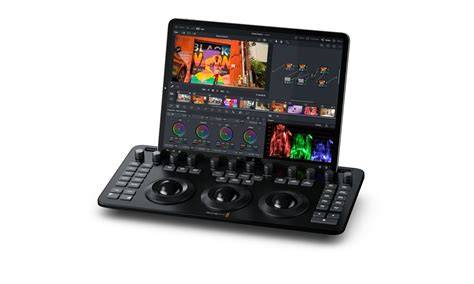
DaVinci Resolve is designed to work across macOS, Windows, and Linux, with support for a wide range of hardware accelerations. Studio enables multi-GPU setups, faster encoding/decoding, and more advanced color and audio pipelines. Hardware control panels, keyboards, and speed editors integrate tightly with Resolve for a faster, more tactile editing experience.
Remote workflows and collaboration are a core benefit of Resolve Studio, including remote grading and monitoring for clients, which is particularly valuable for teams working across cities or countries.
Who should consider Studio?
For most beginners, the free version already provides substantial capabilities, especially for learning, testing ideas, and producing professional results at a smaller scale. For professionals and studios, Studio offers the necessary horsepower, collaboration features, and delivery options needed for high-end workflows, broadcast standards, and theatrical deliverables.
As you gain experience and require more demanding features-such as HDR delivery, AI-powered automation, multi-GPU acceleration, and remote workflows-the Studio upgrade becomes a logical next step.
Price, availability, and a quick recap
DaVinci Resolve Studio costs a flat fee of $295 and provides users with a lifetime of updates. The free version remains available directly from Blackmagic Design, with Studio available through retailers like B&H and CVP. The Studio edition enables outputs up to 32K at 120 fps, advanced HDR workflows, and a broader suite of AI and Fusion capabilities compared to the free version.
In short: the free version is an excellent entry point that covers most of the essential post-production needs. Studio unlocks the full professional feature set, multi-GPU performance, and advanced color, audio, and VFX tools that high-end productions rely on.
What features stand out in Studio?
- HDR workflows (Dolby Vision, HDR10+, HDR scopes)
- Multi-GPU acceleration and hardware-accelerated encoding/decoding
- Advanced noise reduction (temporal and spatial)
- Magic Mask, Face Refinement, and CineFocus for faster masking and skin retouching
- Depth Map, Re-light, DCTL, Film Look Creator, and hundreds of Resolve FX
- Fairlight with Dolby Atmos, MPEG-H, and immersive audio support
- Fusion Camera Tracker, VR Toolset, and advanced compositing
- Remote grading, remote rendering, and collaborative workflows
- Python and LUA scripting for custom workflows
Whether you’re just starting out or building a professional post-production pipeline, DaVinci Resolve offers a scalable solution designed to grow with your skill and your projects.
tags: #davinci #resolve #subscription