Final Cut Pro is Apple’s professional non-linear video-editing application, designed to import, edit, and process video footage and output it to a wide variety of formats. Final Cut Pro X, a fully rewritten 64-bit successor, brings a modern interface, powerful workflow enhancements, and tighter integration with Motion and Compressor. It remains a Mac-only tool that serves both working professionals and ambitious hobbyists who want professional-grade results with an accessible learning curve.
What Final Cut Pro Is and Why Editors Choose It
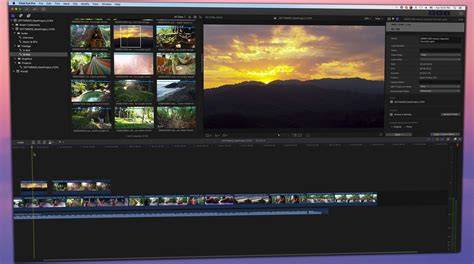
Final Cut Pro is a professional non-linear video-editing application initially developed by Macromedia, and, since 1998, by Apple as part of its pro apps and Creator Studio collection for macOS and iPadOS. It allows users to import, edit, and process video footage, and output it to a wide variety of formats. Its Magnetic Timeline, Roles metadata, and advanced organization tools help editors manage complex multi-camera projects and large media libraries with efficiency.
Final Cut Pro X marks a transition to a 64-bit native application with improved performance, a redesigned workflow, and features such as ColorSync integration, a resolution-independent playback system, and Core Animation-based interface scaling. The software is optimized to run on Apple hardware, leveraging Metal for GPU-accelerated processing and enabling high-performance playback, rendering, and transcoding.
Core Features That Shape the Editing Experience
- Magnetic Timeline: An alternative to traditional track-based timelines where clips “magnetically” snap into place and secondary storylines stay in sync with the primary storyline. It streamlines trimming and avoids gaps automatically.
- Roles and Sub-Roles: A system to categorize clips by function (Video, Dialogue, Music, Effects) and create sub-roles (e.g., Background, Dialogue, B-roll) for precise organization and audio management.
- Multicam Editing: Automatically syncs up to 64 angles of video and photos, allowing rapid switching between camera views in the Angle Viewer and Timeline.
- Auditions: A workflow to compare multiple takes or looks by collecting alternative shots and cycling through them within the same timeline.
- Compound Clips: Nested sequences from the timeline that can be reused across projects, preserving synchronization and reducing clutter.
- Inline Precision Editor: Deep trim control within the timeline for exact edit points, with a dedicated Precision Editor view.
- 3D Titles and Motion Integration: Advanced title templates and motion graphics that can be edited directly in Final Cut Pro or extended via Motion.
- Color Correction and Grading: Tools such as Color Board, color wheels, and masks to fine-tune exposure, saturation, and color balance; support for HDR and wide color spaces.
- Audio Tools and Roles: Multichannel audio editing, audio roles for organized mixes, and the ability to repair audio issues and enhance dialogue, music, and effects.
- Media Management: Smart Collections, metadata tagging, keywords, and Content Auto-Analysis to organize large libraries and enable efficient collaboration.
- Export and Collaboration: Export to Apple devices, online platforms, or physical media; XML import/export enables round-tripping with other NLEs and collaboration workflows.
Final Cut Pro supports a broad range of codecs and formats, including AVCHD, H.264, ProRes, RED, and XAVC, with import of 360° and 4K content. It is designed to utilize available GPU resources for smoother playback and faster rendering on modern Mac configurations.
Licensing, Prices, and How to Buy
Final Cut Pro is a Mac-only application that can be purchased as a one-time license or accessed via Apple’s Creator Studio subscription. The one-time purchase price is $299.99, with a free 90-day trial offered in some regions. The Creator Studio subscription provides ongoing access to Final Cut Pro along with other Apple creative apps (Logic Pro, Pixelmator Pro, Motion, and Compressor) at a monthly or yearly rate. A trial option may be available for new subscribers, and education or institutional licenses may offer savings for eligible buyers.
Final Cut Pro is designed to run on macOS with Apple Silicon support, requiring macOS 15.6 or later for full functionality and hardware with a Metal-capable GPU. For Intel Macs, compatibility exists but some features are optimized for Apple Silicon. The iPad version extends editing capabilities to portable devices with a separate subscription model and platform-specific features, including Background Export and Montage Maker in the Creator Studio.\n
What Sets Final Cut Pro Apart Among Competitors
Compared to other professional editors, Final Cut Pro emphasizes a fast, fluid editing workflow on macOS with a visually cohesive interface that emphasizes media organization and a streamlined timeline experience. While Adobe Premiere offers extensive collaboration options like Team Projects and Productions, Final Cut Pro provides strong standalone performance, deep integration with motion graphics via Motion, and a robust set of native tools for color correction and audio management.
Key differentiators include the Magnetic Timeline, the comprehensive Roles system for organizing media, and the efficient use of smart collections and keywords to manage large projects. The software is designed to be accessible to new editors while offering powerful features for seasoned professionals, and it continues to evolve with AI-assisted features such as transcript search and enhanced visual search that leverage Apple’s AI capabilities and silicon optimization.
Workflow Considerations: From Import to Delivery
Importing media into Final Cut Pro can leverage Content Auto-Analysis to categorize footage by shot type, detect faces, and flag color balance issues. Users can tag clips with keywords and favorites to facilitate quick retrieval. The library-based organization model consolidates Events and Projects into Libraries, enabling easy backups and shared access across machines when used within a team workflow. editors can create proxy workflows for remote collaboration by exporting ProRes or H.264 proxies that preserve editing precision while reducing bandwidth requirements.
For delivery, Final Cut Pro supports multiple delivery formats and platforms, as well as built-in tools to add closed captions, export iTunes-friendly formats, and generate master files for archival. The software’s extensibility with third-party plug-ins and FXPlug compatibility allows additional effects, titles, and color grading enhancements as needed.
Practical Guidance: Licensing for Schools, Studios, and Individuals
Individuals can purchase a standalone Final Cut Pro license or subscribe through Creator Studio for ongoing access to multiple apps. Educational institutions often pursue volume licensing or site licenses, while studios may leverage collaboration features, XML exchange, and shared libraries to coordinate work across teams. A practical pathway for new editors is to start with the one-time purchase to own the software, then consider Creator Studio if additional apps and ongoing updates are desirable.
For those evaluating alternatives, DaVinci Resolve provides a strong free option with a paid Studio edition, and Premiere offers extensive cross-platform collaboration capabilities. However, Final Cut Pro’s macOS-native optimization, Magnetic Timeline, and professional-grade organization tools remain compelling for Apple-centric workflows and teams already invested in the Apple ecosystem.
In summary, Final Cut Pro is a mature, high-performance tool tailored for editors who value speed, organization, and a polished, professional output. Its licensing options-from a one-time purchase to Creator Studio subscriptions-address a range of budgets and needs, while its evolving feature set continues to broaden its appeal among both new learners and veteran editors.