The Huion Artist Glove for Drawing Tablet is designed to electrically isolate the parts of the hand that normally rest on a capacitive touchscreen, enabling a natural paper-like drawing posture on glass surfaces. This glove helps the side of the hand rest on the surface without interfering with the drawing or painting process when using a digital stylus.
What the glove is intended to do
It provides a very natural, relaxed drawing experience by isolating the hand from the screen, so the palm rejection works more consistently across applications. Normally one must hold one’s hand in a rather unnatural hovering position when drawing or writing with a stylus on a touchscreen surface. An artist’s glove neatly solves this problem and supports a more comfortable workflow during extended drawing sessions.
Material and construction
The glove seems to be made of a stretchy, smooth lycra material. It is designed to fit either the right or the left hand and to cover the wrist, the little finger and the finger beside it, leaving the middle finger, index finger and thumb exposed since those are typically used to hold a pen or pencil. The sizing can be a bit snug for some users, so selecting a size larger than usual may be advisable for a looser fit and greater comfort.
Fit, sizing, and fit tips
Users note that the glove can feel a bit small, so many opt for the larger size. It is not a loose fit by default, and trying a larger size can improve comfort and usability. The glove is designed to be flexible enough to accommodate different hand shapes, but the snug fit helps ensure it stays in place during precise drawing movements.
Compatibility considerations
The effectiveness of the glove depends on the glazing material of the touchscreen. It isolates the hand well on glass capacitive touchscreens such as those on the Surface Pro 3 or iPad Air. However, performance may vary on devices with non-glass or conductive plastic screens. If the touchscreen is not glass, the glove may not isolate the hand as intended, which can reduce palm-rejection benefits.
Practical use cases and limitations
On devices with good palm rejection (like some Microsoft applications), the glove can still provide additional comfort and freedom in third-party drawing programs where palm rejection is inconsistent. In some cases, palm rejection in apps like Photoshop Elements may not function as effectively as in native applications, making the glove especially beneficial. The glove allows resting the side of the hand on the screen without interference from the stylus, enabling delicate interactions and smoother strokes.
Price, availability, and how to choose
The Huion Artist Glove for Drawing Tablet commonly sells at an affordable price point around the teens of dollars and is available as an Amazon Prime item. When choosing a size, consider a larger option if you want a looser fit that accommodates longer drawing sessions and different hand sizes. Read reviews to assess fit consistency and confirm compatibility with your specific device and screen type before purchase.
Real-world observations and setup tips
For users of devices with glass screens, the glove can enhance comfort and reduce fatigue during long drawing sessions. If you own a device like the Surface Pro 3 or iPad Air, you may find the glove especially useful. On some all-in-one touchscreens, such as certain Lenovo models, the glove may not isolate as effectively if the screen is not glass, so verify screen material before relying on the glove for palm rejection.
Practical conclusions for artists
Overall, the Huion Artist Glove for Drawing Tablet is a practical accessory for artists who want a natural hand posture while drawing on glass touchscreens. It helps maintain a comfortable hand position and can improve control with the stylus across various apps, provided the screen is glass and the glove fits properly.
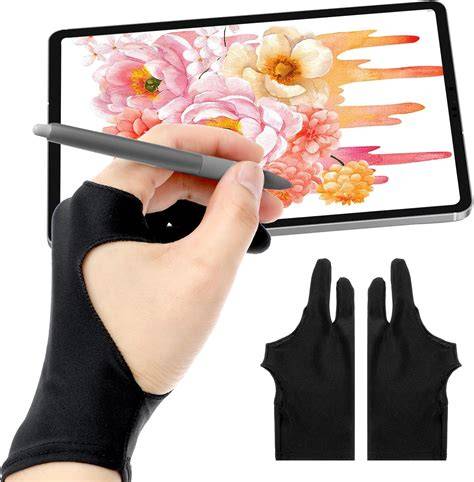
The Best Drawing Glove For Procreate and iPad Apps
- Ensure your device screen is glass for best glove performance.
- Choose a size larger than your usual hand size if you prefer a looser fit.
- Test palm-rejection behavior across different applications to gauge benefits.
- Use the glove to support a relaxed drawing posture during long sessions.
Meta description tag: