People personify brands. Just as we’re more inclined to trust friends with stable, consistent personalities, we’re more likely to trust brands that always look and feel the same. A thorough brand book outlining these guidelines makes it easy for anyone in an organization to effectively represent the brand. A brand style guide is the rulebook for everything you create, from what fonts to use to how logo treatments work with different color schemes. You want customers to recognize your brand no matter where they see it - on their phone, on TV, or on a billboard. The best brands use common visual elements and styles to increase brand recognition.
Before the style guide addresses logo, typography, and brand colors, it should establish the brand identity. What are the company’s core values? What makes the company name memorable and important? If the brand were a person, would it speak informally with contractions, slang, and humor? Or would it be more buttoned-up and serious? Does it refer to itself with the royal “we” or does it use the third person? Would it use active voice to inspire urgency or passive voice to project neutrality? Describe the buyer personas that make up your customers, prospects, and referrals. Personas may have nicknames, like “Vanlife Vanessa” or “Homebody Horace,” and they should represent customers with different needs and interests who respond to different appeals.
Free downloadable professional brand guidelines templates for Adobe Illustrator are available, and they can save time while delivering sleek, professional logos with ease. “Excellent template that saves time and delivers sleek, professional logos with ease.”
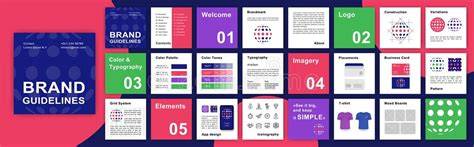
What Should Brand Guidelines Include? Professional brand guidelines don’t need to be complicated. But they should cover the 6 key elements to ensure brand consistency: Brand Overview, Logo Usage, Imagery & Graphics, Color Palette, Typography, and Applications. The guide should also address why to use templates: Instant Structure, Consistent Look & Feel, Client-Ready Formats, and Everything You Get in this Free Download.
These templates include everything you need for professional brand guidelines in 2026, with 38+ pages per document and a structured layout that keeps branding clean and cohesive. They offer multiple design styles and ready-to-use layouts in Adobe Illustrator, designed to help designers control every aspect of the brand book template. The templates emphasize clear placement areas for logos, typography, colors and imagery, and they are built with grid systems to maintain consistency across the document.
There are many logo grid resources available, but a comprehensive kit is practical for real-world projects. A brand guidelines template is a ready-made document you fill with your own logo rules, color codes, typefaces, imagery rules and tone of voice. You customize a structure instead of designing one from scratch. Below are 100 of them, grouped by style, plus a plain guide to what belongs in each section. The list is built around InDesign templates and is often sourced from platforms like Adobe Stock and Envato Elements.
A brand guidelines document typically includes seven core areas: Brand core (mission, values, positioning and brand story), Logo (variations, minimum sizes, clear-space rules, dos and don'ts), Color palette (primary, secondary, accent with HEX, RGB and CMYK values), Typography (families, weights, sizes, hierarchy), Imagery and iconography (photography and illustration rules), Voice and tone (how the brand writes), and Templates and applications (use cases like letterhead, business cards, social posts, packaging, slides).
Newer guidelines add sections for accessibility standards, rules for AI-generated content, design tokens, and channel-specific rules for social media. Marketplace pricing and license terms change, so it’s important to check the license on the template page itself. A brand guidelines template is not just a folder of logo files; it provides a place to write the rules down. If you only need assets, a brand kit is the right choice, and the difference is explained in many guides.
How should you approach choosing a template? Start with the structure for typography, color and logo usage, ensuring your brand core and voice are clearly represented. The templates are designed to export brand guidelines directly from Illustrator or InDesign, allowing you to deliver client-ready documents quickly. The 8 brand guide sections typically cover placement areas for logos, typography, colors and imagery, helping you organize and present brand rules with clarity.
In practice, a template can be used to generate logo grids, presentations and full brand guidelines in Illustrator or InDesign. A ready-made document is filled with your own logo rules, color codes, typefaces, imagery rules and tone of voice, enabling a consistent brand narrative across all channels.
Below are representative category groupings you might encounter when browsing brand guidelines templates: Fresh and Basic Style Guide, A Pop of Pink, Effervescent Style, The Modern Elegant Layout, The Detailed Minimalist, Simple Chic, White and Blue Layout, White and Apricot Combo, The Structured Layout, The User-Friendly, The Green Elegance, Pastel-Themed Layout, Black and Green Accents, Bold and Beautiful, Simply Red, Red Black White Triple Combo, A Touch of Yellow, The Green Minimalist, Beige Boldness, Gray with Coral Accents, The Straightforward Layout, The Yellow Landscape, The Pale Peach Layout, The Blue Dominance, White and Orange Combo, Pretty As A Peach, Beautiful Earth-Toned Design, The Elite Portfolio, The Unique Yellow Landscape, White and Blue Elegance, Black and Yellow Layout, The Bold Red Layout, One-page Brand Guidelines Templates, Light and Dark Brand Guideline, Minimal and Muted, Blue and Red Brand Layout, The Green Light, Layout with Tan Accent, The Orange Accents, Fair and Square, plus poster-style brand guideline templates. These templates aim to balance visual appeal with practical guidance to speed up a brand identity workflow.
Whether you’re creating a brand book for a new company or updating an existing style guide, a well-chosen InDesign brand guidelines template can save time, enforce consistency, and provide clear guidance for anyone working with the brand. By starting with identity, defining rules for logos, colors, typography, imagery, and voice, and then applying a structured, scalable layout, teams can produce client-ready brand manuals that are easy to understand and apply across all touchpoints.
7 Stunning Examples Of Brand Guidelines (Strategy & Style Guides)
tags: #indesign #brand #guidelines #template