Explore how InDesign remains the layout tool for magazines, newspapers, books, and interactive and animated projects on screen and the web, offering typography, transparency effects, and seamless Creative Suite integration. The course covers everything from workspace setup to EPUB export, with a focus on turning complex publishing tasks into efficient, repeatable workflows.
What you'll learn
- Important - Download These First - Working Files to follow along with practical exercises and sample projects.
- A quick sampling of features that define InDesign as the industry standard for desktop publishing.
- How InDesign supports typography, transparency effects, and seamless integration with other Creative Suite apps.
- Search-and-find strategies in Adobe Help to quickly locate answers and guidance within InDesign and the Creative Suite.
- Access to worldwide InDesign resources from the welcome screen, including templates, scripts, and plug-ins via InDesign Exchange and partner ecosystems.
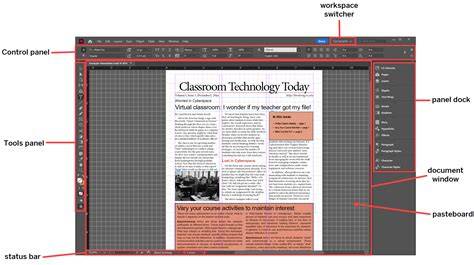
Getting started with InDesign: interface, workspace, and basics
This training covers setting up your workspace, working with grids, and understanding the layers panel introduced in CS5.5. You’ll learn how to manage text, paragraph formatting, and the creation and use of styles to combine text and objects efficiently. The course also delves into exporting finished work in multiple formats, from print to interactive documents.
New to CS5.5 is EPUB export capabilities, and the program goes in-depth with this feature so you can prepare print-ready and digital-ready documents. By the end, you will be fully versed in creating print and digital ready documents in Adobe InDesign.
Working with text, styles, and objects
Topics include setting up the correct document layout, choosing appropriate colors, and using paragraph styles to apply consistent formatting. Advanced sections cover transparency adjustments, working with objects and layers, and combining text with graphics in sophisticated layouts.
Advanced users will find guidance on creating eBooks, preflighting and packaging documents, and transitioning workflows between InDesign and other popular software such as Word, Photoshop, and Illustrator. The course emphasizes practical strategies for both print and digital publishing workflows.
EPUB and digital publishing
CS5.5 introduces EPUB export capabilities, and the course dives deeply into this feature, including how to export your finished work to EPUB and other formats. You’ll learn to prepare documents for digital distribution while maintaining high typographic quality and layout fidelity across devices.
InDesign’s role as a desktop publishing powerhouse remains strong even as web publishing grows. This tutorial reinforces that knowledge, noting that printed media is still highly relevant and that InDesign is a valuable skill for a range of publishing contexts including magazines, books, catalogs, and interactive documents.
Resources, templates, and community
Having InDesign resources at your fingertips is essential. The course showcases resources from the welcome screen, templates, scripts, and plug-ins via InDesign Exchange and its partners. It also encourages connecting with free user groups and events for tutorials and expert tips.
Where to look for help and discover hidden features is a recurring theme. InDesignSecrets, Adobe forums, and official documentation provide ongoing support and advanced techniques, including GREP, dynamic publishing workflows, and accessibility considerations for PDFs.
Potential features and topics covered
- Workspace setup, grids, and layers in CS5.5 and later.
- Text handling, paragraph formatting, and style management for consistent layouts.
- Creating and using objects, transparency, and alignment for complex compositions.
- EPUB export and other digital publishing formats.
- Preflighting, packaging, and preparing documents for professional printing.
- Importing Word and Excel files with style mapping and live linking for automatic updates.
- Tables, TOCs, index, and data merge for catalog and book projects.
- Working with multi-page documents, book files, and digital PDFs for interactive experiences.
Where to learn more and stay updated
To grow beyond the basics, explore courses like InDesign CC 2018 Essential Training and other modules that expand on grids, typography, and advanced publishing workflows. Conferences such as AdobeMax offer insights into creative workflows and new features that keep you at the forefront of desktop publishing.
InDesign for Beginners | FREE COURSE
Whether you’re a beginner aiming to set up your first document or an advanced user looking to optimize workflows, this tutorial series provides a structured path through the core capabilities of Adobe InDesign and its ecosystem.