FLUX Kontext, developed by Black Forest Labs, represents a significant advancement in AI-driven image editing and generation. By leveraging natural language processing and sophisticated machine learning, it allows users to modify images with simple text instructions, making advanced editing accessible to a wide audience, from filmmakers and designers to hobbyists.
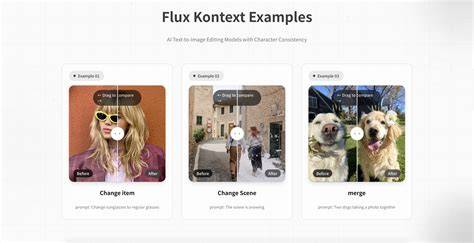
FLUX Kontext is a suite of generative flow matching models designed for both image generation and editing. Unlike traditional text-to-image models that create images from scratch, FLUX Kontext performs in-context image generation, meaning it can process both text prompts and existing images to produce coherent, context-aware visual outputs. It operates using a generative flow matching approach in the latent space, a technique that unifies image generation and editing. A key component is the 12B diffusion transformer (in the [dev] version) to process high-resolution images efficiently.
What you gain with FLUX Kontext
- In-context image editing: modify any part of the image with prompts, without masking or ControlNet.
- Versatility: restore and upscale old images, perform outpainting, and even combine multiple images into a new composition.
- Colorization and creative transformations: colorize black-and-white images and apply stylistic changes via text instructions.
- Speed and efficiency: inference times are reported to be up to eight times faster than some leading competitors, enabling rapid iterations.
- Accessibility: designed to work with prompts and existing inputs, lowering barriers for non-experts while delivering professional results.
Key capabilities and how they work
FLUX Kontext processes inputs using a latent-space approach that unifies generation and editing. For example, if a user uploads an image and provides a prompt like “Change the car color to red,” the model analyzes the scene, identifies the car, and modifies only its color while preserving the background, lighting, and other elements. This context-aware editing is central to the model’s usability in complex scenes.
The model’s architecture supports several editing modes, including local editing (targeted changes within specific regions), global editing (overall image adjustments), style references, and text editing, all evaluated on KontextBench, a benchmark with 1,026 image-prompt pairs across five task categories. This benchmarking demonstrates the model’s capabilities and helps compare it against other approaches.
Getting started with a Flux Kontext + ComfyUI workflow
- Install ComfyUI as your base UI for an accessible, modular workflow.
- Integrate FLUX Kontext into ComfyUI using the appropriate loader or plugin chain to enable prompt-driven editing and image processing.
- Prepare your input image and define a clear text prompt describing the desired edit, such as color changes, object relocation, or style shifts.
- Run the inference and review results, iterating on prompts or input images to refine the output.
- Leverage optional steps like upscaling, restoration, or outpainting to complete the project as needed.
Practical tips for high-quality results
- Provide precise prompts: specify the target object, attribute changes, and any constraints to preserve surrounding areas.
- Use high-resolution input images when possible to maximize detail retention and fidelity.
- Experiment with incremental prompts to gradually approach the final look, especially for complex edits.
- Cross-check outputs against the original lighting and color temperature to maintain realism after edits.
Limitations and considerations
While FLUX Kontext offers speed, accessibility, and versatility, there are limitations to be aware of. Like any generative model, it may introduce artifacts or misinterpretations in highly ambiguous prompts. Maintaining edge consistency and color harmony across edits may require iterative prompting and careful input preparation. With ongoing development and benchmarks like KontextBench, the system’s reliability and capabilities continue to evolve.
Workflow example: editing a photo with a prompt
Suppose you want to change a car color to red while keeping the background intact. Upload the photo, specify the prompt “Change the car color to red, preserving reflections and background,” and run the inference. The model analyzes the scene, isolates the car, and updates only its color, leaving surrounding elements untouched. If needed, you can further refine by specifying lighting adjustments or adjusting saturation to integrate the color change naturally.
Enhancing outputs: restoration, upscaling, and outpainting
FLUX Kontext supports restoring older images and upscaling to higher resolutions, enabling modern workflows for archival material and creative projects. Outpainting expands the scene beyond the original frame, enabling new compositions or extended storytelling in a single unified edit. Combining multiple images into a new composition is also supported, enabling creative collages or synthetic scene generation with consistent context and lighting.
Performance notes and benchmarks
In tests reported by Replicate, FLUX Kontext demonstrates inference speed advantages over some leading competitors, with times up to eight times faster in certain configurations. KontextBench provides a comprehensive evaluation across local editing, global editing, and other task categories, illustrating where Kontext excels and where users may want to adjust prompts or inputs for optimal results.
Overall, FLUX Kontext is a transformative tool in AI-driven image editing, offering a user-friendly, efficient, and precise alternative to traditional methods. Its ability to process text and image inputs, maintain context, and deliver high-quality results positions it as a leading solution for modern visual workflows in various industries.
To maximize the impact of FLUX Kontext within a ComfyUI-based pipeline, consider integrating a sequential flow that handles input loading, prompt parsing, image editing, optional upscaling, and output export. This modular approach makes experimentation with prompts straightforward and repeatable, supporting iterative design processes.
FLUX Kontext Dev COMPLETE Comfyui Installation and Beginners Guide
As the ecosystem grows, users will benefit from richer prompts, more robust benchmarking, and broader compatibility with creative software pipelines. The combination of natural language understanding, fast inference, and flexible image editing makes FLUX Kontext a compelling tool for both professional workflows and casual experimentation.
Table: Konzeptvergleich und Fähigkeiten (summary)
| Funktion | Beschreibung | Beispiel |
|---|---|---|
| In-Context Editing | Edits anhand von Textbefehlen auf vorhandene Bilder | „Ändere die Farbe des Autos zu Rot“ |
| Ohne Maskierung | Kein ControlNet erforderlich | Direkte Farbanpassung am Objekt |
| Upscaling | Hochauflösendes Output-Rendering | Auf 4K skalieren |
| Outpainting | Bild erweitert über ursprünglichen Rahmen hinaus | Hintergründe erweitern |
| Bildkombination | Mehrere Bilder zu einem neuen Compositing | Neue Szene aus zwei Referenzen |