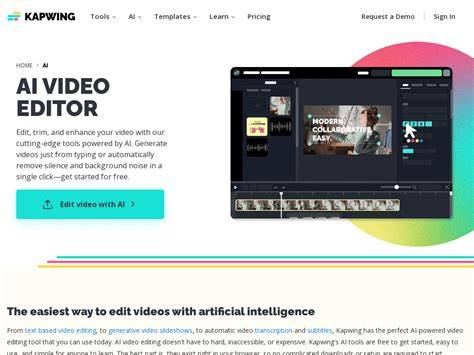
Kapwing is a cloud-based video editing platform designed to streamline creation, collaboration, and publishing for creators, marketers, educators, and teams. It blends traditional editing with AI-powered tools to help users generate, edit, caption, translate, and repurpose video content all in one centralized workspace.
What Kapwing Does: Core Capabilities
Kapwing wraps a robust timeline editor with stock footage, audio, and subtitles, enabling users to trim, sequence, and overlay elements in a single project. It’s described as “Google Docs, but for video,” highlighting its collaborative features where multiple team members can work on a project simultaneously and see changes in real time.
One standout feature is the AI Video Generator, which turns a text prompt into a finished short video-with script, stock footage, subtitles, music, and transitions-in roughly 60-90 seconds. The default flow stitches stock footage with an AI-scripted narrative and voiceover, then auto-generates captions and a music bed. This rapid-generation capability is especially appealing for quick social media clips or when you’re short on visual ideas.
Kapwing also exposes separate generative AI tools inside the editor, including Veo, Sora, Kling, Runway, and Luma. These tools can create new frames from text or image prompts, offering longer, more varied, and potentially more cinematic outputs than stock-footage stitching alone.
AI Features in Detail
- Auto-subtitling and translations: Kapwing can automatically generate subtitles in multiple languages and allows edits to the transcript to refine captions. This is particularly valuable for social media content that plays on mute.
- Smart Cut: Automatically detects and removes silences, speeding up the editing process for talking-head videos.
- Background removal: An AI-powered background remover helps ditch distractions without a green screen, though results can vary with complex backgrounds or fast movement.
- Audio improvement: Noise reduction and voice clarity enhancements help in less-than-ideal recording environments.
- AI characters and text-to-video: Kapwing can generate AI characters and convert text prompts or scripts into AI-generated video content, useful for storytelling or recurring characters.
- Text-to-speech and dubbing: Voice cloning and dubbing into multiple languages expand accessibility and reach.
- Repurpose Studio and resizing: Long-form content can be repackaged into multiple social formats, and videos can be resized (e.g., horizontal to vertical) with automatic centering of speakers.
Pricing and How It Affects Usage
Kapwing offers a Free plan with caps: exports up to 1 minute per video, 720p resolution, and a watermark. This tier is suitable for testing and personal projects but limits professional publication.
The Pro plan (approximately $24/month, or discounted when billed annually) unlocks:
- Up to 120 minutes per export, 6 GB upload, and removal of watermarks
- Commercial usage rights for AI generations and stock media
- Access to higher usage limits for auto-subtitling, auto-translation, background removal, and other AI tools
The Business plan expands collaboration, quotas, and advanced features geared toward teams, with pricing and quotas aligned to organizational needs. Free exports remain watermarked, and Pro/Business offer significantly expanded capabilities for professional workflows.
How Kapwing Stacks Up Against Competitors
Compared with other AI-enabled editors, Kapwing combines an accessible web-based editor with a broad AI toolkit and a centralized dashboard. Its closest competitors include:
- CapCut and InVideo, which offer AI-assisted editing within more self-contained pipelines.
- Runway and Morphed, which emphasize deeper generative AI capabilities and multi-model access, sometimes at higher complexity or cost.
- Descript and Veed, which provide strong transcription, subtitling, and podcast/video editing features with varying pricing models.
Kapwing’s edge lies in its integrated approach: an editing timeline, stock library, auto-subtitling, background removal, and a suite of generative tools all within a single platform and a collaborative environment. However, for pure generative output or ultra-long-form generation, some alternatives may offer more control, higher resolutions, or different credit structures.
Workflows: How to Use Kapwing Effectively
1) Start with an AI-driven video generation: input a prompt or script, let Kapwing assemble a starting point with stock footage, music, and captions. This is ideal for social snippets or quick concepts.
2) Refine with the editor: use the timeline to trim, add overlays, captions, and audio, and leverage transcription for precise edits or subtitle adjustments.
3) Subtitles and translations: edit transcripts to ensure accuracy, then export captions in multiple languages to broaden reach.
4) Repurpose content: leverage Repurpose Studio to extract highlights from longer videos, generate captioned clips, and tailor outputs for different platforms.
5) AI-augmented production: combine the default AI Video Generator with select generative models (Veo, Sora, Kling, Runway, Luma) for more cinematic or varied outputs, managing credits according to project scope.
Practical Tips and Considerations
- Expect a learning curve, but the interface is designed to be intuitive and responsive, making common tasks straightforward.
- The free tier is useful for experimentation but not suitable for publishing branded content due to watermarks and export limits.
- Credit management matters: generative features run on a monthly pool of credits, so high-volume generative work may necessitate upgrading to higher tiers or using complementary tools.
- For teams, Kapwing’s collaboration features allow real-time feedback and easy sharing, aiding consistency across brand assets.
Who Should Use Kapwing
Kapwing is well-suited for content creators who need an all-in-one, web-based workflow: social media managers repurposing longer videos into shorts, educators creating quick lessons, marketers producing brand-consistent videos, and small teams seeking collaborative video production without heavy desktop software.
Table: Quick Comparison Snapshot
| Aspect | Kapwing | Competitors (examples) |
|---|---|---|
| Core strength | All-in-one video editor + AI tools + collaboration | Specialized AI gen tools or traditional editors |
| AI capabilities | Auto subtitles, smart cut, background removal, text-to-video, characters | Generative models vary by platform |
| Collaboration | Real-time multi-user editing | |
| Pricing (typical) | Free with limits; Pro ~$24/mo; Business tier for teams | Varies by platform |
| Export quality/limits | Pro/Business unlock higher resolutions and longer exports | Depends on plan |
Use Cases and Examples
Kapwing shines when turning long-form content into multiple short-form clips, applying consistent captions, and quickly generating draft videos from prompts. For creators who want a centralized dashboard to manage edits, subtitles, translations, and brand assets, Kapwing provides a cohesive environment that reduces context switching and accelerates production timelines.