When you’ve tried generating images with Midjourney, you’ve likely noticed an element of surprise in the outputs. It’s easy to get beautiful images, but getting them to look exactly as you want can be challenging. Fortunately, there are techniques to tweak prompts, including the use of weights. This article focuses on weighted prompts, multi-prompt queries, and how to ensure the sum of all weights remains positive for better control over the final image.
Understanding multi-prompt queries and the role of ::
Before weights, Midjourney uses multi-prompt queries to treat components as separate ideas. The Midjourney manual uses the prompt "hot dog" to illustrate this concept. The :: characters tell Midjourney that one prompt ended and another began, thus separating the words into distinct elements. We now have everything we need to start adding weights, because every part of a full prompt can have its own weight. The heavy-weighted chocolate image above was nice, but had a lot of mess in it. The returned image is interesting to say the least. It is indeed much cleaner, but it also has a bunch of nonsense text. While proper text placement is a feature on the Midjourney roadmap, the model currently doesn't understand text, it only places pixels. At last we have arrived at a decent looking chocolate ice cream without the mess.
Note that the default weight is 1.0, meaning that without any adjustments, all elements are considered equally important. However, Midjourney weighted prompts provide a mechanism to prioritize certain aspects of a prompt over others. Following the double colon ("::"), you can add a number to define how much emphasis Midjourney places on that specific element within the prompt - that is what we call weight in Midjourney prompts. It allows you to fine-tune the results. For example, “ice cream:: cake” breaks down the prompt into “ice cream” and “cake,” allowing Midjourney to generate a unique image of ice cream and cake. Negative weights are employed to de-emphasize or reduce the importance of certain elements. Now let’s look at how to add weight to Midjourney prompts to emphasize or de-emphasize some aspects of the prompt more than others for better results.
How to apply weights: practical steps
First, identify the key elements you want in your image.
Based on the importance of each element, assign appropriate weights.
Format your prompt by appending the weights to each element, using the :: syntax. For example: “ice cream:: cake.”
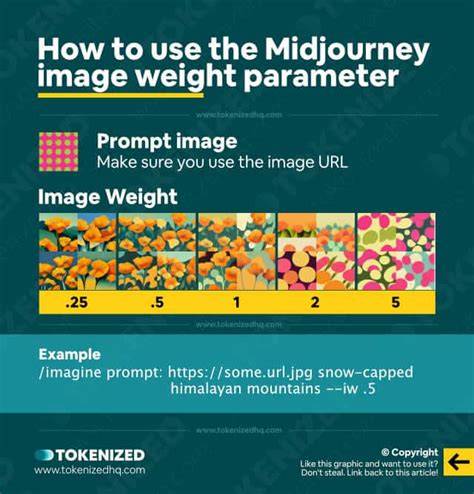
Put your Midjourney weighted prompt after /Imagine. You can also specify the weight of the image using --iw to control how important the provided image should be in the final result.
Positive and negative weights: shaping the final image
Positive weights emphasize certain elements, while negative weights de-emphasize or reduce their presence. Using negative weights can be powerful, but they should be used sparingly. For instance, a prompt might read: “still life gouache painting:: fruit::-.5” to reduce the prominence of fruit. The sum of all weights must be positive; otherwise, the prompt can collapse or yield unpredictable results.
Practical examples show how the emphasis changes with weights. For example, a prompt with elements like freckles (weight: 2) and the worn leather cover (weight: 2) while keeping the green dress as a secondary element (weight: 1) demonstrates how weighted emphasis shifts the final composition toward the high-weighted details. The dazzling neon lights and futuristic city (weight: 3) become the primary focus when weighted accordingly.
Best practices for weighted prompts
Leverage order: Elements placed earlier in the prompt hold slightly more weight by default.
Negative weights: Use negative weights for finer control and to push away unwanted aspects (e.g., “desert:: camel::-.2”).
Keep context in mind: Ensure weighted elements are contextually related to avoid conflicting directions.
Positive prompting often yields better results than heavy reliance on negative prompts. Start simple and build up complexity gradually.
Remember the relative nature of weights: The numbers are relative, not absolute. A weight of 2 is not guaranteed to be twice as influential as 1 in all contexts, but it indicates emphasis relative to other elements.
Negative prompts and negative weights: removing unwanted details
Negative prompts help you erase or reduce unwanted elements. Midjourney uses the --no parameter to block specific elements, and negative prompt weights provide an alternative way to push an element away without fully removing it. For example, “train station, watercolor painting --no people” removes people from the scene. Negative weights can range from ::-.1 to ::-1 (or higher magnitudes), and they must be balanced so that the total weight sum remains positive.
Sometimes a combination of positive and negative weights yields the best results. For instance, a prompt like “a realistic photo, human colony on alien world::2 lush vegetation::-.05 sunny” demonstrates how you can preserve certain features while suppressing others to achieve a desired balance. It’s often easier to describe what you want than to rely on exclusions alone.
Examples and practical tips from the field
Using multi-prompt structures helps Midjourney interpret distinct ideas more clearly. The four-part prompt framework-[art medium], [main objects], [detailing], [lighting]-provides a reliable starting point for experimentation. You can explore how different weights affect each component and how the relative emphasis shifts the final output. Advanced users may employ the “-style raw” command to reduce “secret sauce” and gain more direct influence over the result while still leveraging Midjourney’s capabilities.
Tools that automate prompting can assist in experimenting with different weights and multi-prompt structures. It’s also important to avoid overloading prompts with too many negative terms, since this can reduce image quality and make it hard to identify which exclusion actually fixed the problem. Start with a single most bothersome element and remove it first, then iterate as needed. If you’re using negative prompt weights, ensure the total weight remains positive to avoid inconsistent results.
Putting it all together: a concise guide
1) Separate prompts with :: to treat elements as distinct ideas. 2) Assign weights after each element to control emphasis. 3) Use positive weights to emphasize, and negative weights (or --no) to downplay or remove. 4) Ensure the sum of all weights remains positive. 5) Consider using --iw to control image weight when combining prompts and reference images. 6) Start with simple prompts, then incrementally add complexity and adjustments. 7) If Midjourney’s behavior becomes too opaque, try the “style raw” option for more predictable outputs.
Real-world takeaway: maximizing control with weights
Mastering prompt weights lets you steer Midjourney with greater precision, enabling you to spare time on re-rolls and discover the most effective combinations. Whether you’re creating photorealistic imagery, surreal landscapes, or abstract compositions, weights empower you to shape the generated visuals toward your artistic vision. The sum-of-weights rule-positive total-ensures the model interprets the composite prompt in a stable and constructive way, helping you unlock Midjourney’s full potential while producing unique, tailored images.
Practical prompts and weight examples
Example 1: a realistic photo, human colony on alien world, lush vegetation::2 sunny
Example 2: a realistic photo, human colony on alien world::0.5 lush vegetation::2 sunny
Example 3: desert:: camel::2
Example 4: desert:: camel::-0.2
Example 5: still life painting:: still:: life:: painting::
Example 6: car:: blue::1
Example 7: car blue::1
Notes on usage and accessibility
Prompt weights are a powerful tool, but they require practice. Begin with clear, component-based prompts, then gradually introduce weights to fine-tune emphasis. Negative prompts and weights offer a complementary approach to achieve the desired balance, but the positive prompt route is often more straightforward and reliable for many users. As you explore, you’ll learn how the relative scaling of weights affects outcomes and how to maintain a positive total for predictable results.