Nomad Sculpt is a versatile 3D sculpting app that runs on mobile devices, with Android and iOS versions offering different experiences. This article compiles key platform, feature, troubleshooting, and usage details to help you get the most out of Nomad Sculpt on Android and beyond.
Platform
Where are my projects located on my device? The projects are located in the projects folder inside the main Nomad folder. On iOS, you can access the Nomad folder with the iOS Files app. On Android, the Nomad folder is in Android/data/com.stephaniginier.nomad/files/. On the recent Android version (10/11), you don't have access to the Android/data folder anymore. You can access it through a separate app, for example this one.
Is there a way to beta test? For Windows & MacOS, a beta might be available on the Homepage. For iOS there is a private TestFlight, visit the Discord in the #beta-ios channel. The Web Demo is usually updated with the latest features.
Why is there a free trial on Android? But not on iOS? Because old Android devices suck (and some recent ones as well...), and I didn't want people to buy the app and be welcomed with a black screen. But the main reason is that I felt like paid Android apps are not really the norm.
What is the best tablet to run Nomad on? TLDR: An iPad. The slightly longer answer is "The newest iPad you can afford, unless you really hate Apple, in which case the newest Samsung tablet you can afford. Anything else, test first." Nomad runs best on newer iPads: iPads and iPhones can access the Quad Remesher plugin from Exoside, and recent iPads with the latest pencil support are highly capable. Performance scales with newer hardware, especially the latest M-series chips. Android performance lags behind iPads, so testing on your device is recommended before purchase.
I bought Nomad for one device, can I use it on another device? As long as it uses the same app store and same account, yes. If you bought it on iOS, you can use it on other iOS devices. If you bought it on Google Play, you can use it on other Android devices. However, if you bought Nomad on Android and then switch to an iPad, you will need to buy it again because Nomad does not share licenses between Apple and Google ecosystems.
How to restore my purchase? Google/AppGallery handles purchase synchronization, not the user directly. Eventually the purchase is restored, but steps can vary. Recent Huawei devices without Google services require purchasing the app again on AppGallery. There is no centralized license server for cross-store sharing.
Can you translate or fix [my-language]? I can relatively easily add another language, but I rely on AI translation for updates. The translation files can be found here.
Features
Why is the gizmo not moving? You might have pin enabled in the left menu toolbar.
Can we animate inside Nomad? Not for now. A timeline feature that could animate the layers could be interesting, but it is not currently planned. Rigging/skinning is hoped for in the future, but poses challenges due to interaction with sculpting tools.
Can we do proper low-poly modeling? Not for now. This is not Nomad Sculpt's core focus, though future tools may appear.
Can we do UV and texturing? Short answer: Yes. Long answer: Not directly, but there are several workflows to integrate Nomad's vertex paint with UVs and textures. You can paint colors, roughness, and material properties directly into vertices, load textures for brushes, bake textures from vertex data, and export textures via OBJ exports for use in other apps like Procreate. You can also bake normals and other properties from vertices to textures, and use post-process workflows for enhanced renders. You can import objects with textures for rendering, and Nomad can UV unwrap lower-poly objects when needed.
Can I record a turntable video? Not planned for now. iOS has a simple video recording feature that lets you capture a turntable view, as described in the built-in instructions.
Can you add [insert-favorite-feature] as a top-level button? Yes. The lower toolbar can be customized from the interface menu, and floating toolbars can be created to fit your workflow.
What are the next features? The mid/long term roadmap contains many ideas, but the priority is bug fixes and improving existing features before adding new ones.
Can we rig in Nomad? No, but it is planned. For now you can parent shapes together and adjust pivot points to create simple posable sculpts.
Can we use more than 4 lights? No, this is a limitation of the real-time render engine in Nomad. You can fake additional lighting using emissive objects and post-process global illumination as described in tutorials.
Can we import Zbrush tools? No, Zbrush uses a proprietary format. You can extract alpha maps and use them in Nomad. You can also import textures or bake texture maps from Zbrush exports.
Why don't the colors match what I painted? Why can't I get white in the render? Real-time rendering uses Physically Based Rendering (PBR). Lighting and environment influence color appearance. To adjust, you can switch to Unlit or Matcap modes, or adjust environment lighting and exposure. Emissive materials and post-processing can also help achieve closer matches. For PBR, adjusting environment, exposure, and lights helps align rendered colors with painted colors.
Crashes
It crashes when I save or remesh my model! This typically indicates low RAM. To reduce memory usage, use topology options to limit polygon counts, and monitor RAM usage rather than storage capacity. If it crashes on load, it may be a heavy file or a problematic file in the Nomad folder. Rename settings.json or move recent files to identify the culprit. If Nomad crashes at startup, relocating or renaming files in the Nomad folder can simulate a clean install.
It crashes when I load my project! You can use the free Demo mode to import and export projects, though editing tools are limited. If your project uses many layers, consider squashing them to reduce memory usage.
It crashes when I start Nomad! Startup crashes usually occur due to a heavy file in the Nomad folder. Locate the Nomad folder and rename or move files to isolate the cause. If needed, rename or move files in resource folders such as projects, matcaps, environments, etc. Renaming the entire Nomad folder effectively yields a clean install.
Practical tips and basics
Nomad is a 3D sculpting app designed to work across devices, optimized for tablets with a pressure-sensitive stylus like Apple Pencil or Samsung Galaxy Tab stylus. The interface blends desktop-like sculpting concepts with mobile usability, offering tools for sculpting, painting, and texturing with a focus on an accessible user experience.
Your first sculpt involves a sphere on screen; simply drag with the stylus to begin. Symmetry is enabled by default, and the left-side controls adjust brush size and strength. The default tool is Clay for adding material, Sub for subtracting, and Smooth for refining surfaces. You can rotate the model in empty space, zoom with pinch, and pan with two-finger gestures. Undo is accessible via two-finger taps or the undo button in the lower left.
For painting, select the Paint tool from the right, choose a color, and apply it to the model. Erase to remove paint and switch back to painting. The toolset includes a variety of operations-from basic sculpting to more complex tools like move, crease, inflate, split, and trim-accessible through the Tools page. You can explore the interface to discover additional features and workflows.
Multiple export formats are supported, including glTF, OBJ, STL, and PLY. This enables flexible sharing and compatibility with other software, allowing you to transfer models and textures between Nomad and external applications.
Next steps and learning resources
Want to learn more about sculpting tools? Explore the Tools section. Want to export models, import models to sculpt on, or render images of your sculpts? The Files section will guide you. For controlling detail, visit the Topology section to learn about multires and decimation. If you want to work with more objects, explore the Scene section. For a comprehensive overview, the Nomad Sculpt manual covers all features and tips, with a robust search function.
Nomad Sculpt is a mobile 3D modeling tool designed to help you create virtual sculptures and 3D compositions directly on a tablet or smartphone. While the interface is feature-rich, it remains approachable, enabling workflows that range from quick sketches to detailed renders on capable devices.
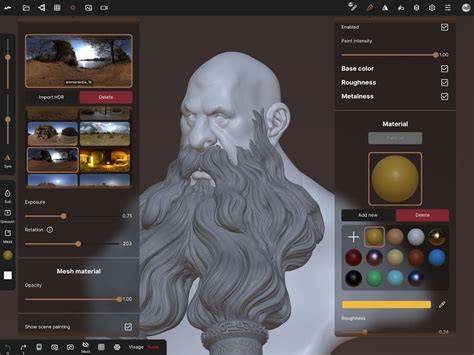
Export Turntable as GIF | 17 seconds | Nomad Sculpt
Through Nomad Sculpt, you can leverage multiple export and import formats for versatile project sharing. The app must be installed from the Google Play Store for the first time to work correctly.