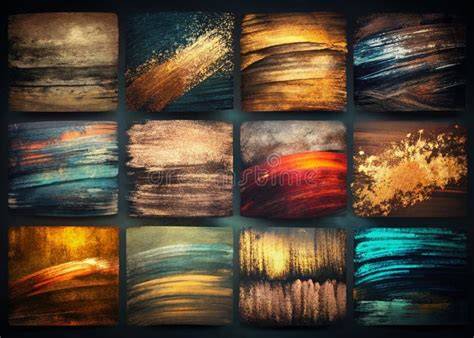
Oil brushes in Photoshop offer a broad spectrum of textures, pressures, and opacities that mimic traditional oil painting while exploiting the flexibility of digital media. This collection features a range of brush styles-from minimally textured bristle strokes to crisp, dry-edged applications-designed to suit illustrators, concept artists, and digital painters seeking painterly characterization and control.
Understanding brush behaviors and textures
A versatile Photoshop oil paint brush with a subtle wet texture behaves with a BRUSHTRUE feel: it has a minimally visible bristle texture that is rich and clearly visible with light pressure but becomes less noticeable at higher pressures when the brush quickly provides a full wet coverage. As well as having a variable line width, this oil brush also has a variable opacity at low stylus pressures. This allows artists to build up layers with nuanced translucency, echoing the way oil paint behaves in real life.
A Sharply defined bold and thick Photoshop oil brush with a conspicuous profile starts and ends with a crisp opaque layer of opaque paint that clumps and clears occasionally as if applied without regard to thinner of any kind. This creates decisive, graphic strokes ideal for strong silhouettes, bold accents, and dynamic edge work within concept art or editorial illustration.
A medium sized oil brush with just enough texture to add character but not too much to stand in the way of a relatively solidly filling line provides a balanced option for controlled fill areas and confident line work. It blends well with neighboring shades, helping maintain a cohesive painterly surface.
A soft flat oil brush that blends well and has a gentle cloud-like structure introduces airy transitions and smooth glazes. It is particularly useful for soft lighting, atmospheric backgrounds, and subtle color shifts without introducing harsh texture.
A patchy oil brush with a widely variable flow and a loose frayed edge delivers irregular, organic textures that can simulate spontaneous brushwork, broken edges, or distressed surfaces-ideal for expressive styles and texture-heavy illustrations.
A sharp edged, very dry oil brush for Photoshop with lots of texture provides a crisp, grainy, and highly textured stroke. This tool excels in detailed edges, bark-like textures, and tactile surface descriptions in both character design and environmental painting.
A thick pasty oil paint brush with a slight plaster-like appearance when applied with quick strokes but quickly develops a full rich cover at higher pressures offers rapid coverage with the potential for pronounced impasto effects. It's suitable for strong color blocks, bold highlights, and dramatic contrasts.
A rich buttery oil brush with a variable transparency and width enables smooth, flexible blending and nuanced opacity adjustments. This brush is well suited for seamless skin tones, soft transitions in portraits, and layered color fields in concept art.
Target users and practical applications
This collection was built with the needs of illustrators, concept artists, and digital painters. Inspired by classical canvases and modern digital masters alike, the set includes 30 brushes, ranging from dry bristles and palette-knife smears to soft, blendable glazes and thick impasto textures. The look and feel are rooted in tradition, but the versatility is modern.
We've tested these brushes on everything from RPG-style character design to editorial portraits, fine art studies, sketching and book illustrations. And do believe us: they're as versatile as pencils, enabling you to go for any creative task: backgrounds, fine art-inspired digital pieces, commercial commissions, creative storytelling. Oil brushes mimic the look and behavior of actual oil paint - thick textures, bristled strokes, and buttery blending. They’re perfect for concept art, character design, environment painting, portraits, and editorial work.
Technical notes and availability
SturDaVinci Art Tools owner and 13 time Diamond Award winner, Richard Sturdevant, releases his personal stash of enhancement tools. Classic Oil Photoshop Brushes care incredible Photoshop painting brushes that create a very realistic oil brush texture to make your photos stand out from the rest. The 62 Hi-Res Brushes allows users the opportunity and flexibility to choose their preferred tool when creating their work. However, ALL downloads can be accessed via your account profile. DOWNLOAD SPEED: Due to the number of files, large file size, and possible site traffic, download speeds will likely be affected. These PSD files are much larger than previous files and vary in size. Some files may download faster than others.
Tips for integrating oil brushes into your workflow
Experiment with pressure sensitivity to exploit the dynamic line width and opacity variations at low stylus pressures. Layer glazes over dry strokes to build depth while preserving the underlying texture. Combine bold, crisp edges with soft, cloud-like blends to create contrast and atmosphere. Use the patchy and dry brushes for textured surfaces and tactile realism in both characters and environments.
How I Paint Concept Art from Scratch (Digital Painting Tutorial)
Пример таблицы характеристик кистей
| Кисть | Особенность | Идеи применения |
|---|---|---|
| Subtle Wet Oil | Минимальная текстура щетины; вариативность прозрачности | Легкие слои, плавные переходы |
| Bold Crisp | Крепкий опак; резкие края | Контуры, акценты, графичность |
| Medium Texture | Умеренная текстура; ровный залив | Чистые линии и заполнение |
| Soft Flat | Мягкое смешение; облачный стиль | Гланц, полутени, небо |
| Patchy | Разрывистость; вариативный поток | Эффекты текстуры, характер |
Oil brushes mimic the look and behavior of actual oil paint - thick textures, bristled strokes, and buttery blending. They’re perfect for concept art, character design, environment painting, portraits, and editorial work.