Adobe Shortcut Stickers provide a compact, durable solution to keep essential Photoshop shortcuts visible right on your keyboard, whether you’re on a MacBook or a Windows PC. Professionally manufactured from waterproof vinyl and laminated for years of protection, these stickers are designed for easy, residue-free removal. The set is large enough to fit 13, 15, and 16 inch MacBook Pro models, as well as 13" MacBook Air, and many 15.4" and larger PC laptops, making them a versatile accessory for a wide range of laptops.
These stickers are individual vinyl keys that you apply to each keyboard key, offering a classic, old-school look while delivering a practical, modern shortcut reference. They’re compatible with both Windows PC and Mac OS, with the main keys labeled on the bottom of the sticker for convenient identification. The size is deliberately large to accommodate as many shortcuts as possible, ensuring you can access a broad set of Photoshop tools without memorizing every command from memory.
Key Features and Compatibility
- Waterproof, durable vinyl construction with a laminated finish for long-term protection.
- No-residue adhesive for easy removal without leaving sticky residue on your keys.
- Compatibility with Windows PC and Mac OS, with main keys labeled on the bottom of the sticker.
- Large format (3¼" x 3¼") designed to fit 13, 15, and 16 inch MacBook Pros, 13" MacBook Air, and many 15.4"+ PC laptops.
- Includes a broad range of Photoshop shortcuts for quick access to tools and functions.
- Made to maximize shortcut coverage, potentially helping new and experienced users speed up their workflow.
Practical Use and Setup
These Photoshop Keyboard Stickers are ideal for users who want a tactile reference to common commands without toggling between menus or memorizing a long list of hotkeys. They are installed by applying each sticker to its corresponding key, enabling you to stay focused on your editing process while maintaining a nostalgic, hands-on keyboard layout. For those who prefer an older-school aesthetic, the stickers offer a retro look while delivering modern functionality.
In addition to general shortcuts, the stickers reference a variety of tools and blending modes, supporting efficient adjustments during editing sessions. When the Move tool is active, using the arrow keys can move the selection by small increments, typically one pixel in the chosen direction. This kind of granular control is especially useful for fine-tuning positions and alignments within a composition.
Educational and Community Context
As a supplementary learning resource, these stickers pair well with structured Photoshop courses and tutorials that cover Selections and Masking Mastery and other essential workflows. For example, professional courses often emphasize practice with shortcuts to streamline the editing process and to reduce reliance on mouse navigation. Notably, experienced instructors and creators in the Photoshop community share practical tips and shortcut recommendations, helping learners leverage tools more effectively across macOS and Windows environments.
There are also broader considerations when integrating shortcut sets into your workflow, such as choosing whether to pursue a fully Mac-specific or Windows-specific layout, or opting for a universal set like these, which accommodates both platforms. The aim is to support speed, accuracy, and consistency in daily editing tasks, from basic adjustments to advanced compositing techniques.
Related Resources and Context
If you’re looking for deeper mastery beyond quick-access shortcuts, consider structured courses and materials that delve into selections, masking, and layering. Such resources typically include hours of guided lessons, downloadable practice files, and additional tools to reinforce learning and skill development in Photoshop.
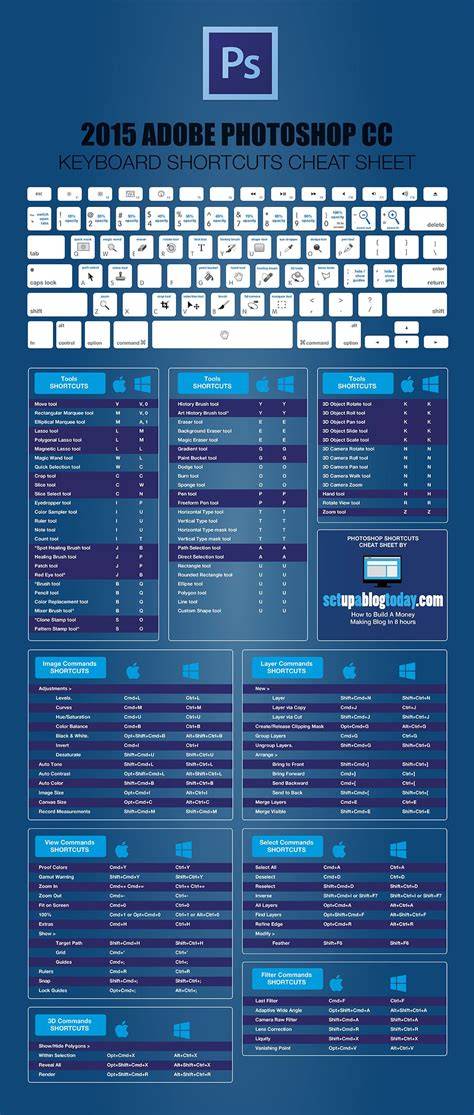
The visual aid helps summarize commonly used keys and their primary functions, reinforcing muscle memory and reducing hesitation during edits.
Best Keyboard Shortcuts | Adobe Photoshop
A concise video walkthrough of essential Photoshop shortcuts, illustrating practical usage in real-world editing scenarios to complement the sticker set.
| Feature | Details |
|---|---|
| Material | Waterproof vinyl with laminate |
| Adhesive | No-residue |
| Compatibility | Windows and Mac OS |
| Size | 3¼" x 3¼" |
| Fit | 13, 15, 16" MacBook Pro; 13" Air; many 15.4"+ PC laptops |
Affiliate Disclosure: Some mentions may include affiliate links; commissions may apply if you purchase through a provided link.