Photoshop is the industry standard tool for image editing, and with good reason. It is powerful, flexible, and has evolved over many years to include all of the features that you need to edit images for both print and the web.
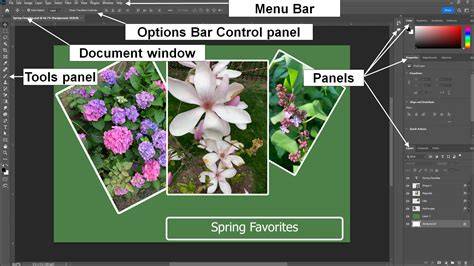
Before you can get started with Photoshop, the first thing that you should do is learn your way around the software. The Photoshop interface can be confusing at first, but it is very flexible and you can configure it to suit your needs with the help of this manual. You can break the interface up into panels, and show only the panels that you need. You can even pre-define different layouts for different tasks and switch between them at will - it is easy, when you know how!
What this manual covers
This guide teaches you how to edit photos, design graphics, retouch images, create digital artwork, and use modern AI-powered tools-all in a structured workflow that makes learning simple and effective. It focuses on real-world Photoshop skills and workflows used by photographers, designers, content creators, marketers, and digital artists.
Key learning outcomes
- Understand the Photoshop workspace, tools, and essential settings
- Create and manage documents, layers, and project files correctly
- Make precise selections and use layer masks for non-destructive editing
- Edit and enhance images using professional color and lighting adjustments
- Retouch portraits, remove imperfections, and clean up photos
- Remove and replace backgrounds with accuracy and ease
- Design social media posts, flyers, posters, thumbnails, and marketing graphics
- Work with text, shapes, brushes, filters, and blending modes
- Use smart objects and effects for flexible, professional workflows
- Apply AI-powered Photoshop tools to speed up editing and creativity
- Save, export, and prepare files for print, web, and digital platforms
Foundations: interface, documents, and layers
Photoshop is easily extensible, with a huge number of filters, effects and plugins available to help to speed up common tasks. The first step is learning your way around the software and configuring the interface to suit your needs with the help of this manual. You can break the interface up into panels, and show only the panels that you need, or even predefined layouts for different tasks and switch between them at will.
Inside this guide you will learn how to understand the Photoshop workspace, tools, and essential settings, create and manage documents, layers, and project files correctly, and use layer masks for non-destructive editing. These basics provide the foundation for more advanced techniques.
Editing, color, and lighting
Designing professional graphics and photo edits starts with precise selections and controlled edits. You will learn to edit and enhance images using professional color and lighting adjustments, retouch portraits, remove imperfections, and clean up photos. Removing and replacing backgrounds with accuracy and ease further expands creative possibilities.
As you progress, you will work with text, shapes, brushes, filters, and blending modes, and you will learn to use smart objects and effects for flexible, professional workflows. AI-powered Photoshop tools are introduced to speed up editing and creativity, enabling faster results without sacrificing quality.
Practical workflows for social and marketing design
Design social media posts, flyers, posters, thumbnails, and marketing graphics with confidence. A practical learning experience awaits rather than a dry technical reference, with each chapter building step by step to help you practice as you learn and develop real creative confidence inside Photoshop.
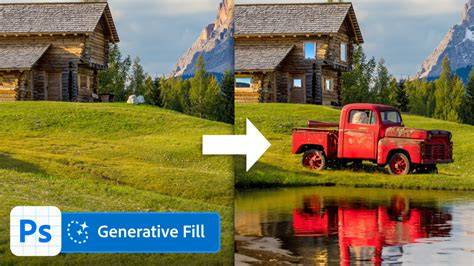
Save, export, and prepare files for print, web, and digital platforms, and explore the capabilities of Generative Fill and Generative Expand to work faster and more creatively than ever before.
Photoshop Interface Tutorial for Beginners | Everything YOU need to KNOW!
Advanced topics and handy tips
If you’ve ever wondered how professional artists and photographers produce those stunning works of art, then wonder no more. The guide introduces you to key tools and techniques that let you get the most from your images and take them to the next level. You’ll learn about non-destructive editing, color management, and efficient file handling, as well as batch processing options for workflow automation.
Premium Special Edition content provides over 190 pages of high-quality material, including independent manuals to core Adobe Photoshop packages and advanced techniques to maximize your image potential.
Practical learning approach
Photoshop is the industry standard tool for image editing, and this manual is designed to feel like a hands-on learning experience rather than a complicated technical reference. Each chapter builds step by step, allowing you to practice as you learn and develop real creative confidence inside Photoshop. You don't need prior experience to start.
What you will gain is a basic understanding of layers, image manipulation, and color management, as well as how to use file management and batch processing options. This is more than enough to get you started with editing your digital photographs and expanding into text and vector image management as needed.