Introduction: Digital art has evolved dramatically over the past decade, with artists now having a wide range of tools at their fingertips. Two of the most talked-about applications in the space are Procreate and Adobe Photoshop-each offering a distinct approach to digital illustration and painting. But beyond the software itself, there's a bigger conversation unfolding: iPad vs desktop-portability versus raw power. Procreate, developed exclusively for iPad, is known for its intuitive touch interface, fluid performance, and artist-centric tools. In contrast, Photoshop, a long-standing industry titan, provides a feature-rich environment optimized for desktop workflows and professional integration. So, which is the better choice for digital art? This article explores the strengths of both tools, comparing brush systems, portability, performance, and real-world use cases-plus how the XPPen Artist Ultra 16 can transform desktop-based art into a seamless, immersive experience.
Procreate’s Strengths on iPad
Procreate has become a fan favorite among illustrators and digital painters for one key reason: simplicity combined with power. Designed with artists in mind, Procreate utilizes the full potential of the iPad and Apple Pencil, creating a direct, paper-like drawing experience.
Core Strengths: Touch-native interface: Everything from zooming and rotating to selecting and masking is done with fingers or Apple Pencil. Smooth, fast performance: Procreate is highly optimized for iPad hardware, making brush strokes fluid and responsive. No subscription: A one-time purchase (~$12.99), making it budget-friendly. High-resolution canvas: Supports up to 16k by 4k resolution (depending on layers and device). Time-lapse recording: Automatically captures every stroke in your process for easy social sharing.
Procreate’s minimalist UI makes it approachable for beginners, yet its toolset is deep enough for professional illustrators, comic artists, and concept designers. Features like QuickShape, customizable gesture controls, and streamlined layer management contribute to a fast, enjoyable workflow.
Photoshop’s Power on Desktop
While Procreate focuses on fluidity and ease, Photoshop reigns as the industry standard for digital art, design, and image manipulation. Its desktop environment allows for more processing power, greater control, and integration with other creative tools.
Key Advantages: Advanced brush engines: Photoshop offers multiple brush systems (Standard, Legacy, Mixer Brush), each highly customizable. Layer capabilities: Use unlimited layers, adjustment layers, masks, and blending modes. Smart Objects: Non-destructive editing and complex asset reuse. Wacom/XPPen support: Fine stylus control and pressure sensitivity with display tablets. AI features: Generative Fill, Neural Filters, and Content-Aware tools. Full Adobe ecosystem: Seamlessly integrates with Illustrator, Lightroom, After Effects, and Creative Cloud.
Photoshop is highly modular, making it ideal for large projects like book covers, matte paintings, animation storyboards, and commercial illustrations. While the learning curve is steeper than Procreate’s, it pays off in versatility and control.
Brushes Systems and Customization
Brush control is the heart of any digital art tool, and both apps offer strong capabilities with different philosophies.
Procreate: Comes with 200+ brushes, categorized by type. Brushes can be duplicated and edited with granular controls (jitter, tilt, opacity, etc.). The Brush Studio lets users build their own brushes from scratch or combine two brushes into a dual brush. Brush packs are easy to import from creators around the world. Responsive and natural with Apple Pencil.
Photoshop: Vast brush library (over 1,000 with default Adobe downloads). Custom brushes can be created with intricate controls (e.g., scatter, texture, dual brush, rotation jitter, angle dynamics). Photoshop supports pressure, tilt, and rotation input-especially effective with pen displays. Brushes are easily shareable across projects and can simulate traditional media like oil, charcoal, watercolor, and airbrush. The Mixer Brush Tool adds blending and wet-paint effects that mimic real-world painting techniques.
Verdict: Procreate excels in fluid, intuitive brush handling and user-friendly customization. Photoshop offers unmatched depth and variety, essential for professional and hyper-detailed workflows.
Portability vs Desktop Performance
Your hardware environment significantly impacts your creative workflow, and here’s where the iPad-desktop divide becomes most obvious.
Portability (Procreate on iPad): Ultra-portable: Draw anywhere-on the train, in a café, outdoors. All-in-one device: No need for peripherals, cables, or stylus calibration. Great for sketching, ideation, and rapid production. Sync files via iCloud or export to Photoshop-compatible formats.
Desktop Performance (Photoshop): Greater RAM and processing power: Enables massive canvases, heavy layers, and complex effects. Dual monitors, color calibration, peripherals: A full studio environment. Ideal for high-res print work, retouching, and compositing. Can handle multitasking-use with reference images, video calls, or asset libraries simultaneously.
Verdict: Choose Procreate for mobility and intuitive interaction. Opt for Photoshop when your work demands raw power, large canvases, or software integration.
Ideal Use Cases for Artists
Understanding what types of artists benefit most from each tool can help clarify your decision.
Procreate Is Best For: Sketching, doodling, and ideation on the go. Comic artists and illustrators who need fluid brushwork. Social media content creators who want time-lapse replays. Designers who value simplicity and speed over depth.
Photoshop Is Best For: Professional illustrators producing client work. Artists working on large-format prints or book covers. Matte painters, concept artists, and storyboarders. Anyone using advanced retouching, compositing, or 3D/animation tools. Some artists even use both tools-starting rough sketches in Procreate, then exporting to Photoshop for refinement and detailing.
XPPen Artist Ultra 16 for Desktop Illustration
If you lean toward Photoshop or other desktop-based tools, pairing them with a powerful drawing display like the XPPen Artist Ultra 16 can elevate your workflow dramatically.
Why It Stands Out for Digital Artists: 4K OLED Display (3840 × 2160): Every pixel is crisp, colors are deep and vibrant-ideal for high-resolution artwork. 16,384 Levels of Pressure Sensitivity: Perfect for dynamic line work, blending, and detailed shading. 99% Adobe RGB and 98% Display P3 Coverage: Ensures true-to-life color accuracy, which is critical for printing and publishing. 1 ms Response Time: No input lag means every brush stroke is immediate and precise. Dual Stylus Options: Choose between the X3 Pro and X3 Pro Slim for your comfort and style. Multi-touch Functionality: Intuitive navigation like pinch-to-zoom and canvas rotation with your fingers. Ergonomic Design: Lightweight, slim, and optimized for long creative sessions. Whether you’re an illustrator, animator, or concept artist, the XPPen Artist Ultra 16 bridges the gap between touchscreen creativity and desktop performance, giving you the best of both worlds.
Practical Combinations: Using All Three Together
There are scenarios where integrating multiple tools yields the best results. For example, draw a background in Illustrator for scalable vector elements, bring elements into Photoshop for composite editing and retouching, add hand-drawn characters in Procreate, and finally animate in After Effects. Procreate can export to Photoshop for further refinement, and the three apps can work in tandem to leverage each platform’s strengths. This approach helps artists leverage vector capabilities, raster fidelity, and motion design pipelines.
Pricing Considerations
When budgeting, Procreate offers a remarkably affordable price point, while Photoshop on iPad is tied to the Creative Cloud ecosystem and may involve ongoing subscription considerations. For $9.99, Procreate provides access to its full feature set. Photoshop on iPad commonly ties into a Creative Cloud plan, with potential inclusions depending on the subscription. In short, Procreate shines for its affordability and user-friendliness. However, professional artists may argue that Photoshop is superior feature-wise for comprehensive image editing and complex workflows.
How to Decide
The answer isn’t about which is better overall-it’s about which one is better for you. If you value portability, quick sketching, and a one-time purchase, Procreate is a strong choice. If you require deep customization, complex layering, and robust integration with other design software, Photoshop is the more powerful option. Some artists even use both-prototyping in Procreate and refining in Photoshop.
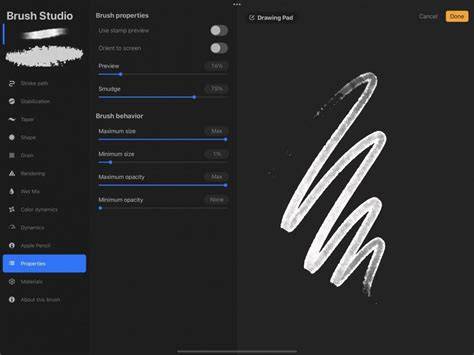
Infographic: Procreate vs Photoshop feature highlights, brush systems, and workflow.
Using Procreate for Graphic Design I Workflow with Illustrator
Video: How to combine the strengths of Photoshop, Illustrator, and Procreate for a single project.
Additional Notes on Workflow and Tools
Digital art tools continually evolve, with updates and feature additions that expand capabilities. Photoshop’s desktop ecosystem remains a hub for industry-standard workflows, while Procreate continues to optimize for the iPad’s mobile drawing experience. The choice may also depend on whether you prioritize vector versus raster workflows, whether you need 3D painting capabilities, and how you integrate with other software in your pipeline.
In practice, many artists find value in adopting both tools for different tasks: sketching and ideation in Procreate, detailed polishing in Photoshop, and vector design or layout in Illustrator. This multi-tool approach aligns with how modern studios operate, leveraging each platform’s strengths to accelerate creative output.