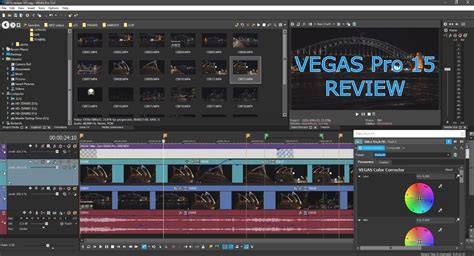
Vegas Pro 13 is a powerful, 64-bit NLE that integrates comprehensive audio and video editing tools, GPU-accelerated playback, and a broad range of supported formats to meet the demands of professional workflows. It remains rooted in its audio-first heritage while expanding strongly into video production capabilities, including 4K support and advanced plug-in ecosystems.
Historical context and evolution
Vegas 1.0 was released after a brief public beta by Sonic Foundry on July 23, 1999 at the NAMM Show in Nashville, Tennessee as an audio-only tool with a particular focus on re-scaling and resampling audio. Later, on June 12, 2000, Vegas Video and Audio 2.0 (also referred to as just Vegas 2.0) was released, with its beta releasing earlier that year on April 10. This was the first version of Vegas to include video-editing tools and was also the first to have a low-cost "LE" version alongside the regular release. The LE releases would continue through version 3.0 of Vegas but would be discontinued by the release of Vegas 4.0. Vegas 3.0 was released the next year on December 3, and added new video effects, features for ease-of-use with DV, and support for editing Windows Media files. Vegas 4.0 was released on 6 February 2003 and added application scripting, advanced color correction, 5.1 surround sound mixing, and Steinberg ASIO support. Vegas 5.0 was released on April 19, 2004. Vegas Pro 10 was released in 2010 with stereoscopic 3D editing, image stabilization, OpenFX plugin support, real-time audio event effects, and a few UI changes, marking the last release to include support for Windows XP. Vegas Pro 11 followed on October 17 of the next year with GPGPU video acceleration, enhanced text tools, enhanced stereoscopic/3D features, RAW photo support, and new event synchronization mechanisms. Vegas Pro 12 introduced two configurations: Vegas Pro 12 Edit and Vegas Pro 12 Suite. Vegas Pro 15 arrived on August 28, 2017, bringing updated GPU acceleration and a new tiered system-Vegas Pro, Vegas Pro Plus, and Vegas Pro Ultimate-with subscription options and perpetual licenses for some editions.
From a product lineage perspective, these milestones show a steady expansion from an audio-centric tool into a full-fledged video editing suite, reinforcing Vegas Pro’s adaptability to diverse post-production needs.
Vegas Pro 13: key features and capabilities
Vegas Pro 13 supports a wide range of I-frame and long-GOP video codecs, including professional and consumer formats, and provides 4K timeline support up to 4096 x 4096. It introduces a proxy-first workflow and Vegas Pro Connect, an iPad companion application for review and approval with online and offline modes. The release also bundles new plug-ins from NewBlueFX, FXHOME, and iZotope, expands OpenFX and VST plugin compatibility, and enhances audio processing with iZotope Nectar Elements for one-click voice processing.
GPU acceleration is a highlighted feature, leveraging OpenCL across NVIDIA, AMD, and Intel graphics to improve performance when editing 4K and layering multiple video tracks. Editors benefit from real-time playback, scrubbing, and a customizable preview quality to maintain fluidity during timeline playback. For RED users, R3D decode properties are accessible, and the workflow supports XAVC and XAVC-S for Sony 4K footage, along with other professional formats like Panasonic P2 (AVC-Intra), Sony XDCAM, HDCAM-SR, ProRes (Windows/QuickTime requirement), and REDCODE raw.
The interface preserves Vegas’s familiar multi-track mixer layout, with each video and audio track functioning like a channel strip that includes read/touch/latch automation controls, plug-in chains, and level meters. Visual and audio tools operate in real time, and the software supports stereoscopic workflows and a robust Title Generator for animated text templates. When paired with DVD Architect, Vegas Pro offers a capable Blu-ray Disc authoring workflow.
Despite its strengths, Vegas Pro 13 presents a few usability caveats. Import/export compatibility with XML, AAF, FCPXML, and Premiere project files can be inconsistent, and some users report issues with relinking media or exporting certain FCPXML files. The interface design has been described as reminiscent of older Windows aesthetics, which some users find both a speed benefit and a visual drawback. Nevertheless, the combination of flexible editing, strong codec support, and powerful effects makes Vegas Pro 13 a compelling option for editors who value speed and a strong audio/video processing pipeline.
Workflow and usability notes
Vegas Pro 13 emphasizes an audio-first design philosophy, where many tasks originate from or relate to audio tracks and effects. The timeline-driven editing approach allows real-time adjustments and rapid iteration, while the software’s structure supports both single-timeline projects and multiple instances of Vegas Pro open concurrently. The OpenCL GPU acceleration is particularly beneficial for 4K projects, improving playback and rendering performance on capable hardware.
Some editors may prefer a different workflow paradigm, as the interface can feel dated compared to modern NLEs. However, for users who require a blend of audio-centric editing, robust plug-in support (including VST and OFX formats), and strong 4K capabilities, Vegas Pro 13 remains a versatile and capable tool in a Windows-based post-production environment.
Suitability and upgrade considerations
Vegas Pro 13 is a solid choice for editors seeking a balance of power, codec versatility, and an integrated audio pipeline. On capable hardware, it delivers fast performance, particularly when working with 4K media such as XAVC, RED, and ProRes workflows. For those already within the Vegas ecosystem, version 13 offers meaningful enhancements through improved GPU acceleration, expanded plug-ins, and new review/proxy features that streamline collaboration and remote review processes.
For new users evaluating alternatives, it’s important to consider interface familiarity, third-party plugin ecosystems, and long-term OS compatibility. Vegas Pro 13 remains a strong option for a Windows toolkit where a robust combination of audio editing prowess and video effects integration is valued. It is fast, efficient, and capable of handling demanding post-production tasks when paired with a suitable workstation.