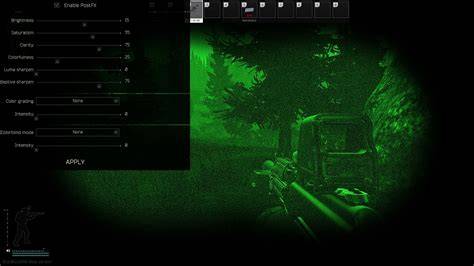
Fine-tuning PostFX settings can make a dramatic difference in how clearly you see enemies in dark corners, indoor environments, and foggy weather. These settings from the screenshot are highly optimized for clarity and visibility while maintaining strong FPS. These Escape From Tarkov PostFX settings are vital to help you see in dark corners and buildings. They give you a gigantic advantage over someone who doesn’t use them and can’t see in the dark nearly as well as you can.
✅ Recommended PostFX Setup
Brightness: 45 Gives a moderate boost to visibility in shadows and indoor areas without overexposing bright daylight zones. Helps spot enemies in places like Big Red or underground.
Clarity: 0 Left at 0 to avoid introducing artificial contrast, which can sometimes cause harsh lighting that hurts long-distance visibility.
Luma Sharpen: 70 This is key for enemy clarity - it sharpens only the luminance channel, which enhances definition and edge detection without adding grain or artifacts. ✅ Ideal for spotting enemy silhouettes in dim environments.
Adaptive Sharpen: 0 Left off to reduce extra processing and avoid over-sharpening effects that can create haloing or edge flicker during movement.
Color Grading: Bayswater Bayswater is known for its cooler, clearer tone - it softens warm color palettes and makes reds and browns stand out more. 🔍 Excellent for factory, woods, or interchange visibility - especially indoors.
Color Grading Intensity: 10 Balanced - strong enough to apply noticeable clarity and hue correction, but not so strong that it looks unnatural or filtered.
Colorblind Mode: None Unless you have a specific need for colorblind settings, keeping this off ensures no unexpected changes to color saturation or enemy highlighting.
Colorblind Intensity: 0 Since colorblind mode is disabled, intensity here has no effect - perfectly configured.
Why These Settings Work - Understanding the Tradeoffs
Escape From Tarkov is known to be CPU‑bound for many players - rendering, object draw distance, LOD, and overall visibility often impact CPU/GPU heavily. Lowering heavy graphics loads frees up resources. High‑cost settings (shadows, reflections, AO, global illumination, high LOD) often add aesthetic flair but rarely help in a combat situation - and they often obscure enemies rather than highlight them. Balanced settings area - medium textures, low shadows, moderate LOD & draw distance - give clarity for identifying threats (loot, players, movement) while keeping FPS stable even on mid-tier rigs.
Extra Tips: Performance Boosts Outside Game Settings
Make sure your GPU drivers and OS are up to date - outdated drivers can cause unnecessary FPS drops. If possible, run the game on an SSD, not HDD - reduces load times when entering raids. Monitor your RAM usage - if you have 16 GB or less, consider closing background apps to avoid memory pressure (some players treat this like a “RAM cleaner”). Avoid unnecessary overlays, screen recorders, or streaming software while raiding - these add overhead and can reduce FPS or cause stutters.
Conclusion
Optimizing Escape From Tarkov for visibility and FPS is more about making smart trade‑offs than maxing out every graphical slider. Use low shadows, medium/high textures, moderate LOD and draw distance, and enable these recommended post processing effects - and you’ll get a clean, sharp view that reveals enemies sooner while keeping your game smooth. Your computer’s power may vary, but this configuration offers a solid baseline. From there, tweak based on performance and visual comfort. You’ll likely see improved FPS, quicker looting, and - most importantly - the ability to spot threats before they spot you. See you in Tarkov. Cheeki Breeki.
Additionally, this guide references broader discussions around PostFX history, how color grading enhances visibility, and practical tradeoffs between image quality and performance. It also notes that PostFX was added to Escape From Tarkov in patch 0.12.5.6924 to address feedback on lighting and visual elements that were often described as bland or washed out. PostFX can have a small impact on FPS, so players are encouraged to test with an FPS counter in offline mode.
Related considerations for hardware and setup
Graphics and PostFX settings should be evaluated alongside display and hardware considerations. A sample setup might include a modern CPU, a capable GPU, and adequate RAM to handle Tarkov’s CPU‑bound nature. Enabling low shadows, medium textures, and moderate draw distance can sustain higher frame rates while preserving crucial battlefield visibility. For some players, disabling PostFX entirely may improve performance on Streets of Tarkov or on systems with limited resources.
Table: Quick comparison of PostFX options and effects
| Setting | Effect on Visibility | Performance Impact |
|---|---|---|
| Brightness 45 | Increases shadow and indoor visibility | Low |
| Clarity 0 | Prevents artificial contrast | Low |
| Luma Sharpen 70 | Sharpens luminance for edge clarity | Medium |
| Adaptive Sharpen 0 | Minimizes halos and flicker | Low |
| Color Grading Bayswater | Cool, clearer tone; reds/browns pop | Low-Medium |
| Color Grading Intensity 10 | Noticeable clarity without artificial look | Low |
| Colorblind None | Standard color saturation | Low |