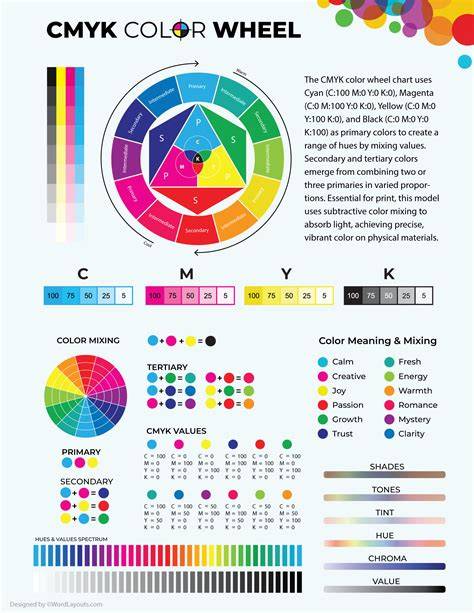
The CMYK color model, also known as process color, was first popularized at the turn of the 20th century. After extensive experimentation in the 1800’s, it was found that cyan, magenta, and yellow inks provided the largest possible set of unique colors in printed media. The CMYK color model is based off of the fact that surfaces appear to be certain colors because of the wavelengths of light they absorb and reflect. For example, things that appear to be red will only reflect red light.
As a subtractive color system, CMYK color takes advantage of this phenomenon by depositing inks on a surface in order to selectively absorb certain colors of light. As shown in this example from LCI Paper, different colors of inks are printed onto a surface in dots and then layered in order to produce the desired color. The size and spacing of dots can be altered to produce the overall visible color. Unlike RGB color, which is used in screens and digital display technology, CMYK color was created for printed materials. Where RGB color has three channels for red, green, and blue, CMYK color has four channels for cyan, magenta, yellow, and key (black).
In practice, the CMYK system operates on halftoning - printing colors as tiny dots that, from a distance, merge to form continuous tones. Diagrammatic halftoning shows how dots’ size and spacing create perceptual color blends. RGB and CMYK are device-dependent; no universal formula converts between them. Color management systems using ICC profiles are required to map between devices accurately. RGB is additive, while CMYK is subtractive, reflecting their respective roles in digital displays and printed media.
Key Colors and “Rich Black”
It is also important to be aware that the RGB color space contains more colors than the CMYK color space. K=100 Black vs. Although it might seem counter-intuitive, using 100% black ink in process color (CMYK: 0 . 0 . 0 . 100) is not the darkest black possible in the color space. So-called “Rich Black” or “Photoshop Black” (CMYK: 75 . 68 . 67 . The reason that “Photoshop Black” isn’t often used in print is that the sheer amount of ink can rip lower quality paper like newsprint. For large areas that will be colored black, small amounts of other inks can be added to K = 100% to create a rich black without oversaturating the paper with ink. Common variants include Cool Black: 60 . 0 . 0 . Warm Black: 0 . 60 . 30 . Designer Black: 70 . 50 . 30 . Rich Black: 75 . 68 . 67 .
Rich black can provide a deeper, more saturated black than using K alone, but its use depends on substrate and printing process. In practice, designers balance ink coverage to avoid paper break or show-through. Standard Black (K alone) is often used for text and fine lines, while richer blacks may be reserved for large solid areas where ink saturation is tolerable and paper quality supports it.
Color Relationships and Reproduction
Some colors are more challenging to reproduce than others. For example, red can often appear orange or rusty when printing; if your red looks too pinkish, you have mixed in too much magenta. Cyan and yellow will produce green; to obtain vibrant greens, you may blend these two inks with appropriate density. Blue is notoriously tricky in CMYK; balanced mixtures such as 100-50-0-0 (C-M-Y-K) are often recommended as starting points. Regal purple tones are CMYK friendly, while pinks depend heavily on magenta, with careful control of yellow, cyan, and black.
We cannot provide a realistic metallic gold or silver finish in CMYK printing, but a flat or non-metallic representation can be produced. Pantone colors (PMS) offer standardized spot colors that can achieve precise matching beyond CMYK, though they may increase cost and setup time. For brands needing exact color replication across materials and print runs, Pantone can complement CMYK by providing a reference for spot colors when exact matches are critical.
CMYK vs. RGB vs. Pantone
Fine art printing often brings up three color systems: CMYK, RGB, and Pantone. The short answer is that colour space is a way of organizing available colours on a given system to render digital images. RGB is the dominant system for digital displays, using red, green, and blue as additives to produce a spectrum of colors. Equal amounts of red, green, and blue at maximum intensity produce white. CMYK stands for cyan, magenta, yellow, and key (black) and is used for printed materials; it subtracts wavelengths of light by depositing inks on paper. Pantone is a standardized system of premixed spot colors, offering broader color gamut and precise matches for branding, albeit at higher cost and complexity.
Because no two monitors or presses reproduce CMYK values identically, using Pantone spaces can help recreate vibrant colors and facilitate global communication of color. The transition from RGB to CMYK is essential when moving from digital design to print, as some hues shift during conversion. Designers should design for CMYK when the final product is intended for printing and view proofs before mass production to ensure color fidelity.
When converting RGB to CMYK, expect subtle shifts. If your design relies on exact color parity across print runs, plan proofs and adjust accordingly. For packaging and branding, CMYK is widely used due to its balance of color range, ink efficiency, and compatibility with offset, flexo, and digital printing. In many workflows, designers start with CMYK to ensure print-ready results, while some workflows still involve converting from RGB for web or mixed-media campaigns.
Practical Guidelines for Designers
- Use CMYK for print materials such as business cards, posters, packaging, and brochures to ensure color compatibility with production processes.
- Be mindful that pinks may require high magenta and low yellow/cyan to remain vibrant; greens result from cyan and yellow mixtures, and blues require careful balancing to avoid dullness.
- Apply rich black sparingly for large black areas; combine CMYK values to achieve depth without paper over-saturation.
- Prepare proofs and soft proofing with calibrated monitors, understanding that screen representations may differ from printed results.
- Understand that CMYK does not map perfectly to RGB; plan color management with ICC profiles when moving between devices and media.
Workflow and Tools
Convert RGB to CMYK using design software such as Adobe Photoshop or Illustrator, with color management and proofing steps to preserve color intent. For packaging and production, CMYK is a practical choice for consistent results across multiple print runs. When alternate colors are required, spot colors or Pantone references can be used in combination with CMYK on some presses to achieve specific tones or effects. For designers working in UI or web design, RGB remains the standard, with CMYK used for the printing phase of the project.
If you’ve looked into fine art printing you’ve probably seen the terms CMYK, RGB, and Pantone colour space. But what are they and what do they mean? The short answer is that colour space is a way of organizing available colours on a given system to render digital images. RGB is the most common system used for digital display, such as your computer monitor, smartphone or tv screen. Named its use of red, green, and blue, it uses these as primaries as additives to make its spectrum of colours. Equal amounts of red, green, and blue at maximum intensity, will produce white. If you’ve ever had a home printer, you may recognise CMYK colour space. It stands for cyan, magenta, yellow, and key (black). CMYK is a subtractive colour space, so it works in the opposite way of RGB. It does this by subtracting red wavelengths of light from the white of a piece of paper by using a filtering pigment (ink), that allows all colours to pass through it except for red. No two monitors will display RGB in exactly the same way, and the same goes for printing; no two printing presses will reproduce CMYK values exactly the same. Because of this, while RGB can serve as a starting point, neither can be used alone to define a colour accurately. This recipe is needed to reproduce a given colour but can still vary from one device or process to another. By using Pantone colour standardised colour spaces, you can recreate vibrant colours and easily communicate your colour around the world.
Summary Notes on Color Management
In practice, CMYK remains a workhorse for print-ready color reproduction, balancing ink usage with color vibrancy, while RGB serves digital displays and Pantone provides precise branding colors when exact matches are required. Understanding these distinctions helps designers choose the right workflow and achieve consistent results across media and geographies.
- CMYK is subtractive and ink-based, designed for printing on white substrates.
- RGB is additive and light-based, designed for screens.
- Pantone provides standardized spot colors for exact matching, often at higher cost.