They say the best camera is the one that you have with you. Even though I love my digital SLR, quite frequently, I shoot with my smartphone. There is a collection of stunning oak trees near where I live. Each time I go there, the trees look different based on the weather and time of year. Did I need an expensive $5,000 camera to get these pictures? For these types of images, it doesn’t matter what type of camera you have. If you’ve got a camera, the inspiration, and the time, you can create some great images with your smartphone. Great images come from a good eye and a basic knowledge of composition and light. If you practice with these elements, you can take awesome pictures with any device even if it’s a phone camera.
Either people shoot with their smartphones or they use an advanced digital SLR. There’s not much in between. For the general public, smartphones have more capacity and are easier to use than the current lower-end point and shoot cameras on the market. People are getting better results with less effort. As a photography educator, I find my iPhone to be easier to use and more consistent across multiple models. Some Android models work differently and don’t have the same capabilities as other phones.
The current compact cameras are more menu-driven than most people can handle. And if their photography skills are not up to snuff, it is hard to get past the automatic modes on those cameras. I have had clients in my classes with these lower-end compact cameras where the manual modes do not work at all. These little gadgets are almost as complicated as the advanced digital SLRs, but without the quality results. I discovered smartphone photography after attending a professional photographic trade show. I took a little seminar on an app called Hipstamatic for iPhone and I was hooked. I was no longer a photo snob! I also realized this was the future of social media and photography for the general public. You could create little masterpieces that were appreciated online. They were not high resolution and the use of these images was limited, but that works just fine for most people. I knew then there was a huge future in this art form for the general public. I continued to research new apps, reading everything I could and staying updated.
This article highlights several Android-friendly apps that empower both casual shooters and enthusiasts to edit on the go. One app allows you to control separate focus and exposure points, one of the secrets to good mobile phone photography. You can also use additional features such as selective focus, exposure compensation, and exposure lock. This app has all of the auto, program and manual modes and is available for Android as well as iOS. With another editing suite you gain full manual control over exposure, ISO, and shutter speed. This app is a must for Android users who want deeper control over their images.
Snapseed is a go-to app for processing photos on Android. It has such an easy interface that you can make it part of your normal workflow and literally do your editing in seconds when taking a shot with your mobile phone. There are so many options in this app, but the favorite is selective contrast and exposure settings. It allows you to go into the image and change exposure, contrast, and saturation in specific parts of your picture. For quick text overlays or watermarks, there are apps that offer simple film and lens presets in a “classic mode” before you shoot to create the perfect effect.
Hipstamatic, originally popular on iPhone, has evolved with a modern interface that lets you change your lenses and filters after you have taken the shot. This approach suits smartphone photography’s playful nature and helps you craft distinctive looks without heavy gear. There are other playful tools that turn images into works of art in seconds, offering double-exposure effects or watercolor-style transformations that broaden creative possibilities. Waterlogue, for example, creates watercolor-style images that feel painterly yet smartphone-friendly. The beauty of smartphone photography lies in its ability to expand your creativity and even complement your Digital SLR work. You can use more than one app to create customized effects, taking each image through a series of apps before arriving at the final look you want.
What are your favorite smartphone apps, and has it changed the way you shoot with your Digital SLR? The answer is often yes-multi-app workflows and flexible mobile editing empower you to experiment, refine, and share more efficiently than ever before.
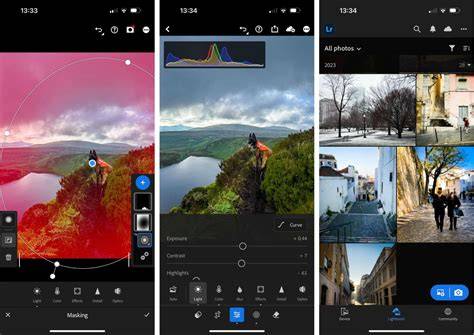
Recommended Android Apps for Editing and Creative Effects
- App A (manual control and exposure features): Provides full control over exposure, ISO, shutter speed, and focus points to fine-tune images on the fly.
- App B (non-destructive editing with selective adjustments): Allows selective contrast and exposure changes in specific parts of the image for targeted corrections.
- Hipstamatic-inspired editing suite: Modern interface with interchangeable lenses and filters, post-shot customization.
- Double-exposure and art-style apps: Turn photos into composite or painterly works with quick presets and guided workflows.
- Watercolor and stylization tools: Convert photographs into watercolor-like artworks while preserving composition and light.
These tools encourage experimentation, letting you blend multiple apps to achieve the final look you want. Whether you shoot with a high-end camera or a smartphone, good editing can elevate ordinary scenes into compelling photographs.
Top 5 Best FREE Photo Editing Apps For Android ⚡ 2025!
For readers who want a compact summary, consider the following table of workflow suggestions and app features to help prioritize your editing path on Android devices.
| App | Main strength | Best use case |
|---|---|---|
| App A | Manual controls | Deep exposure and focus adjustments |
| App B | Selective editing | Localized corrections |
| Hipstamatic-like | Lenses and filters | Creative looks after capture |
| Watercolor app | Artistic rendering | Painterly effects |