In this guide, you’ll learn how to create these handmade Vine Brushes in Procreate to add a personal touch to your designs. Whether you’re decorating ornaments, creating borders, or making sellable brush sets, this tutorial will guide you through every step - from sketching your shapes to adjusting brush settings. Plus, I’ll show you how to use your brushes in a composition to showcase their potential for selling or personal use.
Set up and sketch your base shapes
Set up Your Canvas. Start with a square canvas in Procreate (3000 x 3000 pixels works great). For best results, use pure black for your brush shapes. Sketch your design using a brush like the Rough Inking Brush from my FREE Everything Bagel Brush Set or any brush you prefer. Create simple repeating shapes like leaves, stars, or vines that can form the foundation of your brush.
Save Your Brush Shape. Once your shape is ready, tap the Actions menu, choose Share, and save your sketch as a JPEG. This will be used to create your custom brush.
Creating the brush in Procreate
Create Your Brush. Go to the Brush Library in Procreate and tap the + icon to create a new brush. Under the Shape section, tap Edit, then Import Photo, and select your saved shape. Adjust the source settings by two-finger tapping to invert the black and white areas. This tells Procreate which parts of the brush will be solid and transparent.
Adjust Brush Settings. Fine-tune your brush settings to create the desired effect: Stroke Path: Adjust the spacing to control how far apart your shapes appear. Shape Rotation: Enable rotation to make your shapes follow your strokes or scatter for a playful effect. Apple Pencil: Set opacity and size dynamics to suit your style. Duplicate your brush to create variations without starting from scratch.
Experiment and build a cohesive set
Experiment with New Brushes. Try creating brushes with different themes, like leaves, snowflakes, or Art Nouveau-inspired patterns. Save each new shape and adjust its settings to make a cohesive set of brushes.
Use Your Brushes in a Composition. Test your brushes by using them in a composition. For example, create simple ornament shapes and use your brushes to decorate them. This not only helps you refine your brushes but also creates beautiful images to showcase if you decide to sell your brush set.
WANT TO TAKE THIS FURTHER? Want to design unique texture brushes for Procreate?
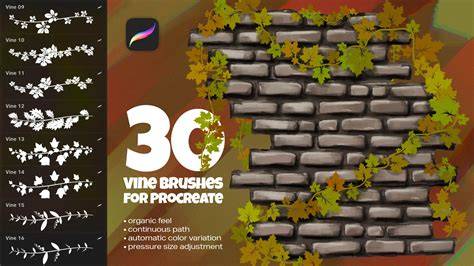
Spilling my best kept secret - how I create Procreate brushes ✨
In addition to the steps above, you can extend your workflow by incorporating two complementary ideas: first, create a small palette of color accents to apply on selected brush strokes to emphasize texture; second, assemble a simple border motif using variations of your vine brush to demonstrate its versatility in ornaments and printed designs.
Optional: a quick practical addition
Consider duplicating your brush to generate multiple texture depths. This helps you craft a richer, more layered look in borders or decorative elements. When you’re satisfied with a set, organize the brushes into a named collection so that you can quickly access related patterns in future projects.