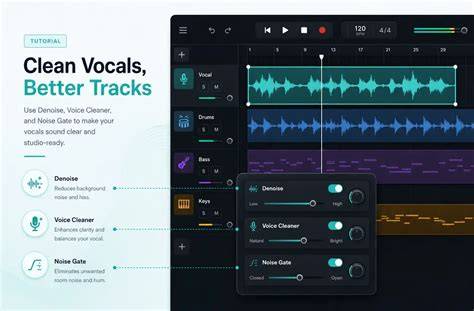
BandLab Studio offers two background noise solutions to cut out unwanted sounds from vocal recordings: Denoise and Voice Cleaner. Denoise - This free tool uses an algorithm to remove steady, unvarying noises like electrical hum, or the buzz from fluorescent lighting in recorded audio. Voice Cleaner - This Membership-exclusive beta feature uses AI technology to remove all types of background noise from vocal recordings.
To access these tools, select your vocal track in Studio, tap the 3-dot icon and select either Denoise or Voice Cleaner from the drop down menu. Denoise is ideal for reducing stationary interference, while Voice Cleaner is designed for vocals and offers more specialized controls. Denoise pairs nicely with BandLab’s presets to improve overall vocal clarity, and Voice Cleaner provides a deeper isolation with Noise Remover, AutoEQ, and DeReverb for crisper, studio-like results.
What is Voice Cleaner? In contrast, Voice Cleaner is a more advanced AI tool that’s especially handy for vocalists who need high-quality vocal takes that are crisp and clear, no matter where they record from. It comes with three functions: Noise Remover, AutoEQ, and DeReverb. Noise Remover uses AI technology to erase background noise with precision, eliminating all sounds apart from vocals, both constant or dynamic. AutoEQ automatically adjusts vocal track’s EQ to achieve perfect tonal balance while enhancing clarity and warmth. DeReverb removes unwanted reverb and echoes, creating a clean, studio-like vocal sound.
Which background noise removal tool should you choose? Choosing the right tool depends on your recording environment and the type of noise you encounter. Consider the typical environments you work in and whether vocal isolation or broad noise reduction is more crucial. Go for Denoise if you need a free cleanup tool to reduce stationary background noise and you’re dealing with a simple arrangement. Pick Voice Cleaner if your focus is on achieving high-quality, noise-free vocal recordings and you want the flexibility to record in environments with significant background noise while still achieving precise vocal isolation and clean, studio-like sound. Denoise is free to use in Studio, and Voice Cleaner is an exclusive tool available with a BandLab Membership, alongside a full suite of creation tools and perks.
How do these tools work in practice? BandLab’s Denoise uses an adaptive algorithm to reduce constant noise, such as HVAC hum or fluorescent buzz, and is most effective on straightforward vocal takes. Voice Cleaner’s three-part suite-Noise Remover, AutoEQ, and DeReverb-provides more granular control: Noise Remover isolates the voice from background sounds; AutoEQ balances tonal characteristics automatically; DeReverb removes room reverberation to deliver a drier, clearer vocal. Because Voice Cleaner is designed specifically for vocals, it may not be ideal for instrumental tracks or complex mixes where non-vocal elements dominate.
Step-by-step usage: To apply either tool, open BandLab Studio, select your vocal track, click the 3-dot icon, and choose Denoise or Voice Cleaner. If you’re in a noisy environment or want a quick cleanup, start with Denoise and listen to the result. For more thorough vocal isolation or when you’re aiming for a studio-quality vocal sound, switch to Voice Cleaner and experiment with Noise Remover, AutoEQ, and DeReverb to achieve the desired vocal clarity. Remember that Voice Cleaner is a Membership-exclusive feature, while Denoise remains available to all BandLab users.
Practical tips for better vocal results with noise removal:
- Record in as quiet an environment as possible; use a pop filter and maintain a consistent mic distance.
- Use wired headphones when enabling input monitoring for clearer feedback during tracking.
- After applying noise removal, listen critically to ensure essential vocal detail isn’t lost in the process.
- Combine noise removal with other tools (EQ, compression, reverb) to preserve vocal character while reducing background noise.
In addition to denoising, BandLab emphasizes the broader workflow benefits of Voice Cleaner and Denoise within Studio. For example, the tools are part of a larger suite that includes AI-powered features and manual editing tools, designed to help producers and performers focus on creativity rather than technical limitations. The cloud-based storage ensures your cleaned vocal takes integrate smoothly with your arrangement, whether you’re recording on web or mobile, and whether you’re using Voice Cleaner or Denoise in isolation or together as part of a vocal processing chain.
To explore further improvements for vocal tracks, consider how denoising fits into your broader BandLab workflow-recording, applying AutoPitch or other vocal FX presets, and using automation for expressive control. Denoise and Voice Cleaner are complementary tools that can help you move from rough takes to polished vocal performances, even when inspiration strikes away from a treated studio space.