If you are just entering the world of CAD as an architect, engineer, or graphic designer, mastering DXF files will help you improve your workflow, enhance collaboration, and ensure the quality of your projects. This guide covers everything you should know to get the most out of the format, including how to create and convert such files.
DXF: Definition, History, and Core Purpose
DXF (Drawing Exchange Format or Drawing Interchange Format) is a widely used vector file format for managing 2D and 3D drawing data and metadata. Although the DXF file type emerged more than 40 years ago, it’s still very common in the engineering and design world. DXF files can be easily created using popular vector graphics software like AutoCAD, Adobe Illustrator, and Inkscape. You may also use these tools to edit designs with professional-level precision.
DXF stands for Drawing Exchange Format and is a file format used in computer-aided design (CAD) software for representing and exchanging CAD drawings. It is primarily used to transfer drawings between different CAD programs that may not have direct compatibility with each other. They contain only information such as line work, dimensions, and text. They’re text-based and can be easily read and modified by anyone.
DXF is a powerful format ensuring flexibility and easy exchange of data within CAD projects. It’s easy to create such files using Adobe Illustrator, while online converters serve well for transforming other formats from/to DXF.
Creating and Editing DXF Files
DXF files are saved in ASCII text format, which means that the file contains human-readable text. This format tends to be larger in size compared to the binary format used by DWG files. The text format stores the data in plain text, including all the coordinate and attribute information. Meanwhile, DXF files have less compression compared to DWG files, which means that the file size is not reduced as much during the saving process.
There are many applications that allow more than just viewing and reviewing DXF files. This includes AutoCAD, Adobe Illustrator, Scan2CAD, SolidWorks, and CorelCAD; just to name a few. The high compatibility of the DXF file format leads to its greatest benefit - DXF file format acts as a bridge between different CAD programs and users. In computing terms, this means that it is easy to process DXF files and divide it into small components that can be made useful for a specific program.
DXF can be created from scratch or by exporting a design from a CAD tool. When exporting 3D geometry, care must be taken to ensure that a true 3D file is exported, as opposed to 2D projections of the 3D geometry. In the latter case, if the tool does not allow exporting a true 3D DXF file, opting for a different 3D format like STEP is advisable.
DXF vs DWG: Open Format, Interchange, and Use Cases
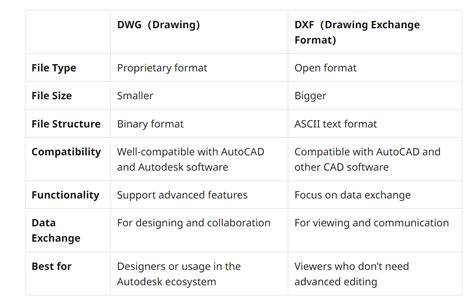
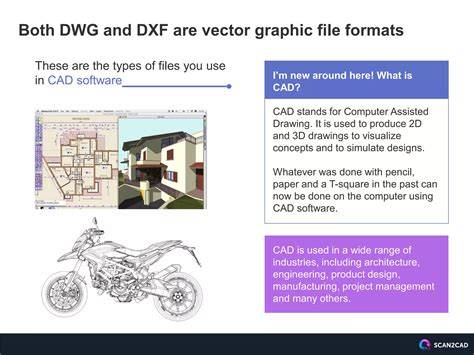
DWG and DXF are both common CAD file formats used in computer-aided design software. While both store geometric entities and support layers, they serve different scenarios. DWG is the primary, proprietary format of AutoCAD and supports more advanced CAD functionalities like 3D models, dynamic blocks, and custom linetypes. It is stored in a binary format, making it more complex to parse but also more feature-rich.
DXF stands for Drawing Exchange Format and is an open, universal CAD file format designed to facilitate the exchange of data between different CAD software. It is primarily used for 2D data exchange and supports a wide range of vector entities. Because it is open and ASCII-based, DXF is easier to read and share across non-Autodesk tools, but it may lack some specialized features found in DWG.
DWG is more suitable when you need the full range of AutoCAD features and the most precise retention of graphic data, while DXF is ideal when interoperability and cross-software collaboration matter most, especially for 2D drawing exchange and basic 3D wireframes.
- DWG is a proprietary format tightly integrated with AutoCAD and often contains advanced CAD attributes, layers, and entities.
- DXF is an open format designed for exchanging drawings between programs, prioritizing readability and compatibility over completeness of features.
DWG files are actually stored in a binary format, whereas DXF files are based on an ASCII text format, making them easier to read but sometimes larger in size. The structure of DXF uses open tags and sections to organize data, and the documentation details how to interpret them. In contrast, DWG uses proprietary tags and sections defined by Autodesk.
DXF in Practice: 2D, 3D, and Production Workflows
DXF is a vector file format designed to facilitate data exchange between CAD software. It is predominantly used for 2D applications-perfect for sheet metal cutting, laser cutting, waterjet cutting, and CNC routing. While it can represent 3D geometry, 3D DXF capabilities are limited compared to formats like STEP or IGES, and many engineers treat 3D DXF as 2D projections of 3D geometry. In additive manufacturing, STL and 3MF are often preferred for printable meshes, while DXF serves to supply accurate 2D outlines and patterns.
Autodesk provides free DXF viewers and many CAD tools support exporting to DXF. The format remains a universal language of CAD data exchange, enabling collaboration across disciplines and software ecosystems. For practical use, verify units and scale when importing or exporting DXF to avoid misalignments across systems.
In practice, DXF files can be converted from PDFs, DWG, SVG, and other vector formats, and they can be opened in many viewers or CAM software. However, when working toward CNC or laser-cutting workflows, DXF is often the starting point for generating machine-ready paths, and then other formats are used later in the pipeline for manufacturing or 3D printing.
DXF Converters and Tools
Several tools are popular for converting to and from DXF. Bear File Converter and Filestar offer online or installed solutions for DXF to STL or other conversions. FreeCAD provides a broad set of file conversion capabilities, and other software like SolidWorks, Inkscape, and Adobe Illustrator can also handle DXF interchange in various ways. Online converters are often optimized for mobile devices, enabling convenient conversions on Android and iOS.
When choosing a converter, consider accuracy and the handling of 2D versus 3D data, as well as whether the tool preserves layers, colors, and text. The right converter should minimize data loss during conversion and preserve essential drawing information for downstream production processes.
DXF for Specific Industries and Applications
DXF is heavily used in architecture, construction, and manufacturing for data exchange and production planning. It’s widely adopted as a reliable starting point for laser and waterjet cutting, sheet metal fabrication, and CNC routing. Although not a native 3D printing format, DXF often appears at the start of additive projects, where 2D outlines are turned into 3D models via STL or STEP exports for printing or milling.
In comparison to DWG, DXF is more interoperable across non-Autodesk ecosystems, with smaller file sizes and easier sharing in many cases. Yet, to preserve all AutoCAD-specific features, DWG remains the better choice when working exclusively within Autodesk software.
Choosing Between DXF and DWG
If you work in a specific CAD environment and need to preserve all advanced features, then DWG may be the better choice. If interoperability and cross-platform sharing are paramount, then DXF is typically the preferred option. When collaborating with teams that use diverse software, DXF often serves as a reliable bridge between programs and disciplines.
DXF stands for Drawing Exchange Format and was designed by Autodesk in 1982 as a vendor-neutral way to exchange CAD drawings. The DXF format opened the door for wider interoperability and collaboration across different CAD systems, remaining relevant today for 2D data exchange and basic 3D representations.
Common Misconceptions and Quick Tips
- DXF is not a production-ready 3D model by default-the level of 3D support is more limited than DWG or STEP for complex designs.
- Because DXF is text-based, it tends to be larger than binary formats but is easier to read and debug manually.
- Exporting true 3D DXF requires care; if not possible, consider STEP for full 3D data exchange.
- Always verify scale and units when opening or converting DXF files to avoid downstream issues in manufacturing or fabrication.
Being a universal CAD data exchange format, DXF remains invaluable for collaboration, teaching, and extending interoperability across software, devices, and workflows. The format’s resilience over decades underscores its role as a foundational tool in CAD and CAM ecosystems.
Note: In this article, DXF is discussed as Drawing Exchange Format and Drawing Interchange Format, focusing on its role as a universal, open interchange format for CAD data.