Discover Procreate Dreams, the revolutionary 2D animation app from the creators of the legendary Procreate. We got on the line with James Cuda and Claire D'Este, the minds behind this game-changing software. Explore the journey from Procreate's humble beginnings to the iPad Pro revolution and the birth of Procreate Dreams.
Context: Procreate’s lineage and the birth of Dreams
You may know Procreate as the iPad drawing app that first took the design world by storm in 2011. With its groundbreaking features and top-notch performance, it's been the reigning champion as the number one paid iPad app for six consecutive years. Now, the team behind Procreate is back with the release of Procreate Dreams, a game-changing 2D animation app that's sure to shake up the industry.
In this pod, we scored an exclusive interview with James Cuda, the CEO and co-founder of Procreate, and Claire D'Este, the Chief Product Officer. These masterminds behind Procreate Dreams spilled the beans on everything from their career journeys to the development of this revolutionary app.
The Original Procreate and the iPad Pro moment
Before the iPad Pro, Procreate faced its share of struggles. But when this powerful device hit the scene, it was a turning point. Apple's active promotion of Procreate didn't hurt either.
Procreate doesn't follow trends; they set them. Their focus is on inventing new features and improvements rather than copying what's already out there. It's all about straightforward and intuitive solutions.
From sketches to a full-fledged animation tool: Procreate Dreams
They've applied that same line of thinking to their new baby: Procreate Dreams. This animation app has been in the making for six years. It started as sketches and rough animations in Procreate but has grown into a full-fledged animation tool. The goal? Seamlessly integrating it into professional workflows. The interface is designed to be familiar to Procreate users, offering comfort and ease in transition.
Why create a separate app for animation, you ask? Well, Procreate wants to keep the core focus on drawing without bloating the original app. Animation gets its dedicated space to shine. Developing Procreate Dreams turned out to be more complex than initially thought. It required integrating the advanced painting engine from Procreate and paring down version one to core features. But the potential for future updates is vast.
Procreate Dreams was built on more than just market research; it was a blue-sky approach. The team focused on creating the ideal animation experience they'd want to use themselves, emphasizing a humane and intuitive user interface. Procreate Dreams aims to compete with existing animation software mainstays by offering a smoother, streamlined animation experience. No more expensive equipment and software; it's all about harnessing the power of the iPad.
Tooling and capabilities: a new era for 2D animation
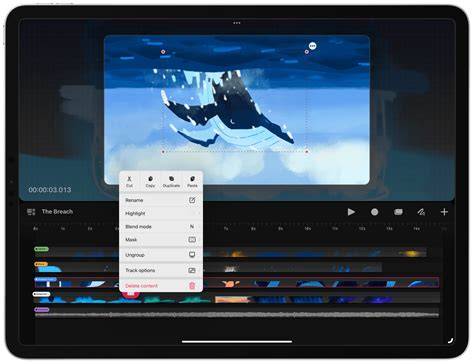
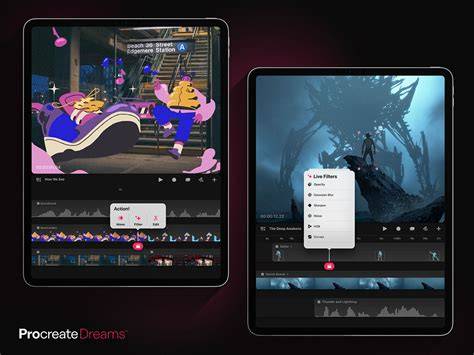
Procreate Dreams is an award-winning animation app, packed with powerful tools that anyone can use. Flipbook brings your artwork to life with multiple tracks and the familiar Procreate brush set. Draw in any style with over 300 hand-made Procreate brushes. Onion Skins help you reference surrounding frames for precise control while building rich and detailed animations by layering the flipbook with multiple tracks.
Now you can animate, record motion or effects through touch and instantly respond to the movie as it plays. Keyframes let you mark moments and adjust scaling, rotation, blur, and more. Procreate Dreams will instantly create every frame, turning simple keyframes markers into fluid motion and effects.
Import audio and video to enrich your stories, such as adding sound effects, atmospheric music, and dramatic voice-overs. You don't have to draw every frame to tell a bigger story-the app supports importing assets to breathe life into your narrative.
Next-generation technology powers this experience. For the first time you can draw, animate, edit, and composite in a powerful animation studio you can take everywhere. Procreate Dreams is designed so that animation tools feel accessible to everyone, not just seasoned professionals.
Pricing is straightforward: no subscriptions, pay once and own. Just $12.99 USD exclusively from the App Store. Flipbook features include a mini Flipbook that moves anywhere, even into a vertical timeline, and a scrub lock to keep you focused on your drawing while flipping through frames. There are quick navigation options between drawings, and backstage visibility lets you control the opacity of your content for easier composition.
Editing, workflow, and future potential
As development evolved, updates introduced improved easing visuals between keyframes, improved scrubbing, and enhanced stability of recordings. The interface emphasizes humane and intuitive design, with tools that feel like natural extensions of the Procreate workflow. This alignment helps existing Procreate users transition smoothly into a dedicated animation environment without losing the familiar drawing-centric approach.
Procreate Dreams positions itself as a simpler, more approachable alternative to traditional animation suites, leveraging the power of the iPad to deliver an on-the-go animation studio. The team signals ongoing potential for future updates, expanding capabilities while preserving a lean core focused on drawing and storytelling.
Why Procreate Dreams matters for the industry
Procreate Dreams has the potential to popularize 2D animation in a big way by bringing professional-level animation tools to a mobile, affordable platform. It aims to compete with existing animation software mainstays through smoother workflows, intuitive touches, and a more humane design ethos. The emphasis on keeping the core drawing experience intact while adding a robust animation toolkit creates a compelling proposition for artists, motion designers, and storytellers alike.
With features like continuous auto-save, undo history, and flexible timeline controls, creators can experiment freely and refine their work without fear of losing progress. The combination of drawing and animation in a single ecosystem lowers the barrier to entry while expanding the expressive possibilities for pros and hobbyists alike.
| Feature | Benefit |
|---|---|
| Flipbook | Layered frames, multiple tracks, textured brushes |
| Keyframes | Ease control, motion, scale, rotation |
| Import assets | Audio and video integration for richer storytelling |
| Auto-save | Continual protection of progress |