The XP-Pen Artist 10 (2nd Gen) is a compact drawing display that emphasizes affordability without sacrificing core drawing performance. It is a second-generation entry in XP-Pen’s Artist line, designed to bring professional features to a smaller, more accessible format. The tablet connects via USB-C (cable not included) to a computer and relies on a driver to unlock its drawing capabilities. The display is laminated and non-glare, offering a paper-like surface that helps reduce glare and improve comfort during prolonged sessions.
Design, ergonomics, and screen experience
The Artist 10 (2nd Gen) uses a 10.1-inch laminated, edge-to-edge glass-like display with a slim black frame. The laminated screen reduces parallax, providing a closer alignment between pen tip and cursor. The matte, semi-gloss surface provides a traditional drawing feel, though the matte layer can introduce a slight grain or color noise at times. Color support spans approximately 100% sRGB with usable NTSC and Adobe RGB representations, making it adequate for many digital artists who don’t require ultra-wide color gamuts.
In terms of portability, the 10.1-inch form factor is highly portable and well suited for travel or small workspaces. The design prioritizes simplicity and ease of use, with six shortcut keys along the tablet’s side that can be configured per app via XP-Pen’s driver. The driver experience, while familiar to Wacom users, can be less intuitive and may require some setup time, particularly during initial installation.
Pen and input performance
The pen features XP-Pen’s X3 Smart Chip technology, delivering a responsive and precise input experience. Initial activation force is described as low (as little as 3g in some iterations), with heightened sensitivity and a retraction distance of about 0.6 mm. The pen is designed to be precise, with virtually no lag and a robust compatibility with tilting and rotation in supported software. The pen’s grip is slightly thinner and lighter than some competitors, which may affect long drawing sessions for users accustomed to bulkier grips.
Important caveat: the data in the promotional material is based on laboratory simulations and may vary with environmental conditions and software configurations. The device relies on a computer host and USB-C connection to function, and although the pen supports tilt input and 8192 levels of pressure sensitivity in some contexts, real-world performance depends on driver calibration and software integration.
Display technology, color, and visual quality
The display uses IPS-ADS technology with a wide viewing angle of 178°, 8-bit color depth, and a brightness of about 220 cd/m², delivering a respectable but not extreme color experience for a 10-inch panel. The screen reduces distractions with an anti-glare, matte treatment and a full lamination approach to minimize parallax. While not a high-end color-critical panel, the 10 (Gen 2) offers a solid baseline for digital illustration, concept art, and light photo work on a compact device.
Performance and workflow
Key performance attributes include a tilt-capable EMR-based input system, 8192 levels of pressure sensitivity in some configurations, and a 60° tilt range. The device supports a 10 mm reading height and a resolution around 5080 LPI, enabling fine brush control and detailed line work. Shortcuts and screen extension features help streamline workflows, including one-click drawing display and tablet switch, as well as dual-port USB-C connectivity for flexible setup with PCs and mobile devices.
Calibration is recommended to maximize accuracy and ensure consistency across applications. The device is designed to function with Windows 7 or later, macOS 10.10 or later, Android devices with USB-C DP1.2 support, Chrome OS 88 or later, and Linux, although actual compatibility can vary by driver version and OS updates. A driver is required to configure settings and customize the shortcut keys, with some users reporting initial driver setup challenges that typically resolve after installation.
Ports, connectivity, and expansion
The Artist 10 (2nd Gen) relies on Bluetooth and wireless features are not described, so wired USB-C connectivity is the primary method. A USB-C to USB-C cable is supported, and the display is designed to connect with a PC or compatible devices via USB-C. There is no built-in battery, and the device must be powered by the host computer. The panel is designed for desktop use and benefits from the ability to position with a height-adjustable stand for ergonomic drawing angles, though its small size makes some workflows feel cramped for longer sessions.
Software and driver experience
The XP-Pen driver aims to be an out-of-the-box solution, with settings that mirror commonly used options found in Wacom drivers. Some users report initial installation friction and UI differences that require acclimation. The driver allows per-app customization of shortcut keys and supports pen button actions, though some users may notice a delay in screen mode switching or experience minor glitches with certain software combinations. For Photoshop users, there can be minor issues with tilt sensitivity or slider transparency settings that may require adjusting in the software or driver configuration.
Compatibility and target audience
The Artist 10 (2nd Gen) is compatible with Windows, macOS, Android, Chrome OS, and Linux to varying degrees, making it a versatile option for artists who need a compact drawing solution. It is especially attractive to beginners and hobbyists seeking a low-cost entry point into drawing displays, but it can also suit professionals who value portability and an affordable secondary screen. For those who require a larger drawing surface or higher-end color fidelity, XP-Pen’s 22" or 24" models in the Artist line may be more appropriate.
Performance verdict and best-use scenarios
Pros:
- Compact, portable form factor with a laminated, anti-glare display
- X3 Smart Chip stylus with accurate input and tilt support
- Affordable price point for a dedicated drawing display
- Six customizable shortcut keys for workflow efficiency
- Solid color performance for general digital art tasks
Cons:
- Small 10.1-inch screen can feel cramped for extended sessions and UI-heavy applications
- Driver experience may require time to set up and adjust, especially on macOS or older Windows builds
- Color gamut, while usable, is not as wide as higher-end displays, which can be a limitation for color-critical work
- Requires a computer host; not a standalone tablet
Practical tips for getting the most from the Artist 10 (2nd Gen)
- Calibrate the pen and driver as soon as you set up the device to maximize accuracy and minimize drift.
- Use UI scaling and app-specific shortcuts to optimize palette visibility on the 10.1-inch display.
- Pair the device with a compact, light pen grip that matches your comfort preferences for long sessions.
- Leverage the laminated screen to reduce parallax and improve stroke precision when drawing near edges.
- Experiment with the 6 shortcut keys to speed up your most-used actions in your primary software.
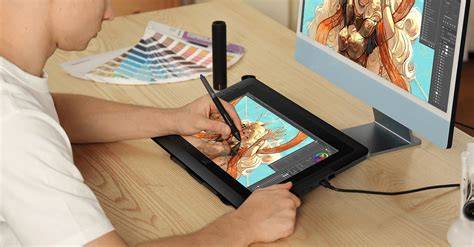
Learn more about the device’s features, including the X3 Smart Chip stylus, through official XP-Pen materials and hands-on reviews.
XP-Pen Artist 10 (2nd Gen) Review and Unboxing
In summary, the XP-Pen Artist 10 (2nd Gen) provides a compelling combination of portability, performance, and price for artists seeking an entry-level laminated drawing display. Its X3 stylus and laminated screen deliver a responsive drawing experience in a compact form factor, making it a practical choice for beginners and space-conscious professionals who value mobility without sacrificing core drawing capabilities.
- Initial Setup and Calibration
- Pen Input and Tilt Performance
- Display Quality and Color
- Software and Driver Experience
- Use-Case Scenarios and Recommendations
| Specification | Detail |
|---|---|
| Screen size | 10.1 inches |
| Resolution | 1920 x 1080 |
| Color gamut | Approx. 100% sRGB |
| Pen input | X3 Smart Chip, 8192 levels, tilt support |
| Ports | USB-C (PC/Android), HDMI (via 3-in-1 cable in some models) |
| Active area / ratio | 16:9 |